

- Home
- Products
- Android Apps
- Streaming Apps
- Go Stream Cast – Live Streaming App for...
Go Stream Cast – Live Streaming App for Android (Flutter: YouTube, Facebook & RTMP Multistream)
Product overview
Flutter live streaming app: go live on YouTube, Facebook and any RTMP server with logos, a news ticker and VIP subscriptions.
Frequently bought together
Item details
Support & inquiry
Description
Go Stream Cast - go live on YouTube, Facebook and any RTMP server
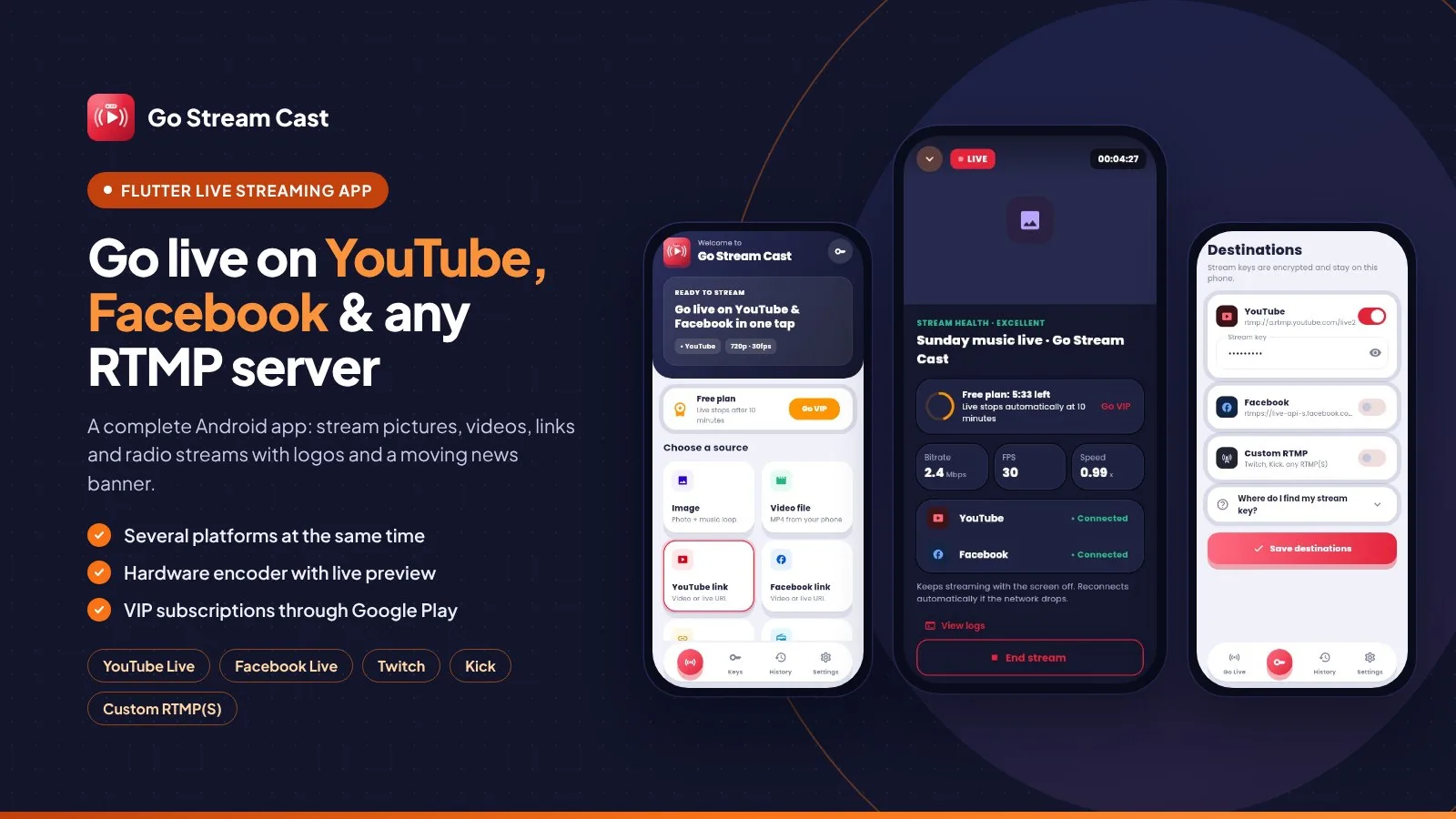
Go Stream Cast is a complete live streaming app for Android (Flutter + Kotlin source code). With only a stream key, your users go live on YouTube Live, Facebook Live and any RTMP(S) server - Twitch, Kick, Restream or their own server - and on several platforms at the same time.
They stream a picture with music, a video file, a YouTube or Facebook link they have the rights to, a direct m3u8 / mp4 link or an audio / radio stream with a cover - with logos, animated GIFs, text watermarks and a news banner with a moving ticker on top. A hardware engine (the phone's video chip) shows a live preview and keeps streaming when the app is closed. You earn with VIP subscriptions through Google Play.
Live demo
- Demo page: https://demo.anowhosting.com/GoStreamCast/
- Demo APK for Android: https://demo.anowhosting.com/GoStreamCast/apk/gostreamcast-demo.apk
- Documentation: https://demo.anowhosting.com/GoStreamCast/docs/index.html
Pick a source and press Start
- Home with a status card, the Free / VIP banner and six source tiles
- Image + music, video file, YouTube link, Facebook link, direct m3u8 / mp4 / rtmp, audio / radio link
- 5 quality presets (240p to 1080p) with the needed upload speed and data per hour
- Check link confirms a link before you go live
Pictures, videos, links and radio streams
- Image fitted over a soft blurred copy of itself, optional looping music
- Video files with Loop forever; portrait stays portrait
- Audio streams: MP3, AAC/AAC+, OGG, Opus, FLAC, WAV, HLS, Icecast / Shoutcast
- Your cover picture or a generated LIVE radio cover
News banner with a moving ticker
- LIVE tag, headline, second part, label and scrolling ticker text
- 5 colour styles and 3 speeds with a live preview editor
- Change the texts while you are live (hardware engine)
Logos, animated GIFs and text watermarks
- PNG, JPG, WebP, animated GIF or text
- 9 positions, drag and drop, Auto move to the next corner every minute
- Size and opacity; free plan 1 logo, VIP up to 5
Everything about the live at a glance
- Live preview, timer, stream health, bitrate, FPS and speed
- Hardware engine: MediaCodec encoder, automatic bitrate, up to 1000 reconnect tries
- Keeps streaming with the screen off and after the app is closed
- Logs with a Copy button - stream keys are hidden
Every platform at once
- YouTube, Facebook and custom RTMP(S) from one encoder
- Stream keys encrypted with the Android Keystore
- Built-in help: where to find the stream key
- Stream history with status
Built to earn: VIP subscriptions
- Monthly, 6 Months and Yearly plans through Google Play Billing
- Prices come from Play Console - change them without a new build
- Free plan: 10-minute lives and 1 logo; VIP: unlimited time and up to 5 logos
- Restore purchase built in
Beautiful in light and dark
- Material 3 design, Poppins font, soft shadows and smooth motion
- Auto / Light / Dark theme, animated splash and logo
- Popups with close and Yes / No, 5-star rating popup, touch sound and vibration switch
Rebrand, sign and publish
- App name, company details, colours and icons in a few clearly named files
- Your own package id and keystore
- Signed APK and AAB built on your computer with VS Code or Android Studio
- Google Play notes and a privacy policy template
What you get
- The complete Flutter source code with the Kotlin hardware live engine (Android)
- Ready run configurations for VS Code and Android Studio
- Illustrated HTML documentation: step-by-step build guide for VS Code and Android Studio, signed APK / AAB, rebranding, VIP products in Play Console, stream keys, Google Play notes, FAQ
- Privacy policy template, logo sources (SVG) and a 512 px Play Store icon
Good to know
- No server or hosting needed - the app streams straight from the phone to the platforms.
- VIP plans are Google Play subscriptions; Google Play handles payment, renewal and cancellation, and the VIP screen says so.
- Users stream their own content or content they have the rights to.
Core features
Streaming
- YouTube Live, Facebook Live and any RTMP(S) server, several at the same time
- 6 sources: image + music, video file, YouTube link, Facebook link, direct m3u8 / mp4 / rtmp, audio / radio link
- 5 quality presets 240p-1080p with 2 s keyframes; upload speed and data per hour shown
- Hardware engine (RootEncoder + MediaCodec, Media3 ExoPlayer) with live preview; FFmpeg engine as fallback
- Auto-reconnect, automatic bitrate, screen-off and background streaming (foreground service)
- Live stats: bitrate, FPS, speed, health, timer; logs with Copy
Overlays
- News banner with LIVE tag, headline, label and moving ticker; 5 styles, 3 speeds
- Logos: PNG, JPG, WebP, animated GIF or text; 9 positions, drag and drop, Auto move, size, opacity
- Edit logos and banner texts while live
App
- VIP subscriptions (Monthly, 6 Months, Yearly) through Google Play Billing, Restore purchase
- Stream keys encrypted with the Android Keystore
- Stream history, Settings, in-app privacy policy, 5-star rating popup
- Material 3, Auto / Light / Dark theme, animated splash, touch sound and vibration
Server requirements
- Flutter 3.47 or newer (stable) with Dart 3.13+
- Android Studio (Android SDK, bundled JDK 17) - VS Code with the Flutter extension also works
- Phones: Android 7.0+ (arm64-v8a, armeabi-v7a, x86_64)
- To publish: a Google Play developer account (also for the VIP subscriptions)
- Stream keys from YouTube, Facebook or any RTMP(S) service
Installation instructions
- Unzip the package and open GoStreamCast/app in VS Code or Android Studio.
- Run
flutter pub get, connect a phone and press Run (ready run configurations are included). - Rebrand: app name and company details in
lib/core/anow_brand.dart, package id inandroid/app/build.gradle.kts, colours inlib/core/theme.dart, icons inres/mipmap-*. - VIP: create the three subscription products in Play Console (IDs in the documentation).
- Build: create your keystore and
android/key.properties, thenflutter build appbundle --release(Google Play) orflutter build apk --release --split-per-abi.
Full steps with screenshots for VS Code and Android Studio: documentation/index.html in the package and online.
Changelog
1.2.2 – November 2026
- Initial release.

