Web
- Home
- Products
- Marketplace
- Digital Downloads
- ApkLevel – APK Store & App Marketplace S...
ApkLevel – APK Store & App Marketplace Script (Laravel 13 + Flutter App)
Web
0 sales
Updated Oct 20, 2026
Product overview
APK download store script: users upload APK, XAPK and APKS files, you approve them. Reviews, Publisher Studio, SEO score, AdSense, 7 payment gateways, OTP login and a Flutter app for Android and iOS. Laravel 13.
Frequently bought together
Item details
Category
Platform
Files included
.php .html .css JavaScript .js .json .dart .svg .md .yml/.yaml composer.json .blade.php pubspec.yaml .env example Documentation
Compatible with
PHP 8.3 PHP 8.4 PHP 8.5 Android 8+ iOS 15+ Flutter 3.x
Software framework
Laravel Flutter
Database
MySQL 5.7 MySQL 8.0 MySQL 8.4 LTS MariaDB 10.x MariaDB 11.x SQLite 3.x
HTML / CSS framework
Custom CSS
Programming language
PHP JavaScript Dart HTML/CSS
Version
1.2.2
Support & inquiry
Product demo
Description
Launch your own APK download store
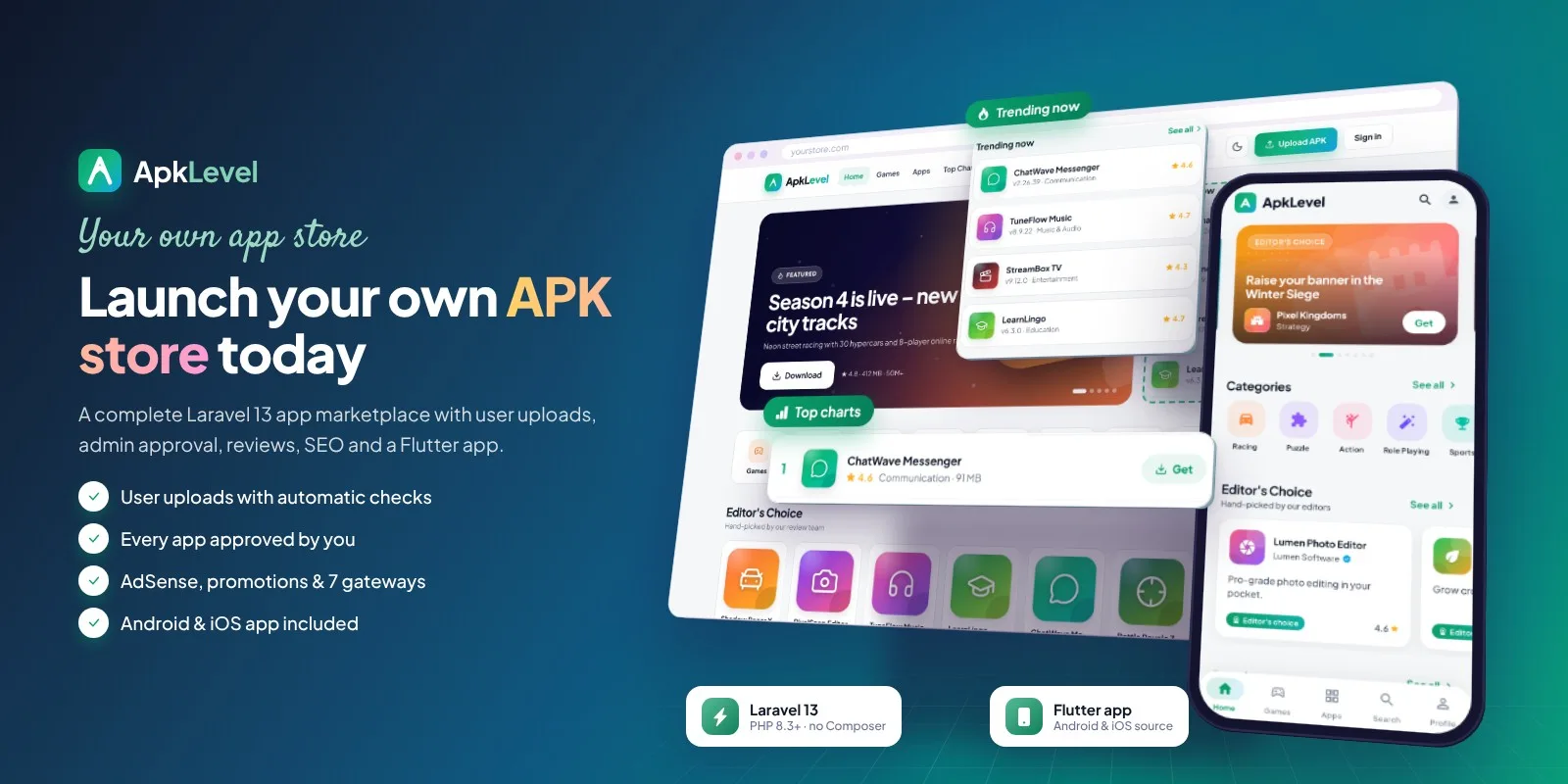
ApkLevel is a complete APK store and app marketplace built with Laravel 13. Registered users upload their own Android apps and games (APK, XAPK or APKS), every upload is checked automatically and waits for your approval, and visitors download verified files, rate apps and write reviews. Developers get their own Publisher Studio, you earn with AdSense and paid promotions, and a Flutter app for Android and iOS is included.
A store people love to browse
Hero slider, trending apps, Editor's Choice, top charts, latest updates and all 50 Google Play categories – fully responsive with dark mode and instant search suggestions.
App pages built to rank and download
- One-tap download for files of any size, with virus-scan badge and SHA-256 checksum
- Screenshots with a full-screen viewer, promo video, pros & cons, versions and reviews
Developers upload their own apps
A 4-step wizard reads the package name, version, icon and permissions straight from the APK, XAPK or APKS file. Big files are uploaded in 5 MB parts.
Every upload is approved by you
- Automatic checks: structure, signature, sensitive permissions, listing completeness and optional VirusTotal lookup
- Approve, request changes or reject with a reason – or auto-approve verified developers
Publisher Studio with real analytics
Downloads, page views, ratings and replies for 7, 30 or 90 days, statistics for every app, a review inbox and an account checklist.
Paid promotions with payments you can trust
- Stripe, PayPal, Razorpay, Paddle, Lemon Squeezy, iyzico and bank transfer
- Every payment verified on the server; signed webhooks; each payment reference can pay only one order
Your brand, your colours
Five theme styles, ten colour presets or your own colours, five self-hosted fonts, logo, favicon and a changeable admin folder name.
What you get
- Complete website with the vendor folder and a web installer – no Composer, Node.js or SSH
- Flutter app source for Android and iOS, REST API, demo content, illustrated documentation and automated tests
Requirements at a glance
PHP 8.3+ · MySQL 5.7+ / MariaDB 10.3+ · Apache, LiteSpeed or Nginx · works on shared hosting.
Support and updates
Support covers installation, configuration and bugs in the item. Updates are free for buyers. Server administration and custom development are not included.
Demo note: the live demo runs in demo mode – saving and deleting are disabled, so it stays the same for every visitor.
Core features
APK store website
- Home page with banner slider, trending list, category shortcuts, Editor's Choice, top charts and latest updates
- App pages with promo video, screenshots, pros & cons, versions, permissions, SHA-256 checksum, virus-scan badge, similar apps and download countdown page
- All 50 Google Play categories (33 app categories, 17 game genres) with icons and colours, filters and sorting
- Instant search suggestions, developer profiles, favorites, RSS feed, dark and light mode, mobile bottom navigation
- App requests: visitors ask for missing apps and vote; everyone is notified when the app is added
- Signed, expiring download links – the real file path is never shown
User uploads with admin approval
- Users upload APK, XAPK and APKS files of any size – uploaded in 5 MB parts with a progress bar
- Package name, version, minimum Android, permissions and architectures are read from the file automatically
- Upload queue with automatic checks (structure, signature, sensitive permissions, listing completeness, optional VirusTotal lookup)
- Approve, request changes or reject with a reason; auto-approve verified developers; uploads can be switched off completely
- Publisher Studio for developers: 7/30/90-day downloads and views, per-app statistics, SEO tips, review inbox and an account checklist
Reviews & notifications
- Star ratings, reviews with helpful votes, developer replies, moderation and reports
- Notifications for admins and developers in the bell menu, by branded e-mail and by push to the mobile app
Login options
- E-mail and password with e-mail verification and password reset
- Google and Facebook sign-in (also inside the mobile app)
- SMS one-time code login with Twilio, Vonage, Plivo or MSG91
- Two-step verification with authenticator apps and recovery codes – can be required for admins and developers
- Developer identity verification (KYC) with private document storage, admin review and verified badge
SEO
- Live 13-point SEO score and Google preview for every app, automatic titles and descriptions
- Schema.org app and breadcrumb markup, Open Graph, canonical URLs
- Automatic sitemap index with images, robots.txt editor, IndexNow, redirects manager
- Google, Bing, Yandex, Pinterest and Baidu verification (meta code or file), Google Analytics 4
Monetisation
- Google AdSense with 8 placements (or any ad code), auto ads, automatic ads.txt
- Paid promotions: home banner and sponsored spots with automatic expiry
- Stripe (cards, Apple Pay, Google Pay), PayPal, Razorpay (UPI), Paddle, Lemon Squeezy, iyzico and bank transfer with slip upload
- Secure payments: every payment verified with the provider against the stored order, amount and currency; signed webhooks that stay closed without a secret; each payment or bank reference can pay only one order
Admin panel
- Fully responsive admin panel (tables turn into cards on phones) with dashboard, live site controls, renamable admin folder and demo mode with one-click demo logins
- Apps, categories (CSV/JSON import, Google Play preset, drag to reorder), reviews, reports, users, orders, pages
- Appearance: 5 theme styles (Modern, Minimal, Soft, Bold, Glass), logo, favicon, 10 colour presets or any colours, 5 self-hosted fonts, home sections, footer styles
- Every setting in the admin panel: SMTP, social login, SMS, payments, push, security
Mobile app
- Flutter source for Android and iOS: home, browse, search, app details, in-app download, reviews, profile, notifications
- Admin mode: approve uploads and moderate reviews from the phone
- Demo mode with bundled data; brand colours loaded from the website; light and dark themes
Code
- Laravel 13 (PHP 8.3+), service classes, Sanctum REST API, automated tests, web installer
- Secure: CSRF protection, rate limiting, security headers, hashed OTP codes, encrypted API secrets, re-encoded images, signed downloads, SSRF-safe URL fetching
Server requirements
- Web hosting with PHP 8.3 or newer (8.3, 8.4, 8.5) and MySQL 5.7+ / 8.x or MariaDB 10.3+ (SQLite also works)
- PHP extensions: pdo_mysql, mbstring, openssl, curl, gd (WebP), fileinfo, zip
- Apache or LiteSpeed with mod_rewrite (cPanel, hPanel, Plesk, DirectAdmin) or Nginx
- No Composer, Node.js or SSH needed — all libraries are included
- Optional services need your own accounts: SMTP, Google / Facebook apps, Twilio / Vonage / Plivo / MSG91, Stripe / PayPal / Razorpay / Paddle / Lemon Squeezy / iyzico, AdSense, Firebase, VirusTotal
- Mobile app: Flutter 3.44+ and the Android SDK to build; iOS builds need a Mac with Xcode
Installation instructions
Install
- 1. Create an empty MySQL database and a user with all privileges in your hosting panel, and select PHP 8.3 or newer.
- 2. Extract the ZIP. Upload the contents of the product folder to your domain folder (e.g. public_html) – including the hidden .htaccess file.
- 3. Open your-domain.com/install: the web installer checks the server, creates the tables, imports the Google Play categories and creates your admin account (optional demo content).
- 4. Log in at the admin folder you chose and set your logo, colours, SMTP e-mail, login methods and payment methods.
- 5. Optional: add the cron job shown in the documentation, paste your Search Console code and your AdSense publisher ID.
- 6. Mobile app: open the mobile_app folder in VS Code, set your website address and build the APK – every step is in documentation/app-vscode.html.
Updates
Upload the contents of the new product folder over the old files (keep .env, storage and public/uploads) and open the site – database updates are applied automatically on the first visit (Clear cache in the admin top bar does the same).
The illustrated step-by-step guide is in documentation/index.html.
Changelog
Version 1.2.2
- Changed: support section reworded – support is open to every buyer, with nothing to activate or register.
Version 1.2.1
- Fixed: database changes of an update are applied automatically on the first visit, so the sign-in page works right after uploading the files.
- Improved: the sign-in form always works, even if the demo accounts cannot be prepared.
Version 1.2.0
- New: one-click demo login for the admin panel and the developer area; demo accounts create and repair themselves.
- Security: a provider payment or bank reference can pay only one order; bank transfers ask for the transfer reference.
- Security: security headers on every page.
- Improved: on phones admin tables turn into cards, ratings stay visible in chart rows and filter bars wrap.
- New: demo overview page and updated documentation (payment protection, security, cron, customising, changelog).
Version 1.1.1
- New: screenshots open in a full-screen viewer with a Close button, previous / next arrows and a counter; Esc, the back button, a click outside the picture or a swipe down also close it.
Version 1.1.0
- New: Paddle, Lemon Squeezy and iyzico payment gateways (server-side pricing, verified by API or signed webhooks).
- New: two-step verification with authenticator apps and recovery codes on the website and in the mobile app.
- New: developer identity verification (KYC) with private documents, admin review queue and verified badge.
- New: app requests – visitors request missing apps and vote; requester and voters are notified when the app is added.
- New: Publisher Studio – downloads and views for 7/30/90 days, per-app statistics, SEO tips, review inbox and account checklist.
- New: promo video (YouTube / Vimeo) and pros & cons for every app, also in the mobile app.
- New: five theme styles – Modern, Minimal, Soft, Bold and Glass.
Version 1.0.1
- Fixed: app pages, downloads and reviews returned "403 Forbidden" when installed directly in public_html (updated .htaccess).
- Fixed: the installer shows the "You're live" screen after setup instead of a 404 page.
- Security: pages fetched by URL in the admin panel are checked on every redirect (SSRF protection).
- New default colour scheme "Play Green".
- Mobile app: the back button returns to Home; layout fixes on Home, Categories and the admin chart.
Version 1.0.0 – initial release
- APK store website, user uploads with admin approval, reviews, notifications, Google / Facebook / SMS OTP login, SEO tools, AdSense, paid promotions, admin panel and Flutter mobile app.
Reviews
Based on 0 reviews