Web
- Home
- Products
- Multimedia
- Music
- WorldRadios – Live FM & Online Radio Dir...
WorldRadios – Live FM & Online Radio Directory Script (Laravel 13) with Android & iPhone App (Flutter)
Web
4 sales
Updated Oct 23, 2026
Product overview
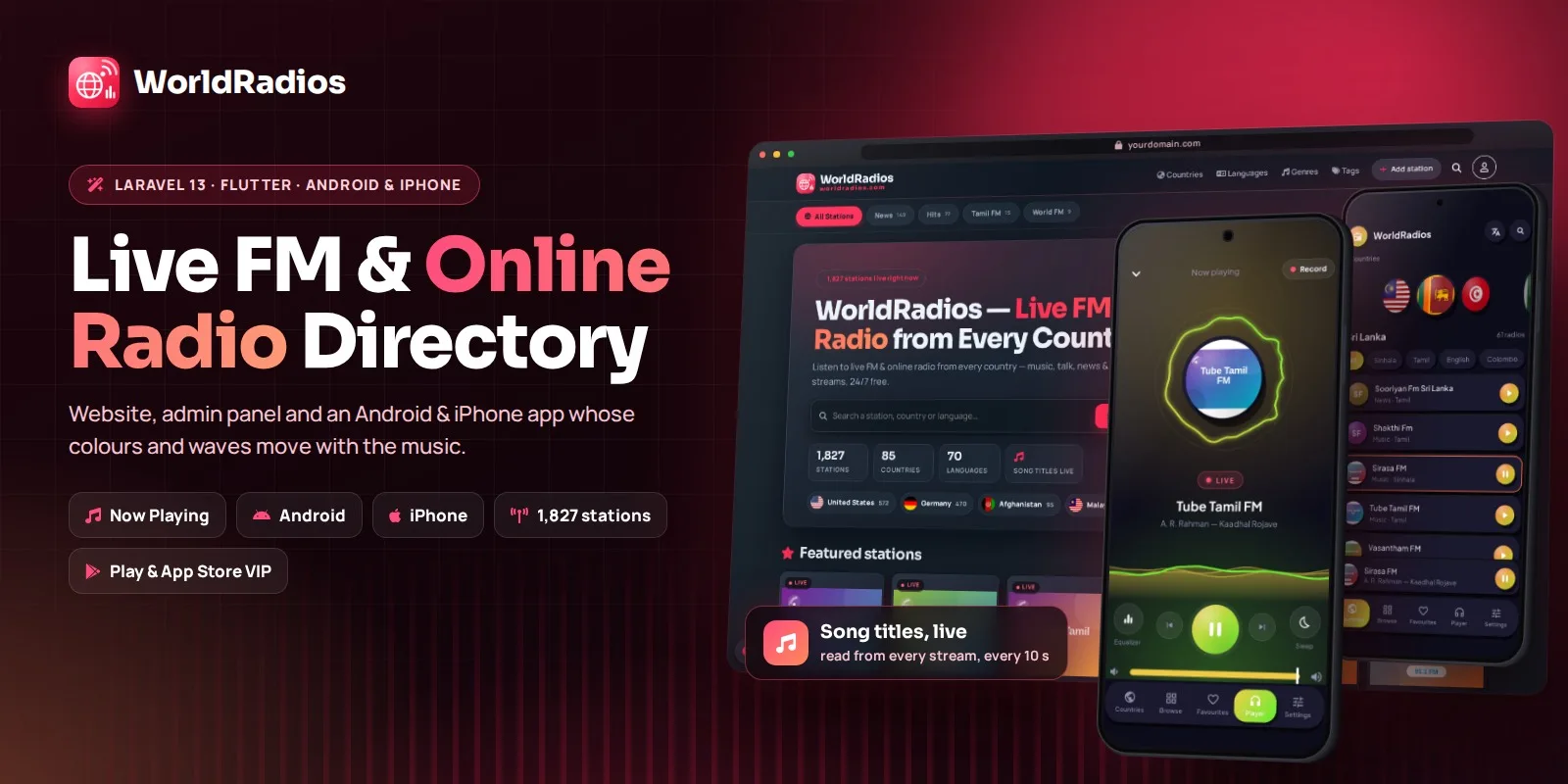
Launch your own live radio directory: a fast Laravel 13 website with live song titles, a full admin panel, a station owner area and a Flutter app for Android and iPhone with background playback, VIP subscriptions and AdMob.
Item details
Category
Platform
Files included
.php .html .css JavaScript .js .sql .md .yml/.yaml composer.json
Compatible with
PHP 8.3 PHP 8.4 PHP 8.5
Software framework
Laravel Flutter
Database
MySQL 5.7 MySQL 8.0 MariaDB 10.x MariaDB 11.x
HTML / CSS framework
Bootstrap
JavaScript framework
Alpine.js
Programming language
PHP JavaScript Kotlin Swift Dart
Version
2.1.0
Support & inquiry
Description
WorldRadios — Live FM & Online Radio Directory Script with Android & iPhone App
WorldRadios is a complete, ready-to-launch live radio directory. You get a fast, mobile-first website built with Laravel 13, a full admin panel, an area for radio station owners, and the source code of an Android and iPhone app made with Flutter. The website and the app share one admin panel, so you change the app's name, logo, colours, ads, VIP plans and push messages without building the app again.
It comes with 1,827 live stations from 85 countries in 70 languages, so your site is full and playing the moment you install it.
Why WorldRadios?
- Live song titles (Now Playing) read straight from Icecast, Shoutcast, HLS and status pages, with artwork and a recently-played list
- A player that never stops while visitors move between pages
- Web + Android + iPhone from one purchase and one admin panel
- Earn money with AdMob ads and ad-free VIP subscriptions through Google Play and the App Store
- Easy to install on cPanel shared hosting with a web installer — no Composer, Node.js or SSH needed
Public website
Visitors browse by country, language, genre, category and tag, search instantly, save favourites and see recently played stations. The sticky player keeps playing between pages, shows controls on the phone's lock screen and has a sleep timer. Stations can be shared, embedded on other websites with the embed player, or reported when they stop working. Dark and light mode, 7 colour themes and full SEO (titles, descriptions, schema, sitemap, robots.txt, ads.txt) are built in.
Android & iPhone app
One Flutter code base for both phones, in a soft 3D design with dark and light mode: a 3D carousel of country flags, language chips, browse with tabs, search and filters, and list, grid or classic views. The player's ring and waves move with the music (real beat detection on Android). It includes an equalizer with presets, bass boost, 3D surround and volume boost, a sleep timer that fades out, recording of shows, background playback with notification and lock-screen controls, a "rate this app" prompt and six languages: English, Tamil, Sinhala, Hindi, Spanish and French. It targets Android 16 and meets the current Google Play requirements.
Make money
Show AdMob banner and interstitial ads (with EU consent), and sell ad-free VIP as subscriptions or one-time products in Google Play and the App Store. Prices appear in every currency, free trials and renewals are supported, and each purchase can be checked with Google or Apple from your own server.
Admin panel
A dashboard with plays and songs on air, station management with bulk actions, submissions and owner requests, a scheduled Radio-Browser importer, Now Playing settings with a stream tester, pages and menus, ads, SMTP e-mail with a log, SEO, themes, admin users, and all app settings — look, effects, ads for Android and iPhone, VIP and push notifications (OneSignal or Firebase).
Station owner area
Radio owners sign up, submit their stations, request changes and see listener reports, while you approve or reject everything from the admin panel.
What you get
- The complete website, ready to upload, with all libraries and compiled assets
- Web installer, upgrade path from earlier versions and an optional SQL file
- Full Flutter source code of the Android and iPhone app
- Illustrated documentation: installation, Now Playing, mobile app, subscriptions and admin panel
Station streams and logos belong to their stations.
Core features
Radio website
- 1,827 live stations in 85 countries and 70 languages included
- Now Playing: live song, artist and artwork from Icecast, Shoutcast, HLS and status pages, with recently-played list
- Sticky player that keeps playing between pages, lock-screen controls, sleep timer
- HTTPS relay for http-only streams and playlist (.pls / .m3u) support
- Browse by country, language, genre, category and tag; instant search
- Favourites and recently played
- Embeddable player, share buttons, report a broken station
- Dark and light mode with 7 colour themes
- Mobile-first and fast: logo thumbnails, prefetching, caching
- SEO: automatic titles and descriptions, schema, sitemap, robots.txt, ads.txt
Admin panel
- Dashboard with plays, songs on air and a to-do list
- Stations with bulk actions, genres, tags, SEO and song-title settings
- Now Playing on/off, check interval, history length and stream tester
- Submissions and owner change requests with approve / reject e-mails
- Radio-Browser importer with scheduling and sync
- Pages, header and footer menus, ads, SMTP e-mail with log, themes, admin users
- Mobile App settings: look, effects, ads, VIP products, push notifications
- Web installer, one-click upgrade, demo mode, clear cache
Station owner area
- Owner sign-up, station submissions, change requests and listener reports
Android & iPhone app (Flutter)
- Soft 3D design in dark and light, 3D country-flag carousel
- Browse with tabs, search, filters (genre, language, tags, sort); list, grid and classic views
- Ring and wave visualizers that move with the music; real beat detection on Android
- Equalizer with presets, bass boost, 3D surround, volume boost and normalizer
- Sleep timer with fade-out; record shows to the phone
- Background playback with notification and lock-screen controls
- Song on air with artwork and history
- Six languages: English, Tamil, Sinhala, Hindi, Spanish, French
- VIP (ad-free) through Google Play and the App Store, verified by your server
- AdMob with EU consent; OneSignal or Firebase push notifications
- "Rate this app" prompt and notification / battery settings
- Name, logo, colours, tabs, ads and VIP plans controlled from the admin panel
Server requirements
Software version / compatibility
- PHP: 8.3, 8.4, 8.5
- Framework: Laravel 13
- Database: MySQL 5.7, 8.0, 8.4 LTS or MariaDB 10.3+ / 11.x
- Web server: Apache, Nginx or LiteSpeed (cPanel shared hosting works)
- Browsers: Chrome, Edge, Firefox, Safari, Samsung Internet, Opera (desktop and mobile)
- Android app: Android 7.0 (API 24) up to Android 16 (API 36)
- iPhone app: iOS 15.0 or newer
- App source: Flutter 3.44 or newer (tested with 3.47), Dart 3.10+
Server
- PHP extensions: pdo_mysql, mbstring, openssl, curl, fileinfo, gd
- Outgoing HTTP allowed (song titles, stream relay, importer)
- Optional: one hourly cron job
- No Composer, Node.js or SSH needed
To publish the app
- Android Studio with Flutter; a Google Play developer account
- For iPhone: a Mac with Xcode and an Apple Developer account
Installation instructions
Install the website
- Create a MySQL database and a database user in your hosting panel.
- Upload the contents of the upload folder to your domain folder (for example public_html) and select PHP 8.3 or newer.
- Open your domain in the browser. The web installer checks the server, creates the tables, loads the starter stations and creates your admin account.
- Optional: add the hourly cron job shown in the documentation.
- Log in at /radio_admin and set your logo, colours, e-mail and Now Playing settings.
Build the Android & iPhone app
- Install Flutter and open the mobile folder in Android Studio (or Xcode for iPhone).
- Set your website address in mobile/lib/core/site.dart and change the package / bundle ID to your own.
- Android: run
flutter build appbundleand upload the .aab to Google Play. - iPhone: run
flutter build ipaand upload to App Store Connect. - To sell VIP, create the products in the Play Console and App Store Connect and add their IDs in Admin → Mobile App → Subscriptions.
Upgrade
- Upload the new files over the old ones. Your stations and settings are kept; the database updates itself on the first visit.
Illustrated guides are in the documentation folder: install, now-playing, mobile-app, subscriptions and admin.
Changelog
Version 2.1.0
- App: player now shows in the notification bar and keeps playing in the background on Android 13–16
- App: "Player in notifications" switch and battery-optimisation shortcut in Settings
- App: "Rate this app" prompt when the app opens
- App: targets Android 16 with 16 KB page-size support for Google Play
- VIP subscriptions with base plans (monthly, 6 months, yearly)
Version 2.0.0
- New Android & iPhone app in Flutter with beat-reactive player
- Now Playing: live song titles with artwork and history
- VIP through Google Play and the App Store, verified by the server
- Laravel 13 website with sticky player, themes and SEO
Reviews
Based on 0 reviews