Web
- Home
- Products
- PHP Scripts
- Booking & Reservations
- BusGo - Bus Ticket Booking Script + Flut...
BusGo - Bus Ticket Booking Script + Flutter Apps
Web
0 sales
Updated Oct 30, 2026
Product overview
Bus ticket booking for one coach company: seat maps, round trips, QR e-tickets, counter, conductor scanner, Flutter apps.
Frequently bought together
Item details
Category
Platform
Files included
.php .html .css JavaScript .js .json .dart .kts .svg composer.json .blade.php pubspec.yaml Documentation
Compatible with
PHP 8.3 PHP 8.4 Android 8+ Flutter 3.x
Software framework
Laravel Flutter
Database
MySQL 5.7 MySQL 8.0 MySQL 8.4 LTS MariaDB 10.x MariaDB 11.x SQLite 3.x
HTML / CSS framework
Custom CSS
Programming language
PHP JavaScript Dart HTML/CSS
Version
1.0.0
Support & inquiry
Product demo
Description
BusGo - online ticket booking for your coach company
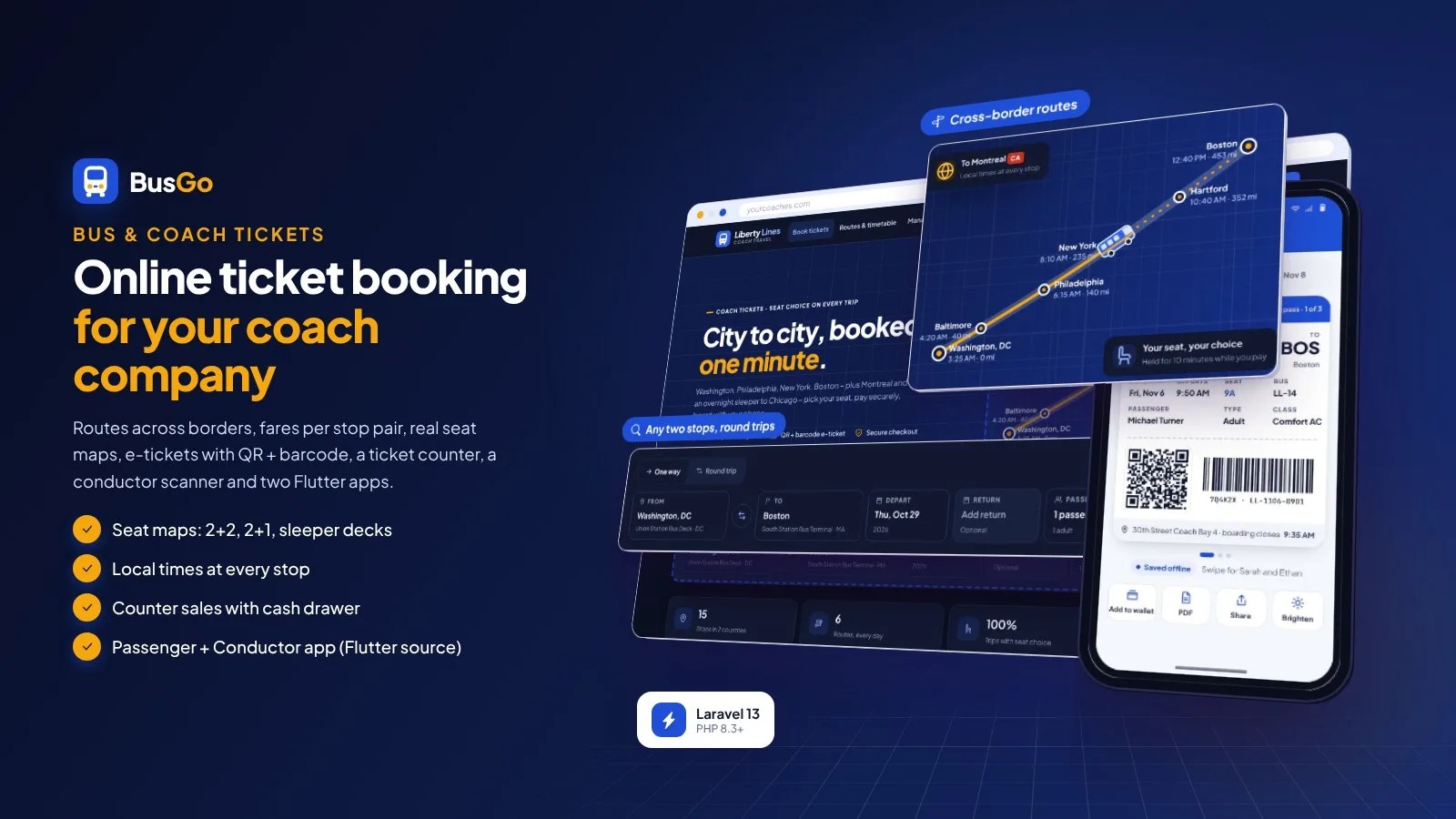
BusGo is a complete website for one bus or coach company: build your routes from stops (also across borders - every stop shows its own local time), set fares per stop pair and class (with an optional per-mile / per-km helper), draw seat maps (2+2, 2+1, sleeper berths on two decks) and let riders book one way or round trip between any two stops. Every passenger gets an e-ticket with a QR code and a Code 128 barcode.
Your team sells walk-up tickets at the ticket counter with a cash drawer, conductors scan tickets at the door, and the owner runs everything from one admin panel. Riders pay with Stripe, PayPal, Paystack, PayHere, Razorpay or bank transfer - every payment verified on the server - or cash at the counter.
Two Flutter apps are included as source code: a Passenger app you rebrand with your name, logo and colours, and a Conductor app with offline QR / barcode scanning. You build them yourself with Flutter and Android Studio - step-by-step guides are included.
Live demo
- Demo website URL: https://busgo.anowhosting.com/
- Sample search (Philadelphia → Boston): https://busgo.anowhosting.com/search?from=3&to=6
- One-click rider demo URL (Michael Turner: round trip 7Q4K2X): https://busgo.anowhosting.com/demo-login/customer
- One-click counter agent demo URL (Dana Brooks, Philadelphia): https://busgo.anowhosting.com/demo-login/counter
- One-click conductor demo URL (Marcus Bell): https://busgo.anowhosting.com/demo-login/conductor
- One-click admin (owner) demo URL: https://busgo.anowhosting.com/demo-login/owner
- One-click admin demo URL: https://busgo.anowhosting.com/demo-login/admin
- Rider demo login (email / password): michael.turner@example.com / password
- Counter agent demo login (email / password): dana@libertylines.example / password
- Conductor demo login (email / password): marcus@libertylines.example / password (app PIN 123456)
- Owner demo login (email / password): karen@libertylines.example / password
- Admin demo login (email / password): owen@libertylines.example / password
- Demo overview page: https://busgo.anowhosting.com/codester/index.html
- Public documentation: https://busgo.anowhosting.com/codester/docs/index.html
Search between any two stops
- Stops with country and time zone; routes with any number of stops, distances, platforms, boarding / drop-off only stops; "Make return route" in one click
- Riders book any stop pair of a route, one way or round trip, with adult, child, senior and infant passengers
- Results with a 7-day date strip (lowest fare per day), filters by class, amenities, time of day and fare
- Times always in the local time of each stop - a sleeper to Chicago arrives in Central Time
Pick a seat on the real bus
- Seat layout editor: 2+2, 2+1, sleeper 1+2, custom; one or two decks; doors, restroom, blocked seats
- Passenger type per seat; seats held with a countdown while the rider pays
- Per-segment inventory: a seat is never sold twice, but can carry riders on parts of the route that do not overlap
- Fares per stop pair and class, passenger types (same fare, % off, fixed or free), service fee and tax
E-tickets with QR code and barcode
- One ticket per passenger with a QR code and a Code 128 barcode, boarding point, platform and local times
- By e-mail and SMS (Twilio or your own SMS gateway), print or save as PDF, trip reminders
- Manage booking by PNR + last name; cancel single seats with your refund rules (90 / 75 / 50 / 0 % by default) and a live preview
- Rider accounts with My trips, receipts and saved passengers - or guest checkout
Ticket counter with cash drawer
- Counter agents per station sell on the same seat map until departure
- Cash with change or card terminal, printed ticket (A4 or receipt printer)
- Cash drawer: opening float, sales, refunds, count by banknotes of your currency, Z-report
Conductors scan at the bus door
- Web scanner: today's trips, camera scanning (QR + barcode) or typed ticket / PNR
- Results: valid, already used, wrong trip, not found, cancelled - with undo
- Manifest per boarding stop, board and no-show, "the bus is at this stop"
Passenger app and Conductor app (Flutter source code)
- Passenger app: search, seat map, passengers, payment (your website's gateways in the browser), bank transfer with receipt photo, offline e-tickets, my trips, cancel with refund preview, notifications, light and dark
- Rebrand in one file (name, website, colours, logo), then build the APK / App Bundle - step-by-step guide with Play Store checklist and iOS notes
- Conductor app: connect with a setup QR, 6-digit PIN, QR + Code 128 scanner with torch, manifest, offline scanning with sync (first scan wins), hand out the APK - no store needed
- Delivered as Flutter source code (Android + iPhone from one code base) - you build the apps with Flutter and Android Studio
Six ways to pay, verified on the server
- Stripe, PayPal, Paystack, PayHere, Razorpay and bank transfer (receipt + approval, PNR as reference) - plus cash or card at the counter
- Amounts and currency checked on the server; signed webhooks that fail closed; one gateway transaction per booking; nothing renews automatically
- Refunds back to the original method, refund references for the team
Run the company from one panel
- Dashboard: departures today with load, seats sold, revenue, payments mix, needs attention
- Routes & stops, fare matrix, buses & seat layouts, schedules with extra trips and cancellations, bookings, payments
- 19 country presets (currency, km / miles, date and time formats, time zone, tax, banknotes), colour presets, light and dark theme, languages with auto-translate, SEO, templates, backups, staff roles, REST API v1
What you get
- The complete website script with the vendor folder and a browser installer (MySQL / MariaDB or SQLite); pick your country in the installer
- Passenger app and Conductor app as Flutter source code (two zips with START-HERE build steps) - you build and publish them with Flutter and Android Studio
- Optional demo data: the sample coach company Liberty Lines (USA) with 15 stops, 6 routes incl. a cross-border route and an overnight sleeper, 24 coaches, a team and a year of bookings
- Four illustrated HTML guides: website (install, cron, country presets, network, fares, trips, booking, counter, conductor, payments with webhook URLs, settings, demo mode, update), Passenger app, Conductor app and the REST API reference
Good to know
- One installation is the website of one bus company (single-site). The apps are not pre-built: you build them from the included Flutter source code following the guides.
- Payments are one-off; nothing renews automatically. Online payments need your own merchant accounts; SMS needs Twilio or your own SMS gateway.
- English is bundled; other languages are added in the admin with optional auto-translate. USA defaults (USD, miles, New York time) - every region setting is editable, with 19 country presets.
- All companies, people and numbers of the demo are fictional sample content.
Requirements at a glance
PHP 8.3+, MySQL 5.7+ / MariaDB 10.3+ (or SQLite), Apache, LiteSpeed or Nginx and a cron job. Apps: Flutter 3.24+ (stable) and Android Studio. Full list below.
Core features
Network
- Stops with city, code, country, time zone, address and map position
- Routes with any number of stops, distances (km or miles), travel and stop times, platforms, boarding / drop-off only stops
- Return route in one click; cross-border routes with local times and optional passport / ID numbers
Buses, seats & fares
- Bus classes with amenities; seat layout editor (2+2, 2+1, sleeper 1+2, custom, two decks, blocked seats)
- Per-segment seat inventory - never sold twice
- Fare matrix per stop pair and class, optional per-mile / per-km helper, copy to return route or other class
- Passenger types: adult, child, senior, infant (same fare, % off, fixed or free, age ranges); service fee and tax
Trips
- Schedules with weekdays, dates, bus, conductor and driver; trips created ahead automatically
- Extra trips, dates off, cancel a departure with full refunds and messages
- Trip status by the clock: scheduled, boarding, departed, arrived
Booking
- Search any two stops, date strip with lowest fares, filters, one way or round trip
- Seat map with passenger type per seat and hold timer; guest checkout or accounts with saved passengers
- E-tickets with QR code and Code 128 barcode, e-mail and SMS, print / PDF, trip reminders
- Manage booking by PNR + last name, cancel single seats with refund rules and live preview
Counter & conductors
- Ticket counter per station: cash with change or card, printed ticket, find bookings, cash refunds
- Cash drawer with opening float, count by banknotes and Z-report
- Conductor web scanner, manifest per stop, boarding, no-shows, undo
Payments
- Stripe, PayPal, Paystack, PayHere, Razorpay, bank transfer with receipt approval, cash / card at the counter
- Server-side verification, signed webhooks that fail closed, idempotent completion, no auto-renew
Apps & API (Flutter source code)
- REST API v1 with hashed tokens, expiry and rate limits
- Passenger app: rebrandable (one file), search, seats, payment, bank transfer, offline e-tickets, my trips, cancel, notifications
- Conductor app: setup QR, PIN, QR + barcode scanner with torch, manifest, offline scanning with sync (first scan wins)
Admin
- Dashboard, bookings, payments, refunds, staff roles (owner, admin, staff, counter, conductor), activity log
- 19 country presets, colour presets and pickers, light and dark theme, logos, fonts
- Languages with auto-translate, pages and FAQ, e-mail and SMS templates, SEO, backups, update, maintenance, demo mode
Server requirements
- PHP 8.3 or newer (8.3, 8.4)
- MySQL 5.7+ / 8.x or MariaDB 10.3+ (SQLite 3 for small sites and local tests)
- PHP extensions: pdo (pdo_mysql or pdo_sqlite), mbstring, openssl, tokenizer, xml, ctype, json, fileinfo, curl, gd, zip, intl
- Apache with mod_rewrite (cPanel, Plesk, DirectAdmin), LiteSpeed or Nginx; Windows with XAMPP / Laragon
- One cron job every minute (Task Scheduler on Windows)
- HTTPS (payments, webhooks and the apps)
- No Composer, Node.js or SSH needed for the website - the vendor folder is included
- To build the apps: Flutter 3.24+ (stable), Android Studio with JDK 17; a Mac with Xcode for iPhone builds; a Google Play developer account to publish
- Accounts you bring: payment gateway merchant accounts and SMTP; optional SMS (Twilio or your gateway) and translation keys
Installation instructions
Install the website
- Create an empty MySQL / MariaDB database and user in your hosting panel and select PHP 8.3 or newer.
- Upload the busgo folder and point your domain to its public folder - or upload its contents straight into public_html (with the hidden .htaccess files).
- Open your-domain.com: the browser installer checks the server, asks for the database and creates your company and owner account; choose your country (currency, km or miles, time zone and formats) and optionally the demo data (imported in short steps so shared hosts do not time out).
- Sign in at /login: add your stops and routes, buses and seat layouts, fares and schedules, switch on your payment gateways and set up SMTP.
- Add the cron job
* * * * * cd /path/to/busgo && php artisan schedule:runfor seat holds, unpaid bookings, trip status, new trips, reminders and backups.
Build the apps
- Turn on Admin › Settings › Mobile apps › Apps can connect.
- Unzip apps/BusGo-Passenger-App-Source.zip and apps/BusGo-Conductor-App-Source.zip; follow START-HERE.txt and the guides (rebrand, flutter pub get, flutter build apk / appbundle).
Updates
- Back up, upload the update zip in Admin › Update (or copy the new files over the old ones; .env, storage and public/uploads are kept), then click Run update - your data is kept.
The illustrated guides are in documentation/ and online at https://busgo.anowhosting.com/codester/docs/index.html.
Changelog
1.0.0 – October 2026
- Initial release.
- Routes from stops with local times per stop (cross-border), fares per stop pair and class with optional per-distance helper, passenger types.
- Seat layout editor (2+2, 2+1, sleeper decks), per-segment seat inventory, seat holds, one way and round trip.
- E-tickets with QR code and Code 128 barcode, manage booking, cancellations with refund rules.
- Ticket counter with cash drawer and Z-report; conductor web scanner with manifest.
- Stripe, PayPal, Paystack, PayHere, Razorpay, bank transfer and cash; 19 country presets; REST API v1.
- Passenger app and Conductor app included as Flutter source code with build guides.
Reviews
Based on 0 reviews