
 Web
- Home
- Products
- Management
- School
- Campora – School Website SaaS with Online Admissions (Multi-School Laravel Script)
Campora – School Website SaaS with Online Admissions (Multi-School Laravel Script)
Web
0 sales
Updated Nov 09, 2026
Product overview
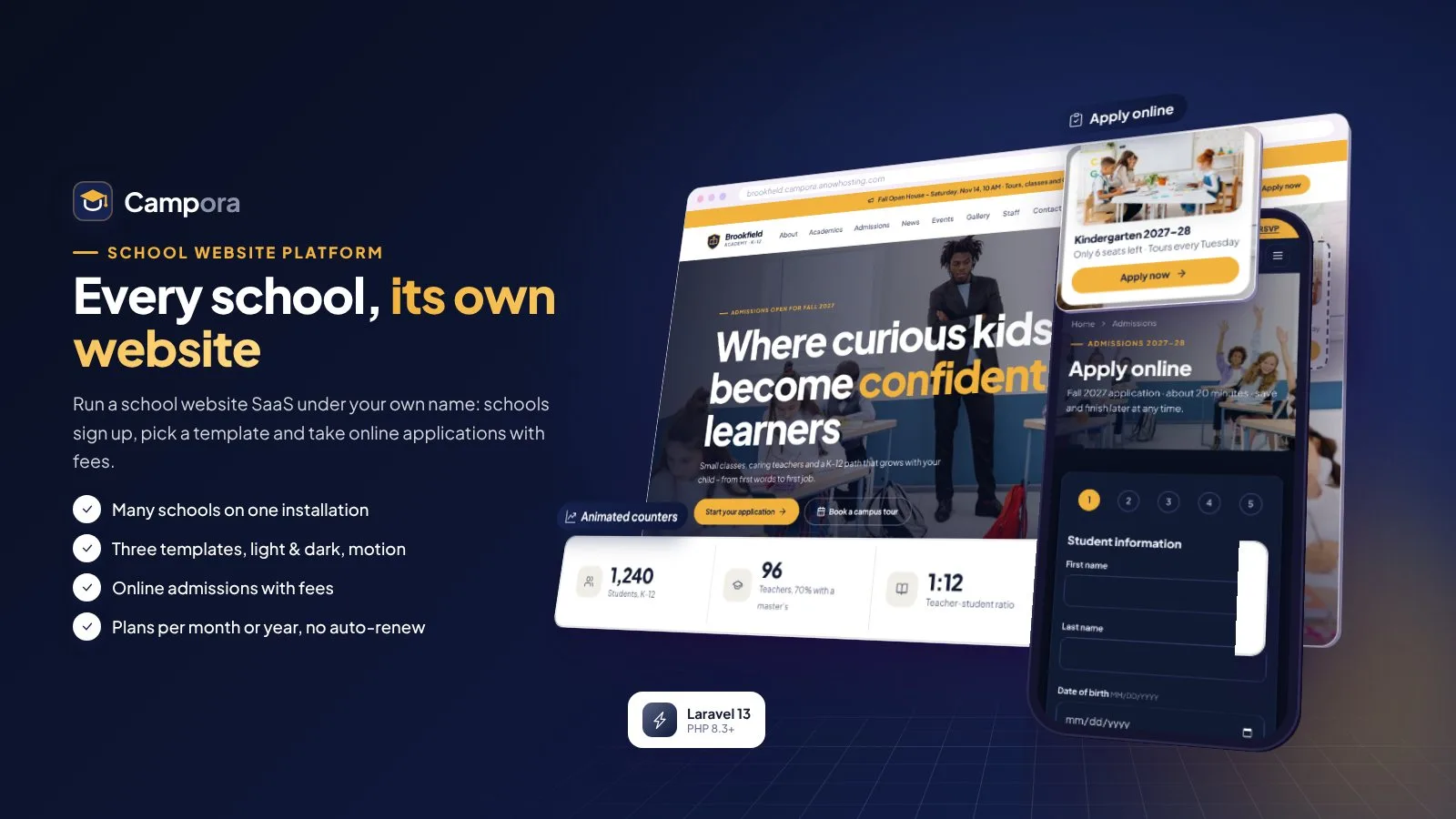
Multi-school website SaaS: 3 templates, online admissions with fees, news, events, gallery and Free / Basic / Pro plans.
Frequently bought together
Item details
Category
Platform
Files included
.php .html .css JavaScript .js .json .svg .webp composer.json .blade.php .env example Documentation
Compatible with
PHP 8.3 PHP 8.4
Software framework
Laravel
Database
MySQL 5.7 MySQL 8.0 MariaDB 10.x MariaDB 11.x SQLite 3.x
HTML / CSS framework
Custom CSS
Programming language
PHP JavaScript HTML/CSS
Version
1.0.0
Support & inquiry
Product demo
Description
Campora - every school, its own website
Campora is a complete school website platform (SaaS) you run under your own name. Schools sign up, pick an address, choose one of three website templates and get a full, fast school website with news, an events calendar, photo and video gallery, staff directory, downloads, contact page and online admissions with an admission fee - all from one installation.
You earn from plans: Free, Basic and Pro, paid for one month or one year with Stripe, PayPal, Paystack, Razorpay, PayHere or bank transfer - nothing renews automatically, schools get reminders with a pay link. Each school takes its admission fees with its own payment account. Schools open on a sub-domain (school.yourdomain.com), on a path address that works on any shared hosting (yourdomain.com/s/school) or on their own domain. Light theme by default with a full dark mode, motion effects, installable as an app (PWA), languages with auto-translate - and every text, price, limit and colour is an admin setting.
- Platform website (landing page): https://campora.anowhosting.com/
- Demo school website (Brookfield Academy): https://campora.anowhosting.com/s/brookfield
- One-click school admin demo URL (Maria Alvarez): https://campora.anowhosting.com/demo-login/school
- One-click admissions officer demo URL (Thomas Wright): https://campora.anowhosting.com/demo-login/admissions
- One-click website editor demo URL (Nina Patel): https://campora.anowhosting.com/demo-login/editor
- One-click parent view (application status page): https://campora.anowhosting.com/demo-login/parent
- One-click super admin demo URL (Daniel Brooks): https://campora.anowhosting.com/demo-login/super
- Demo overview page: https://campora.anowhosting.com/codester/index.html
- Public documentation: https://campora.anowhosting.com/codester/docs/index.html
Three templates, light and dark
- Horizon (modern), Heritage (classic, serif headings) and Bright (friendly, for elementary and preschools)
- Switch the template any time - every content stays
- Home page from 12 sections to order, show or hide, with a motion hero slider
- Eight colour presets plus custom colours; button text colour chosen automatically for contrast
A complete school website
- About (vision, mission, values, head of school, history, leadership), academics with programs, clubs and tuition
- News with categories, events calendar with iCal, photo albums with lightbox and videos on click
- Staff directory by department, downloads, contact form with map, custom pages, announcement bar
- Page cache, WebP images in three sizes and lazy loading - fast on phones
Online applications, no account needed
- Multi-step application form with a form builder: intakes, grades, fields, documents and fee
- The admission fee is paid to the school's own gateway account - or by bank transfer with receipt
- Families get a private status link (or look up by application number + e-mail)
- Timeline, interview date and messages on the status page
Review every application in one place
- Filters by status, grade, fee, intake and dates; search; CSV export
- Verify documents or ask the family for a clearer copy
- Schedule interviews, internal notes, messages, fee waiver
- Accept, waitlist or decline - the family gets the matching e-mail
Two payment flows, verified on the server
- Plan payments go to you, admission fees to each school's own account
- Stripe, PayPal, Paystack, Razorpay, PayHere and bank transfer with receipt approval
- Amount and currency checked on the server, signed webhooks that fail closed, one completion per transaction
- US sales tax by state, invoices, reminders with a pay link - no auto-renew
Everything a school office needs
- Dashboard: applications and fees of the last 30 days, visitors, upcoming events, website health
- Website editor with live preview, pages, news, events, gallery, staff and downloads
- Team roles: school admin, admissions officer, website editor
- Plan & billing with usage meters, own domain with DNS verification
Run the whole platform from one panel
- Schools, revenue, paid schools, schools by plan and periods ending soon
- Plans with 12 limits each, sales tax, payments, invoices and bank transfers to approve
- Domains, templates, landing page, e-mail templates, gateways, languages, PWA and social networks
- Grant a period, sign in as a school admin, suspend a school
Change the website without code
- Drag home sections into order, switch them on or off
- Edit texts, photos, buttons and items of every section
- Template and colours with a live desktop and phone preview
- Announcement bar with start and end dates
What you get
- The complete script with the vendor folder and a browser installer (MySQL / MariaDB or SQLite)
- Optional demo data: twelve sample schools with complete websites, 240 applications with fees, a year of plan orders and a crowd of sample schools for the platform figures, plus one-click demo logins
- Illustrated HTML documentation: installation (cPanel, VPS, Windows), cron, sub-domains and own domains, every super admin and school admin area, admissions, both payment flows with webhook URLs, PWA, languages, demo mode and updates
Good to know
- One installation runs one platform with many schools; prices are in one currency (USD by default) and every price and limit is an admin setting.
- School sub-domains need a wildcard DNS record and a wildcard SSL certificate; without them every school works on its path address.
- Plans are paid per period - nothing renews or charges automatically. Online payments need your own merchant accounts (and each school its own for admission fees).
- English is bundled; other languages are added in the admin with optional auto-translate.
Support and updates
Support covers installation questions and bugs. Updates come as a full package and a small update zip with a one-click update in the super admin.
Core features
Platform (SaaS)
- Many schools on one installation, every row kept inside its school
- Landing page, templates page, pricing with monthly / yearly switch, help and legal pages
- School sign-up with live address check, template choice and optional sample content
- Sub-domain per school, path address that always works, own domains with DNS verification
School websites
- Three templates (Horizon, Heritage, Bright), light and dark theme
- Home page from 12 sections, motion hero slider, reveals on scroll, parallax, counters
- About, academics, news, events with iCal, photo and video gallery, staff directory, downloads, contact with map, custom pages
- Announcement bar, testimonials, achievements, FAQ, newsletter
Online admissions
- Form builder with intakes, steps, fields and documents
- Admission fee to the school's own gateway or bank transfer
- Private status page, look-up by number + e-mail, messages and timeline
- Review inbox with filters, documents, interviews, notes, decisions and CSV export
Selling plans
- Free, Basic and Pro with 12 limits each - all admin settings
- Per month or per year, no auto-renew, reminders with a pay link
- Stripe, PayPal, Paystack, Razorpay, PayHere, bank transfer with receipt approval
- Server-side verification, signed webhooks that fail closed, US sales tax by state, invoices
Design & platform
- Light theme by default, full dark mode, colour presets and custom colours
- Installable app (PWA) for the platform and every school, social networks manager with icon upload
- Languages with auto-translate (DeepL, Google, LibreTranslate), SEO, sitemap, schema.org, page cache, SMTP per school
- Browser installer, one-click update, backups, maintenance page, changeable admin addresses, demo mode
Server requirements
- PHP 8.3 or newer (8.3, 8.4)
- MySQL 5.7+ / 8.x or MariaDB 10.3+ (SQLite 3 for small sites and local tests)
- PHP extensions: pdo (pdo_mysql or pdo_sqlite), mbstring, openssl, tokenizer, xml, ctype, json, fileinfo, curl, gd (zip for the one-click update)
- Apache with mod_rewrite (cPanel, Plesk, DirectAdmin), LiteSpeed or Nginx
- A cron job every minute
- Optional: wildcard DNS + wildcard SSL for school sub-domains; SMTP for e-mail
- No Composer, Node or SSH needed - the vendor folder is included
- Your own merchant accounts for online payments (Stripe, PayPal, Paystack, Razorpay or PayHere)
Installation instructions
Install
- Create an empty MySQL / MariaDB database and user in your hosting panel and select PHP 8.3 or newer.
- Upload the contents of the campora folder into the document root of your domain (the included .htaccess files route everything to the public folder) - or point the domain to its public folder.
- Open your domain: the installer checks the server, connects the database and creates your owner account (optionally with the demo data).
- Sign in at /login - you land in the super admin. Set the platform name, base domain, mail, plans and gateways.
- Add the cron job:
* * * * * cd /path/to/campora && php artisan schedule:run - Optional: a wildcard DNS record and certificate for school sub-domains, then switch them on in Settings › Domains.
Updates
Upload the update zip in Super admin › Settings › Update (or copy the files by FTP) and press Run update.
Documentation
Open documentation/index.html in the package (also online on the demo).
Changelog
1.0.0 – November 2026 – Initial release
- Multi-school platform: landing page, templates, pricing, school sign-up and super admin
- School websites with three templates (Horizon, Heritage, Bright), light and dark theme and motion
- Online admissions: form builder, documents, admission fee to the school's own account, status page, review inbox
- Free, Basic and Pro plans per month or year - no auto-renew, reminders with a pay link
- Stripe, PayPal, Paystack, Razorpay, PayHere and bank transfer with signed webhooks
- Sub-domains, path addresses and own domains with DNS verification; PWA, languages, social networks, SEO, backups, demo mode
Reviews
Based on 0 reviews