Web
- Home
- Products
- PHP Scripts
- Education & School
- CoachDesk – Coaching Centre Management S...
CoachDesk – Coaching Centre Management SaaS (Laravel 13 Multi-Institute Script)
Web
0 sales
Updated Oct 21, 2026
Product overview
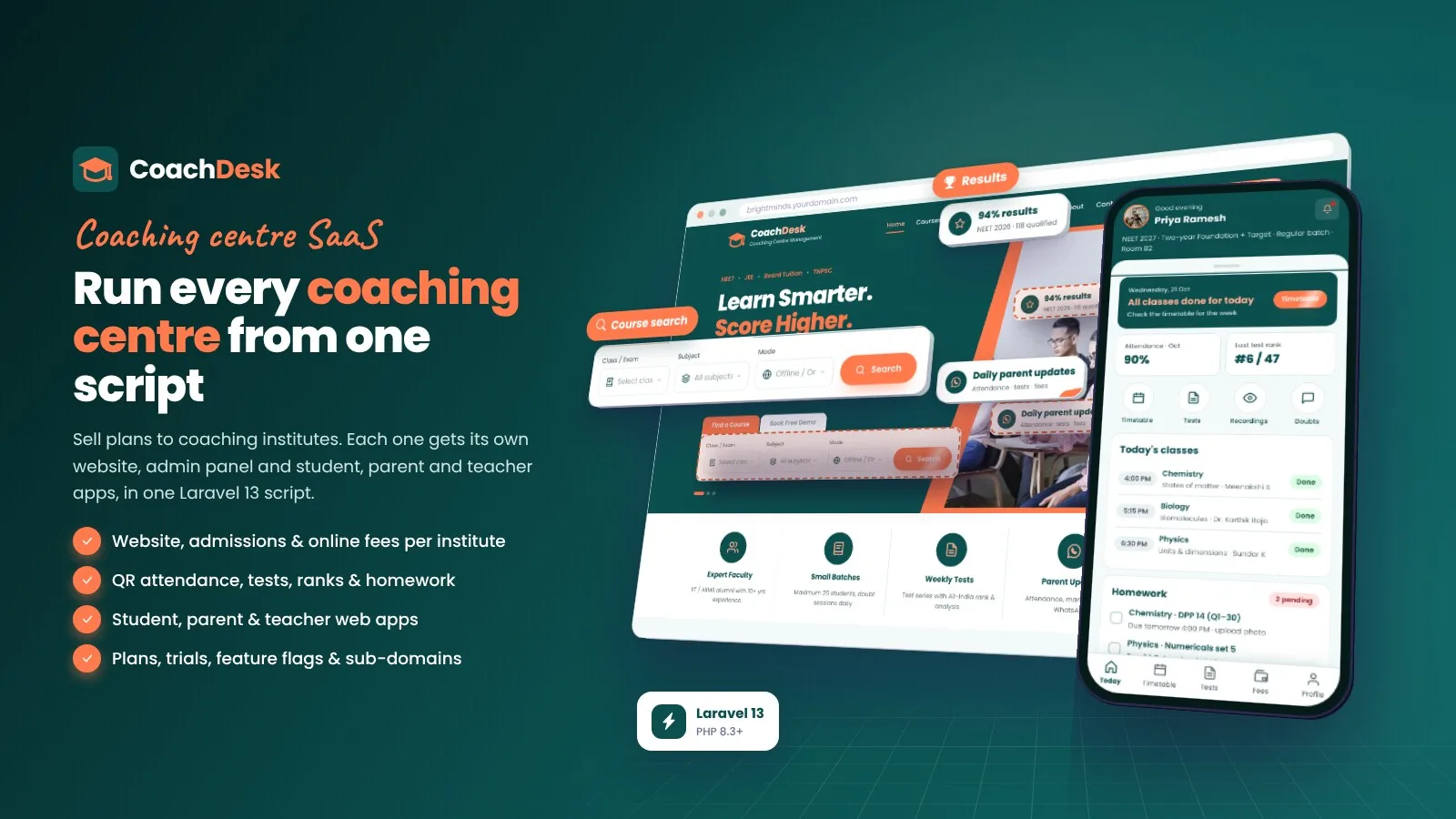
Multi-institute coaching SaaS: institute websites, online admissions, QR attendance, tests, fees with instalments and student, parent & teacher web apps. Laravel 13 with browser installer.
Frequently bought together
Item details
Category
Platform
Files included
.php .html .css JavaScript .js .json .svg composer.json .blade.php .env example Documentation
Compatible with
PHP 8.3 PHP 8.4
Software framework
Laravel
Database
MySQL 5.7 MySQL 8.0 MySQL 8.4 LTS MariaDB 10.x MariaDB 11.x SQLite 3.x
HTML / CSS framework
Custom CSS
Programming language
PHP JavaScript HTML/CSS
Version
1.0.1
Support & inquiry
Product demo
Description
CoachDesk - run a coaching centre platform from one Laravel script
CoachDesk is a multi-institute SaaS for coaching and tuition centres. You run the super admin and sell plans; every institute gets its own website (on a sub-domain or its own domain), an institute admin panel and phone-first student, parent and teacher web apps. Enquiries, online admissions, batches and timetable, QR attendance, tests and ranks, homework, fees with instalments and online payments, WhatsApp / SMS / e-mail messages and a drag-and-drop page builder are all included. Built on Laravel 13 (PHP 8.3+) with a browser installer - the vendor folder is included.
A premium website for every institute
Hero with course search, categories, popular courses, batch types, admission steps, offers, facilities, results, faculty, testimonials, FAQ and a free-demo form - every text, photo and menu is editable in the institute's CMS. Language and currency switcher included.
Course pages and online admission
- Course pages with gallery, syllabus, batches and timetable, fees, faculty, results, reviews and a brochure
- 4-step online admission: student details, parent and documents, batch and fee plan (instalments, one-time or monthly), coupon, payment
- Pay online, by bank transfer or at the centre; the seat is held while the payment runs
An institute admin that runs the day
Dashboard with active students, attendance, fees collected, dues, today's classes and enquiries; enquiry pipeline and free-demo bookings; students with documents, remarks, transfers, ID cards and certificates; courses, batches, centres and rooms; expenses, payroll and reports with CSV export; staff roles with section permissions.
Fees and payments you can trust
- Instalments, late fees, discounts, coupons, waivers, counter collection, refunds, receipts and automatic reminders
- Stripe, PayPal, Razorpay, Paystack, PayHere and bank transfer - each institute enters its own keys, so fees go straight to the institute
- Every online payment is verified with the gateway on the server; webhooks are signed and closed without a secret
Apps for students, parents and teachers
Phone-first web apps with a bottom tab bar (no app-store download). Students see classes, timetable, attendance with QR check-in, tests, homework upload, material, fees and online payment, doubts, notices and their ID card. Parents follow several children, results, remarks and fees and book parent-teacher meetings. Teachers start classes, take attendance (manual or QR), enter marks and grade homework.
QR attendance, tests and timetable
- Attendance by QR code, manually or by CSV import (for the export of a biometric device), with low-attendance alerts
- Tests with marks, ranks, analysis and report cards; study material, homework and doubts
- Weekly timetable with clash check and substitutes; live classes with Zoom meeting creation
A SaaS super admin to sell plans
Public sign-up at /start with a live sub-domain check and a free trial; plans with prices, limits (students, centres, teachers), trial days and feature flags; subscription invoices with tax, bank transfer approval, renewals with grace period and suspension; institutes with KYC, custom domains and a support login with audit log; analytics, templates, languages, currencies, admin roles, platform-wide colours and Google Fonts, and a one-click system update.
Page builder, your brand, easy setup
- Drag-and-drop page builder with 11 block types and live preview
- 9 colour presets plus custom colours, logos and 1,950+ Google Fonts - platform defaults in the super admin, own branding per institute
- Multi language with a translation editor and multi currency
- Browser installer for shared hosting, VPS and Windows (XAMPP / Laragon) - no Composer, Node.js or SSH needed
What you get
- The complete script with the vendor folder and browser installer (MySQL / MariaDB or SQLite)
- Demo data (a sample academy plus sample institutes) and illustrated HTML documentation
Good to know
- The student, parent and teacher apps are responsive web apps; no native Android / iOS apps are included.
- WhatsApp messages need a Meta WhatsApp Cloud API account and templates approved by Meta; SMS needs an MSG91 or Twilio account.
- Institute sub-domains need a wildcard DNS record and a wildcard SSL certificate; custom domains need DNS at the institute.
- Biometric devices are supported through CSV import. There is no public REST API in this version.
Requirements at a glance
PHP 8.3+, MySQL 5.7+ / MariaDB 10.3+ (or SQLite), Apache, LiteSpeed or Nginx, a cron job. No Composer, Node.js or SSH needed.
Support and updates
Support covers installation, configuration and bugs in the item. Server administration and custom development are not included.
Demo note: the live demo runs in demo mode - saving is disabled in the super admin and institute admin, and the demo data resets every 3 hours.
Core features
SaaS platform (super admin)
- Many coaching institutes in one installation, each with its own data, website, admin panel, apps and payment keys
- Institute address: a sub-domain per institute (wildcard DNS) or the institute's own custom domain
- Public sign-up at /start with live sub-domain check, starter website and free trial
- Plans with monthly / yearly prices, limits (students, centres, teachers), trial days and feature flags; platform-wide feature switches
- Subscription invoices with tax (e.g. GST), bank transfer approval, renewals with grace period and suspension
- Dashboard and analytics (MRR, institutes, trials ending, plan split, platform health) with CSV export
- Institutes with status, KYC, onboarding checklist, notes and support login with audit log; support tickets
- Platform default colours and Google Fonts, WhatsApp / SMS and e-mail templates, languages, currencies, admin users with roles, one-click system update
Institute website
- Home page with hero, course search, categories, popular courses, batch types, results, testimonials, FAQ and free-demo form
- Courses with brochure, syllabus, batches, fees, faculty, results and reviews; batches, results, faculty, about, contact and custom pages
- Online admission with batch, fee plan, coupon and private document upload
- Sitemap, robots.txt, ads.txt, SEO titles and descriptions, language and currency switcher
Institute admin
- Dashboard: active students, attendance, fees collected, dues, today's classes, enquiries
- Enquiry pipeline, free-demo bookings, online and office admissions
- Students with documents, remarks, transfer, status, app logins, CSV import / export, ID cards and certificates
- Courses, batches, centres and rooms, weekly timetable with clash check and substitutes
- Attendance: manual, QR code and CSV import (biometric export); low-attendance alerts
- Tests with marks, ranks and report cards; study material, homework and doubts; live classes with Zoom
- Fees: instalments, late fees, discounts, coupons, waivers, counter collection, bank transfer approval, refunds, receipts
- Expenses, payroll and payslips; reports with CSV export
- Broadcasts by WhatsApp, SMS, e-mail and app notice, scheduled sending, automatic reminders, parent-teacher meeting slots
- Website CMS with drag-and-drop page builder (11 blocks, live preview), colours and fonts; users and roles with section permissions
Student, parent & teacher apps
- Student: today's classes, timetable, attendance with QR check-in, tests, homework upload, material, fees and online payment, doubts, notices, ID card
- Parent: several children, attendance, results, timetable, remarks, fees and payment, notices, parent-teacher meeting booking
- Teacher: today's classes, start / end class, attendance (manual and QR), tests and marks, homework grading, doubts, notices, remarks
- Login with a one-time code by e-mail, SMS or WhatsApp, or a password; Google and Facebook login
- Responsive web apps that work in any phone browser
Payments
- Stripe, PayPal, Razorpay, Paystack, PayHere and bank transfer (reference and approval), plus pay at the centre
- Separate keys: institutes collect fees in their own accounts, you collect subscriptions in yours
- Server-side verification of every payment (amount, currency, reference), signed webhooks that fail closed, one provider payment per order, repeat-safe completion
Messaging
- SMTP e-mail with branded HTML templates, preview and test e-mail
- SMS through MSG91 or Twilio
- WhatsApp Cloud API (Meta) with mapping to your approved templates
Design, languages & setup
- 9 colour presets plus custom colours, logos, favicon and 1,950+ Google Fonts
- Multi language with translation editor; multi currency with exchange rates
- Google AdSense (publisher ID) with ads.txt, Google Analytics 4 and Search Console verification per institute
- Changeable super admin path, two-step login codes, login throttling, private document storage
- Demo mode with one-click demo logins and automatic demo reset
- Laravel 13 (PHP 8.3+), step-by-step browser installer (also on Windows), one-click system update, vendor folder included
Server requirements
- PHP 8.3 or newer (8.3, 8.4)
- MySQL 5.7+ / 8.x or MariaDB 10.3+ (SQLite 3 for tests and small single-institute installs)
- PHP extensions: pdo (pdo_mysql or pdo_sqlite), mbstring, openssl, tokenizer, xml, ctype, json, fileinfo, curl, gd
- Apache or LiteSpeed with mod_rewrite (cPanel, Plesk, DirectAdmin) or Nginx; Windows with XAMPP or Laragon for local use
- A cron job (or Windows Task Scheduler) every minute
- No Composer, Node.js or SSH needed - all libraries are included
- For many institutes: a domain with a wildcard DNS record and a wildcard SSL certificate
- Optional: SMTP account, accounts with Stripe / PayPal / Razorpay / Paystack / PayHere, MSG91 or Twilio for SMS, a Meta WhatsApp Cloud API account with approved templates, a Zoom Server-to-Server OAuth app, Google and Facebook apps
Installation instructions
Install
- Create an empty MySQL / MariaDB database and user in your hosting panel and select PHP 8.3 or newer.
- Upload the contents of the coachdesk folder (with the hidden .htaccess files) and point your domain to its public folder - or upload it straight into public_html.
- Open your-domain.com: the browser installer checks the server, creates the tables, your super admin and your first institute (demo data optional).
- Log in at /superadmin and set SMTP, branding, plans, the payment gateway for subscriptions and - for many institutes - the institute sub-domain base (with a wildcard DNS record).
- Open the institute admin at /admin: add centres, courses and batches, import students, enter the institute's payment keys and edit the website.
- Add the cron job
* * * * * cd /path/to/coachdesk && php artisan schedule:runfor class sessions, fee invoices, reminders and renewals.
Updates
- Upload the new files over the old ones (keep .env, storage and public/uploads), then open Super admin - System update and run the one-click update - your data is kept.
The illustrated step-by-step guide is in documentation/index.html and online at /codester/docs/.
Changelog
Version 1.0.1
- Super admin: Appearance & fonts tab with platform default colours (9 presets) and Google Fonts, super admin panel font and live preview.
- Phones: same compact admin header on every page with page buttons in their own row; home page free-demo form, login buttons, dashboard cards, dropdowns, filters, dialogs and cookie bar fit the screen.
- Platform settings: grouped navigation with a divider.
Version 1.0.0
- Initial release: multi-institute SaaS with super admin, plans, trials, limits and feature flags, subscription billing, renewals, public sign-up and support login.
- Institute websites on sub-domains or custom domains, CMS and drag-and-drop page builder.
- Institute admin: enquiries, admissions, students, courses, batches, timetable, attendance (manual, QR, CSV), tests and ranks, homework, live classes with Zoom, fees with instalments, coupons, expenses, payroll, communication, parent-teacher meetings, reports.
- Student, parent and teacher web apps; Stripe, PayPal, Razorpay, Paystack, PayHere and bank transfer with server-side verification.
Reviews
Based on 0 reviews