
 Web
- Home
- Products
- PHP Scripts
- Miscellaneous
- DevNova - Developer Agency & Live Demo Showcase PHP Script
DevNova - Developer Agency & Live Demo Showcase PHP Script
Web
0 sales
Updated Nov 11, 2026
Product overview
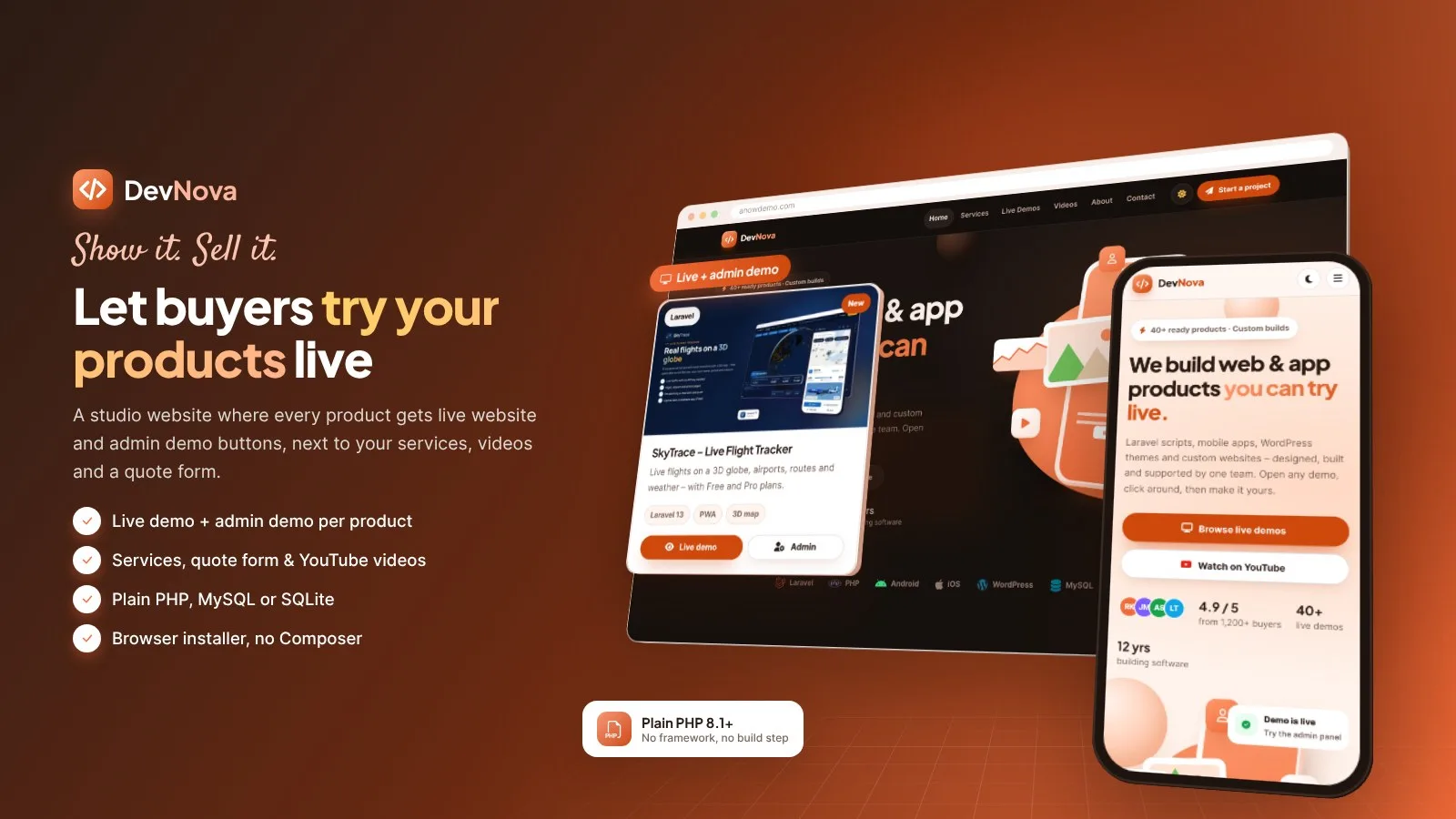
Developer agency website: live demos with one-click admin demo buttons, services, YouTube videos and a quote form. Plain PHP + MySQL or SQLite, browser installer.
Frequently bought together
Item details
Category
Platform
Files included
.php .html .css JavaScript .js .json .svg Documentation
Compatible with
PHP 8.1 PHP 8.2 PHP 8.3 PHP 8.4
Database
MySQL 5.7 MySQL 8.0 MySQL 8.4 LTS MariaDB 10.x MariaDB 11.x SQLite 3.x
HTML / CSS framework
Custom CSS
Programming language
PHP JavaScript HTML/CSS
Version
1.0.0
Support & inquiry
Description
DevNova — show your products live, sell them faster
DevNova is a complete developer agency and software studio website built around one idea: let buyers try your products before they buy. Every product gets its own page with a Live demo and an Admin demo button, the demo login with copy buttons and your buy links. Add your services with prices, your YouTube videos (added by link or imported from your channel by themselves) and a quote / contact form — all managed from one clean admin panel.
Plain PHP 8.1+ with MySQL / MariaDB or SQLite: no framework, no Composer, no Node.js, no build step. Upload, open /install and you are live in minutes.
- Live demo: https://anowdemo.com/
- Admin demo (one click, no password): https://anowdemo.com/admin/demo-login
- Documentation: https://anowdemo.com/documentation/
Admin demo: one click — no e-mail or password needed.
A home page with 3D motion
Hero with a 3D phone stage and trust items, a tech strip, services, featured demos, the latest YouTube videos, process steps, a stats band, reviews and a call-to-action band. Every section can be turned on or off and every text is edited in Admin › Home page.
Every live demo in one place
- Demo cards with cover, badge, tags and Live demo / Admin demo buttons
- Category filter, instant search and pagination
- Every demo click is counted and shown on the dashboard
A demo page that closes the sale
Image gallery, description, main features and a video tour, plus a side box with the Live demo and Admin demo buttons, the demo e-mail and password with copy buttons, buy buttons for Codester and your own store, and details such as built with, database, version, updated date and documentation link.
YouTube videos that sell for you
- Channel card with banner, subscribers, videos and views
- Add a video by its link — title and thumbnail are filled in for you
- New channel videos can import by themselves from the channel feed
- Categories, order, "show on home" and a privacy-friendly in-page player
Services and a quote form
Services with icons, bullet points and price text, and a contact form that asks for the need and budget. Messages land in the admin inbox (unread count, read view, CSV export) with an optional e-mail alert. Spam guard: honeypot, time trap and rate limit.
An admin panel that is easy to run
Visits today, demo opens, video plays and new messages, a 14-day chart, the most opened demos, the latest messages and videos. Manage products and categories, services, videos, messages, reviews, pages, menus and social networks — on desktop or phone.
Your brand, every colour editable
Six colour presets (Peach, Royal blue, Violet, Navy & gold, Rose, Slate) and colour pickers for every brand colour. The button text colour is picked by itself so it always passes AA contrast. Light, dark or device theme by default, logos for light and dark, fonts and custom CSS.
Security built in
- Change the admin address — the old one returns 404 at once
- Two-step login (2FA) with recovery codes, login lock after wrong passwords, idle logout and login history
- CSRF tokens, escaped output, re-encoded image uploads, sanitised SVG icons, security headers
A browser installer that does it all
Upload the files, open /install and follow four short steps: server check, database (MySQL / MariaDB or SQLite), site name and admin account with optional demo content, then install.
What you get
- The complete DevNova script (plain PHP, no Composer needed) with the browser installer
- Demo content: 10 products, 6 services, 6 videos, reviews, steps, stats, social links and legal pages
- Illustrated documentation (documentation/index.html)
Requirements at a glance
- PHP 8.1 – 8.4 with PDO, GD, mbstring, JSON, OpenSSL and DOM (cURL for YouTube autofill and import)
- MySQL 5.7+ / MariaDB 10.3+ or SQLite 3
- Apache or LiteSpeed with mod_rewrite (any cPanel host) or nginx
Support and updates
Support covers installation, configuration and bugs in the item. Server administration and custom development are not included.
Version history
1.0.0 – November 2026 – Initial release.
Demo note: the live demo runs in demo mode — saving and deleting are disabled and the demo content resets itself every few hours.
Core features
Live demo showcase
- Products and demos with categories, badge, tags, cover image and gallery
- Live demo and Admin demo buttons on every card and product page (clicks counted)
- Demo login box with copy buttons, buy buttons for Codester and your own store
- Features list, video tour, built with / database / version / updated / documentation details
- Category filter, search and pagination; featured demos on the home page; duplicate a product in one click
Services, contact and reviews
- Services with icon picker, bullet points, price text and "show on home"
- Quote / contact form with need and budget lists, honeypot, time trap and rate limit
- Messages inbox: unread count, read / unread, reply by e-mail, CSV export, e-mail alert
- Reviews with stars, role and coloured initials
YouTube
- Channel card (banner, name, handle, subscribers, videos, views) and video categories
- Add a video by link with automatic title and thumbnail
- Automatic import of new channel videos (by cron or on site traffic, at most every 6 hours)
- In-page player on youtube-nocookie.com
Content and design
- Home page sections with on/off and their own texts, About page, extra pages (privacy, terms, FAQ), header and footer menus
- Social networks manager: 15 built-in networks with icons plus "Add network" with your own icon, on/off and order
- Light theme by default plus full dark mode, remembered per visitor, no flash on load
- 6 colour presets and a picker for every colour; button text picked for AA contrast
- Self-hosted fonts and icons, logo for light and dark, custom CSS
- Fully responsive from 360 px phones to 1920 px screens
PWA and SEO
- Installable web app: name, icons, theme colour and start address in the admin, install button and iPhone hint, offline page
- Title format and meta description per page, canonical, Open Graph, Twitter card
- schema.org: Organization, Product, VideoObject, BreadcrumbList, FAQPage
- sitemap.xml and robots.txt
Admin and security
- Dashboard with visits, demo opens, video plays, messages and a 14-day chart
- Changeable admin address, two-step login (2FA) with recovery codes, login lock, idle logout, login history, new-login e-mail
- CSRF protection, escaped output, re-encoded image uploads, sanitised SVG, no PHP in uploads, security headers
- SMTP e-mail with a test button; timezone and US date and time formats
- Demo mode: one-click admin demo, read-only admin and automatic demo reset
Code
- Plain PHP 8.1+ with PDO prepared statements — no framework, no Composer, no build step
- MySQL / MariaDB or SQLite, chosen in the browser installer
- Updates apply themselves: upload the new files and the database updates on the next admin visit
Server requirements
- PHP 8.1, 8.2, 8.3 or 8.4
- MySQL 5.7+ or MariaDB 10.3+ (recommended), or SQLite 3
- PHP extensions: PDO (pdo_mysql or pdo_sqlite), GD, mbstring, JSON, OpenSSL, DOM; cURL for the YouTube autofill and import
- Apache or LiteSpeed with mod_rewrite (cPanel, DirectAdmin, Plesk, hPanel) or nginx
- No Composer, Node.js or SSH needed
- Optional: SSL certificate (needed for the installable web app), cron job, SMTP account
Installation instructions
Install
- Create a MySQL / MariaDB database and a user with all privileges in your hosting panel (or skip this and use SQLite).
- Upload the contents of the devnova folder to your domain folder (e.g. public_html).
- Open your-domain.com/install: the installer checks the server, connects the database, creates your admin account and can import the demo content.
- Log in at your-domain.com/admin and add your logo, colours, products, services, videos and contact details.
- Optional: add the cron job from the documentation for the YouTube import and change the admin address in Security & admin URL.
Updates
- Upload the new files over the old ones (keep app/config.php, storage/ and uploads/) and open the admin panel — the database updates itself.
The illustrated step-by-step guide (cPanel, sub-folder, VPS / nginx, demo mode, YouTube, PWA, SMTP, security, FAQ) is in documentation/index.html.
Changelog
1.0.0 – November 2026
- Initial release.
- Products with live demo and one-click admin demo buttons, demo logins with copy buttons, buy links.
- Services, quote / contact form with inbox and CSV export, reviews.
- YouTube channel card, videos by link and automatic channel import.
- Pages, menus, social networks manager, SEO, sitemap and installable web app (PWA).
- 6 colour presets, every colour editable, light and dark mode.
- Changeable admin address, 2FA, login lock, demo mode with automatic reset.
- Browser installer (MySQL / MariaDB or SQLite) and illustrated documentation.
Reviews
Based on 0 reviews