Web
- Home
- Products
- PHP Scripts
- Sport
- FitPulse – Gym & Fitness Club Management...
FitPulse – Gym & Fitness Club Management System (Laravel) with Member App, Trainer App & QR Check-in
Web
0 sales
Updated Oct 23, 2026
Product overview
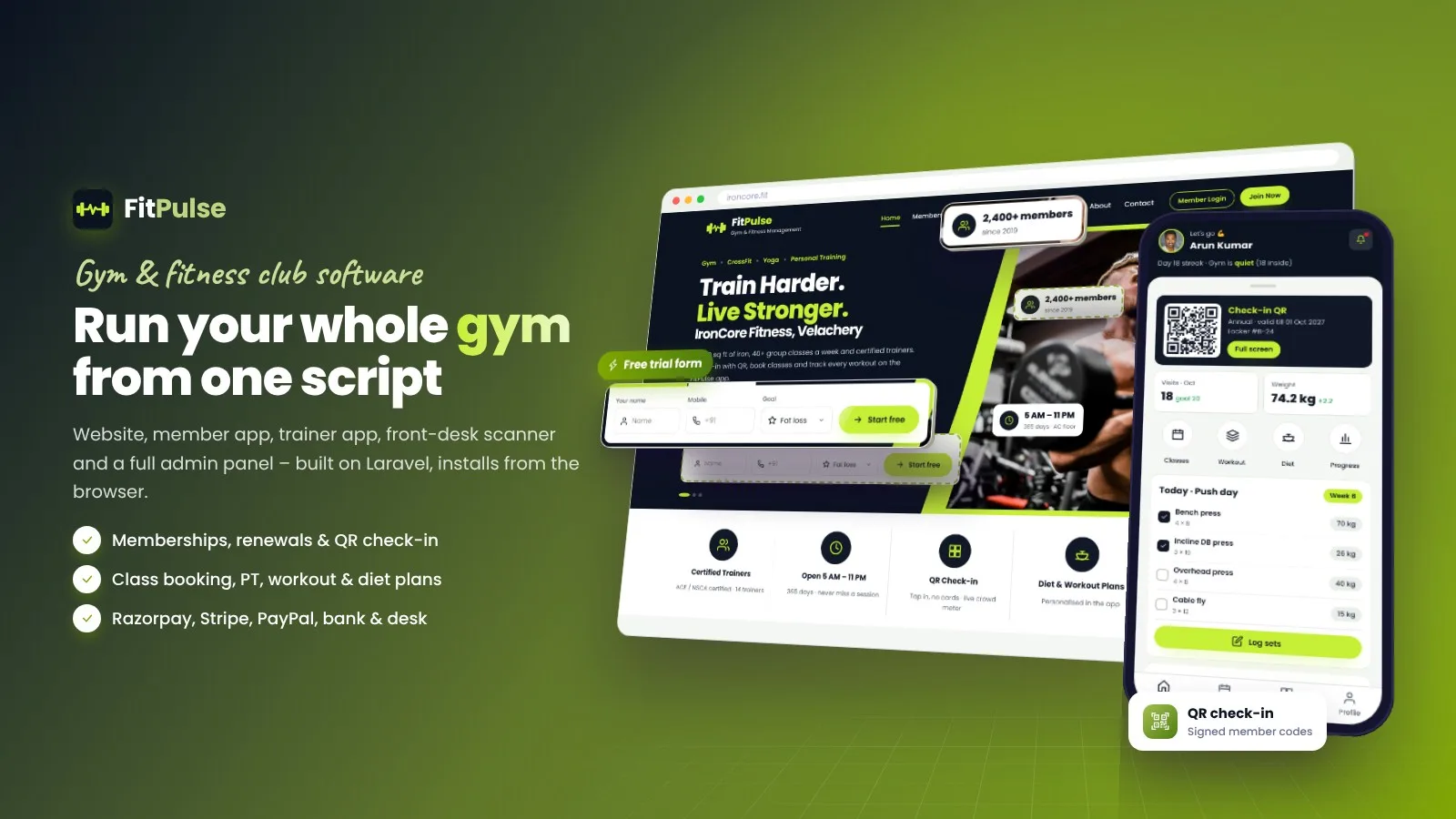
Gym website, member app, trainer app, front-desk QR check-in, class booking, renewals, PT, POS and secure payments (Razorpay UPI, Stripe, PayPal) in one Laravel 13 script with a browser installer.
Frequently bought together
Item details
Category
Platform
Files included
.php .html .css JavaScript .js .json .svg .md composer.json .blade.php .env example Documentation
Compatible with
PHP 8.3 PHP 8.4
Software framework
Laravel
Database
MySQL 5.7 MySQL 8.0 MySQL 8.4 LTS MariaDB 10.x MariaDB 11.x SQLite 3.x
HTML / CSS framework
Custom CSS
Programming language
PHP JavaScript HTML/CSS
Version
1.0.1
Support & inquiry
Product demo
Description
FitPulse – run your whole gym from one Laravel script
FitPulse gives a gym or fitness studio everything in one place: a modern gym website with free-trial form, membership plans and class timetable, a member app with QR check-in, class booking, workout and diet plans, a trainer app, a front-desk QR scanner and a full admin panel for members, renewals, check-ins, leads, classes, trainers, payments, shop and reports. Payments by Razorpay (UPI), Stripe, PayPal, bank transfer or at the desk. Built on Laravel 13 with a browser installer – no Composer or Node needed.
A gym website that fills classes
Animated home page with a free 3-day trial form, training zones, popular classes, pricing, offers, facilities, trainers, transformations, reviews, FAQ and WhatsApp subscribe – all edited from the admin. Fully responsive with an app-style phone layout.
Classes, timetable and booking
- Weekly timetable with category filters and week navigation
- Capacity, waitlist, booking window, cancel window and no-show pause
- Trainers mark attendance from the trainer app
4-step online join
Plan, details, PAR-Q health questions and goals, then payment. Coupons, add-ons and tax are calculated on the server, and the welcome page shows the member's signed check-in QR.
A member app in the browser
- Today view: visits, streak, weight, next class, PT sessions left
- Workout set logging, diet plan, progress charts, attendance calendar
- Freeze, auto-renew, receipts, notices; login with one-time code, member ID + PIN, Google or Facebook
Secure payments and invoices
Memberships activate only after server-side verification with the gateway. Signed webhooks, fail-closed without secrets, amount and currency checks, and one provider transaction per order. Bank transfer and pay-at-desk payments wait for staff approval.
An admin panel built for gyms
- Dashboard, reports, members (CSV import/export, ID cards), renewals with reminder rules
- Check-ins and crowd meter, leads and trials pipeline, classes and schedule
- Trainers, PT, commission and payroll, workout and diet plans, payments, shop / POS, communication
Trainer app and front-desk scanner
Coaches see today's classes and PT sessions, clients and plans due. Reception scans the member QR with the camera or types the ID – expired and frozen members are blocked with a renew prompt.
Easy setup, your brand
Browser installer, logo and colour presets with live preview, editable website content and e-mail templates, changeable admin path, staff roles and a read-only demo mode with one-click demo logins.
What you get
- Full Laravel source code with the vendor folder included
- HTML documentation with screenshots and a quick start guide
- Demo data (sample gym, members, classes, trainers, payments) – import it from the installer or start clean
- 116 automated tests, including payment security tests
Core features
Website
- Fully responsive gym website with an app-style phone layout
- Home page with free-trial form, zones, popular classes, pricing, offers, facilities, trainers, transformations, reviews, FAQ
- Membership plans with comparison, add-ons, PT packs, couple / student / corporate pricing
- Weekly class timetable, trainer pages, facilities, about, contact and legal pages
Join & payments
- 4-step online join with PAR-Q health questions and goals
- Razorpay (UPI, cards, net banking), Stripe cards, PayPal, bank transfer, pay at front desk
- Signed webhooks, server-side verification, unique transaction references
- Coupons, add-ons, tax / GST, invoices and printable receipts
Member app
- Signed check-in QR code
- Class booking with waitlist, cancel window and no-show rules
- Workout plans with set logging, diet plans, progress charts
- Freeze, auto-renew, payment history, notices, profile
- Login with one-time code, member ID + PIN, Google or Facebook
Trainer app & front desk
- Trainer app: today's schedule, PT sessions, clients, plans due, class attendance
- Front-desk QR scanner with renew prompt, duplicate scan protection, new trial in two taps
Admin panel
- Dashboard and reports with CSV export and print
- Members (CSV import/export, ID cards, bulk actions), memberships & renewals with reminder rules
- Check-ins & crowd meter, devices, leads & trials pipeline
- Classes & schedule, trainers, PT, commission & payroll, workout & diet plans
- Payments & invoices, approvals, refunds, expenses, shop / POS with stock
- Communication: e-mail broadcasts, WhatsApp click-to-chat lists, SMS gateway hook, member notices
- Reviews, website CMS, editable e-mail templates, staff roles with 2-step login
Technical
- Laravel 13, PHP 8.3 / 8.4, MySQL / MariaDB / SQLite
- SEO meta, Open Graph, schema.org, sitemap.xml, robots.txt, GA4, AdSense and ads.txt
- Colour presets and logo upload, changeable admin path, read-only demo mode
- Browser installer, vendor included, translation ready
Server requirements
- PHP 8.3 or 8.4
- MySQL 5.7+ / 8.x or MariaDB 10.4+ / 11.x (SQLite 3 also supported)
- PHP extensions: ctype, curl, dom, fileinfo, gd, json, mbstring, openssl, pdo (pdo_mysql or pdo_sqlite), tokenizer, xml
- Apache or LiteSpeed with mod_rewrite (cPanel, Plesk, DirectAdmin) or Nginx
- No Composer, Node.js or SSH needed – all libraries are included
- Recommended: SSL certificate (needed for payments and the camera scanner), one cron job, an SMTP account
- Optional: Razorpay, Stripe or PayPal accounts; Google / Facebook apps for social login
Installation instructions
Install
- Create an empty MySQL database and a user with all privileges, and select PHP 8.3 or newer.
- Upload the contents of the fitpulse folder to your domain folder (e.g. public_html) and extract it.
- Open your-domain.com – the browser installer checks the server, creates the tables and your owner account (optional demo data).
- Log in at /admin and set your gym details, logo, colours, plans, e-mail (SMTP) and payment gateways in Settings.
- Add the cron job from the documentation so reminders and renewals run every day.
Updates
Back up the database, .env and public/uploads, then extract the update zip over the installed files.
Documentation
Open documentation/index.html from the download, or the online documentation.
Changelog
Version 1.0.1
- Phones: compact one-row admin header, scrollable admin menu, page actions in a swipe strip
- Phones with large text: content always visible, round icons stay round, POS grid and join page fit narrow screens
- Installer: faster demo import, progress message, longer time limit for shared hosting
Version 1.0.0
- Initial release
Reviews
Based on 0 reviews