Web
- Home
- Products
- Management
- Business
- GatePass - Visitor Management & Kiosk Ch...
GatePass - Visitor Management & Kiosk Check-in Laravel Script
Web
5.00 (1 reviews) 1 sales
Updated Nov 04, 2026
Product overview
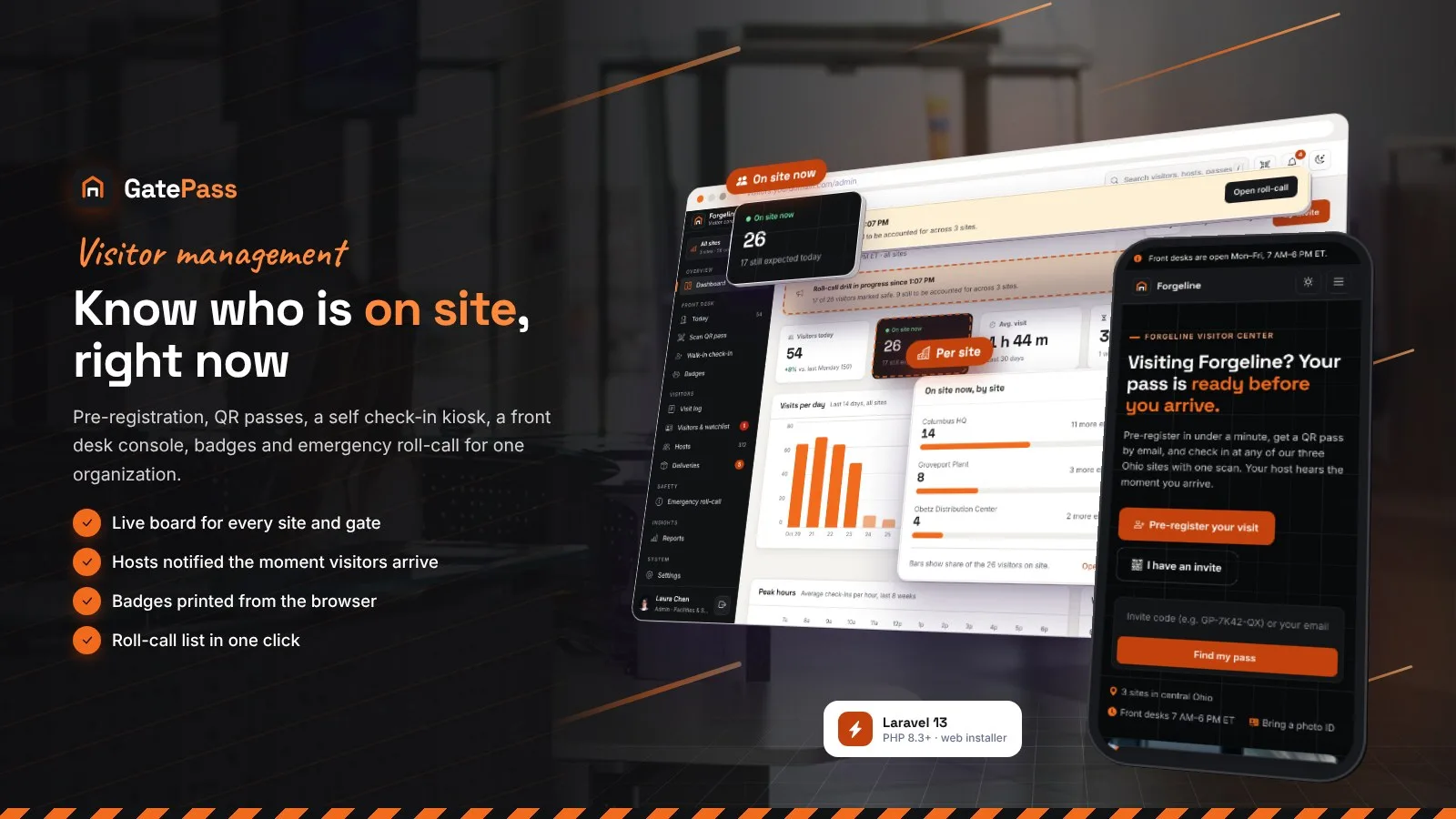
Visitor management: QR passes, self check-in kiosk, front desk, badges, host alerts, deliveries and emergency roll-call.
Frequently bought together
Item details
Category
Platform
Files included
.php .html .css JavaScript .js .json .svg composer.json .blade.php Documentation
Compatible with
PHP 8.3 PHP 8.4
Software framework
Laravel
Database
MySQL 5.7 MySQL 8.0 MySQL 8.4 LTS MariaDB 10.x MariaDB 11.x SQLite 3.x
HTML / CSS framework
Custom CSS
Programming language
PHP JavaScript HTML/CSS
Version
1.0.0
Support & inquiry
Product demo
Description
GatePass - visitor management with QR passes, a self check-in kiosk and a front desk console
GatePass runs the visitors of one organization - a company, school, plant or campus with several sites, front desks, security gates and dock offices. Hosts invite visitors, who get a QR pass with arrival info; visitors check in at a self-service kiosk on any tablet or at the front desk, sign the visitor policy and get a printed badge; the host is notified the moment they arrive.
Approvals, deliveries, a watchlist, emergency roll-call, reports and data retention are built in. Every text, colour, visitor type and rule is an admin setting, with a light theme, a full dark mode and an installable app (PWA).
Live demo
- Demo website URL
- One-click admin demo URL (Laura Chen)
- One-click front desk demo URL
- One-click host demo URL (Emily Novak)
- Demo kiosk URL
- Demo overview page
- Public documentation
Manual logins at /login:
- Admin: admin@example.com / password
- Front desk: desk@example.com / password
- Host: host@example.com / password
One system for every visit
Invites and QR passes, kiosk and front desk check-in, camera QR scanning, badges, host alerts, approvals, deliveries, watchlist, roll-call and reports - for every site, desk, gate and kiosk of your organization.
A visitor center with a QR pass
- Pre-registration in under a minute, with a reminder email the day before
- QR pass by email with arrival info, map, PDF and calendar file
- Visitors sign the visitor policy before they arrive; passes work offline in the app
A kiosk on any tablet
Visitors scan their pass or check in without one: visit type, details, camera photo, typed-name policy and NDA signature, host search and a printed badge. Check-out and courier drop-off on the same screen. Kiosk mode is opened by staff or a PIN and left by tapping the clock three times.
The front desk live board
- Expected, on site and checked out for each site, with late and ID-check chips
- Walk-in check-in with watchlist screening and a live badge preview
- Approve, deny, remind the host and check out in one place
QR scanning and printed badges
Scan passes with the camera of any phone, tablet or laptop. Badges print from the browser at the label's real size - 4 x 3 in or 62 mm - with photo, host, QR code for check-out and expiry, on a label printer or an office printer.
Hosts invite and get notified
- Single, group and recurring contractor invites with an email preview
- Email and in-app arrival alerts with "I'm on my way" and "Send them up"
- Approve or deny from the email link; deliveries waiting for pickup
Emergency roll-call in one click
Everyone on site now, per site - visitors, contractors and optionally employees. Start a drill or a real evacuation, mark people safe from any phone at the assembly point, print the list and alert the hosts of those still missing.
Reports with privacy built in
Visits by day, site, type and host, average duration, first-time and repeat visitors and peak hours with CSV export. Retention rules delete photos, signatures and files and anonymize old visits automatically; visitors can ask for a copy or deletion of their data.
Your brand, light and dark
Colour presets or your own colours with automatic button contrast, your logo and fonts, a full dark mode, an installable app and every text editable and translatable with auto-translate. Social network links with your own icons.
What you get
- The complete script with the vendor folder and a browser installer (MySQL / MariaDB or SQLite)
- Optional demo data: a manufacturer with three sites, 312 hosts, a month of visit history, today's visitors, deliveries, a watchlist and a roll-call drill, with one-click demo logins and a demo kiosk
- Illustrated HTML documentation: installation (cPanel, VPS, Windows), installer, cron, roles, invites, approvals, front desk, QR scanning, badge printing, kiosk setup, tablet signing, deliveries, watchlist, roll-call, reports, every settings area, privacy, demo mode, updates and FAQ
Good to know
- One installation serves one organization with its sites, staff and hosts - it is not a multi-company SaaS. US English, USD region defaults and America/New_York by default; every rule and text is an admin setting.
- Notifications are sent by email and in-app. Badges print through the browser; door, turnstile and SMS integrations are not included.
- English is bundled; other languages are added in the admin with optional auto-translate.
- All organizations, people and numbers of the demo are fictional sample content.
Requirements at a glance
PHP 8.3+, MySQL 5.7+ / MariaDB 10.3+ (or SQLite), Apache, LiteSpeed or Nginx, HTTPS and a cron job. Full list below.
Support and updates
Support covers installation, configuration and bugs in the item. Server administration and custom development are not included.
Demo note: the live demo runs in demo mode - settings are locked, what you try is put back automatically, no email is sent and the demo data refreshes itself at any hour.
Core features
Invites & passes
- Hosts invite single visitors, groups (each guest gets an own pass, CSV import) and recurring contractors (date range, weekdays, daily window, custom fields such as an insurance certificate)
- Invite email with QR pass, arrival info, map link, parking and entrance notes; pass page with full-screen QR, PDF and calendar file
- Co-host notifications; admins and the front desk can invite on behalf of a host
- Public pre-registration with host search, guests and an optional reminder email the day before
- Visitors can sign the current visitor policy from their invite before arriving
Self check-in kiosk
- Any tablet in kiosk mode: QR pass scan with the front camera, walk-in check-in, check-out and courier delivery drop-off
- Visitor type, details, custom fields, camera photo, typed-name policy, NDA or safety induction signature and host search
- Badge printed at the end, host notified at once, idle reset, welcome photo and texts, language switcher
- Kiosk mode opened by a staff sign-in or a kiosk PIN; staff leave it by tapping the clock three times
- "Send to desk tablet": the front desk pushes a policy / NDA to the site's kiosk for signing
Front desk & security
- Live board per site: expected, on site, checked out, late and "ID not checked" chips
- Walk-in check-in with ID check, watchlist screening, policy signature and live badge preview
- QR scanning with the camera of any phone, tablet or laptop - check-in and check-out in one step
- Approve or deny, remind the host, no-show, check-out; site picker for staff with several sites
- Watchlist (alert or block, expiry dates) with alerts at every check-in
Badges
- 4 x 3 in and 62 mm label layouts with photo, name, company, host, QR code for check-out, expiry, assembly point and Wi-Fi line
- Printed through the browser print dialog at the label's real size - works with label printers and office printers, no driver plug-in
- Auto print after check-in, type colours, header and footer text
Hosts, approvals & deliveries
- Host dashboard: visitors with you now, upcoming visits, approvals, deliveries and visit history
- Arrival alerts by email and in-app, "I'm on my way" and "Send them up" replies, daily summary email
- Host approval per visitor type, decided from the dashboard or a secure email link
- Deliveries logged at the desk or kiosk with label photo, recipient notified and reminded, picked up or returned
- Hosts directory with departments, CSV import and export, password or email sign-in link
Safety, reports & privacy
- Emergency roll-call: everyone on site per site, drill or real evacuation, mark safe from any phone, printable list, alert hosts
- Dashboard and reports: visits by day, site, type and host, average duration, first-time and repeat visitors, peak hours, CSV exports
- Visit log, visitor profiles and an activity log of every action
- Retention rules for photos, signatures, files, old visits and the activity log; visitor data export and delete requests; private uploads
Admin, design & technology
- Several sites with own time zone, opening hours, arrival notes and desks, gates and dock offices; auto check-out at closing time
- Visitor types with photo, ID, policy, NDA / induction, approval, badge validity and custom fields (text, choice, date, checkbox, file)
- Roles: admin, front desk, security and host, with a permission matrix
- Editable email templates, SMTP with test email, policy versions with signatures
- Light theme and full dark mode, colour presets and custom colours with automatic contrast, fonts, social network links with own icons
- Installable PWA with offline pass and offline page, languages with auto-translate
- Laravel 13, PHP 8.3+, MySQL / MariaDB or SQLite, own CSS and vanilla JavaScript, no build step
- Web installer with optional demo data, browser-based updater, demo mode with one-click demo logins
Server requirements
- PHP 8.3 or newer (8.3, 8.4)
- MySQL 5.7+ / 8.x, MariaDB 10.3+ or SQLite 3
- PHP extensions: pdo (pdo_mysql or pdo_sqlite), mbstring, openssl, tokenizer, xml, ctype, json, fileinfo, gd, curl
- Apache or LiteSpeed with mod_rewrite (cPanel, hPanel, Plesk, DirectAdmin) or Nginx
- HTTPS (SSL certificate) for camera QR scanning and visitor photos
- A cron job (one line) for auto check-out, retention and reminders
- No Composer, Node.js or SSH needed: all libraries are included
- Optional: a tablet for the kiosk, a label printer (4 x 3 in or 62 mm labels), an SMTP account
Installation instructions
Install
- Create an empty MySQL or MariaDB database and a user with all privileges (or use SQLite), and select PHP 8.3 or newer.
- Upload the contents of the gatepass folder to your domain folder (e.g. public_html) and extract it.
- Open your domain: the web installer checks the server, creates the tables and your admin account, with optional demo data.
- Sign in and set your organization, sites and opening hours, visitor types, visitor policy, email (SMTP), badges, colours and languages in Settings; import your hosts from CSV.
- Add the cron job shown in the documentation:
* * * * * cd /path/to/gatepass && php artisan schedule:run - Open /kiosk on the lobby tablet and start kiosk mode.
Updates
- Back up, upload the new files over the old ones (keep .env, storage and public/uploads), sign in as an admin and click Run update.
Documentation
Open documentation/index.html in the download - it works offline. It is also online at /codester/docs/ on the demo.
Changelog
Version 1.0.0 - Initial release
- Host invites (single, group, recurring contractor passes) with QR pass emails, PDF and calendar file; public pre-registration with a day-before reminder.
- Self check-in kiosk on any tablet: QR scan, walk-in, photo, policy / NDA signature, badge, check-out and delivery drop-off.
- Front desk console with live board, walk-ins, camera QR scanning, approvals, ID check, watchlist alerts and badge printing (4 x 3 in and 62 mm).
- Host dashboard with arrival alerts, approvals by email link and deliveries.
- Emergency roll-call, reports with CSV export, activity log, data retention and visitor data requests.
- Several sites, visitor types with custom fields, roles and permissions, light and dark mode, colour presets, social networks, installable app (PWA), languages with auto-translate, demo mode, web installer and updater.
Reviews
Based on 1 reviews
RRed Rose Media Network
Design Quality Nice work good support team
2 days ago