
 Web
- Home
- Products
- PHP Scripts
- eCommerce
- GreenCart – Vegetable & Grocery Delivery Script (Laravel 13 + Filament) with Flutter Customer & Delivery Apps
GreenCart – Vegetable & Grocery Delivery Script (Laravel 13 + Filament) with Flutter Customer & Delivery Apps
Web
0 sales
Updated Nov 09, 2026
Product overview
Vegetable & grocery delivery: Laravel 13 website, Filament admin, Flutter customer & rider apps. Any country, any language, any currency.
Frequently bought together
Item details
Category
Platform
Files included
.php .html .css JavaScript .js .xml .json .dart .kts .svg .md .yml/.yaml composer.json .blade.php pubspec.yaml Documentation
Compatible with
PHP 8.3 PHP 8.4 Flutter 3.x
Software framework
Laravel Flutter
Database
MySQL 8.0 MariaDB 10.x PostgreSQL 16 SQLite 3.x
HTML / CSS framework
Tailwind CSS
JavaScript framework
Alpine.js Livewire
Programming language
PHP JavaScript Dart
Version
0.2.3
Support & inquiry
Product demo
Description
GreenCart — your own vegetable & grocery delivery business
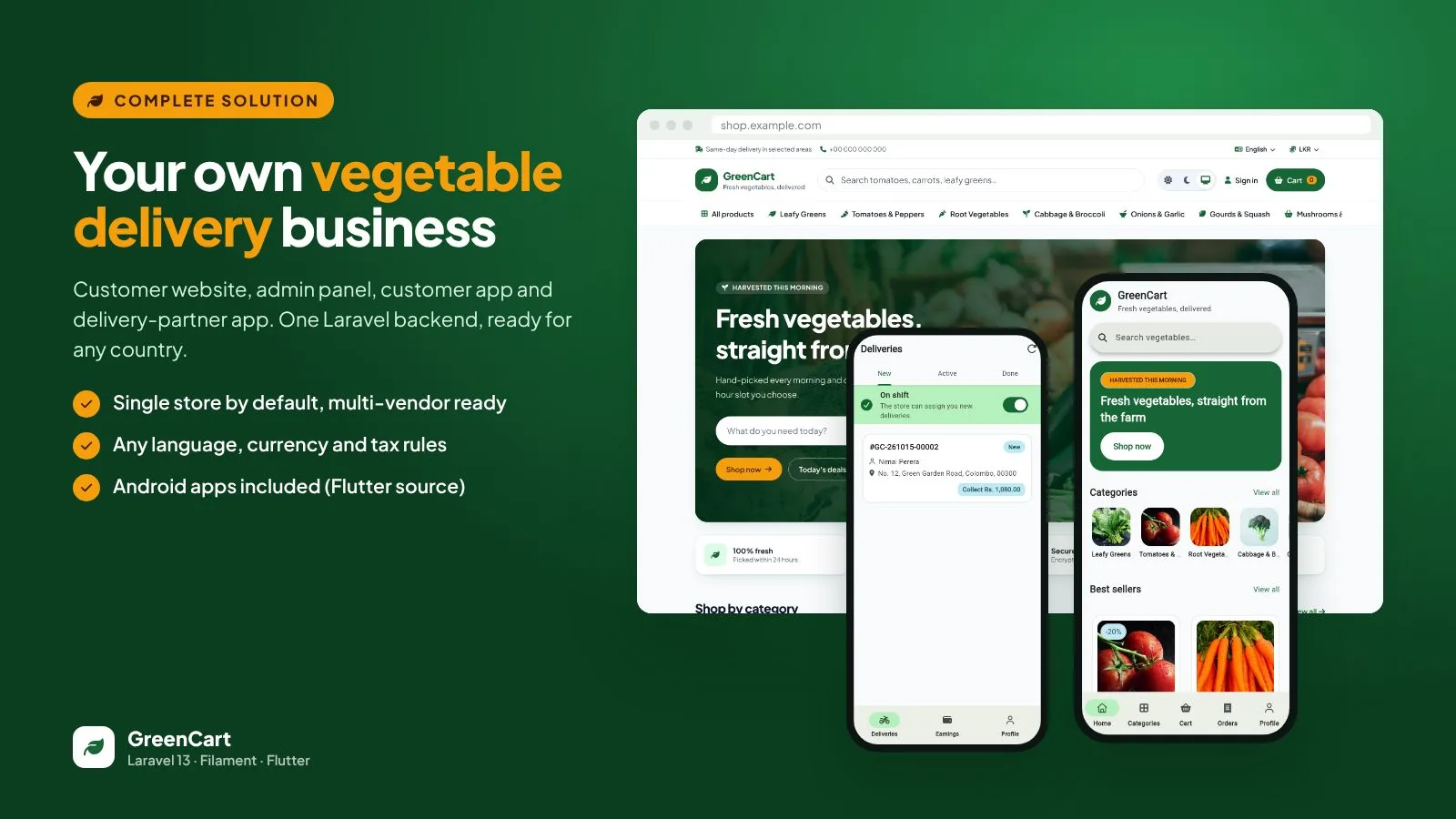
GreenCart is a complete delivery platform for vegetable shops, grocery stores and farm-to-door businesses: a fast customer website, a powerful Filament admin panel, a Flutter customer app and a Flutter delivery-partner app — all on one Laravel 13 backend. Set your country, languages, currencies, tax rules, delivery areas and payment methods in the admin panel; no code changes needed.
Live demo — tap an image
- Admin: admin@demo.test / password
- Customer: customer@demo.test / password
- Rider (delivery app): rider@demo.test / password
A shop made for fresh produce
- Sell by kg, gram, bunch, piece or pack with steps like 250 g and a minimum quantity
- Freshness, origin and harvest date on every product, plus search, filters, wishlist and reviews
- Mobile-first, light and dark mode, right-to-left languages
Checkout customers trust
Prices are always recalculated on the server. Delivery zones (postal prefix, city or radius) set the fee, free-delivery threshold and minimum order; customers pick a delivery slot, apply coupons and pay by Cash on Delivery or Bank Transfer. An order can never be placed twice by a double tap.
Track every order to the door
A clear timeline from placed to delivered. When a rider is assigned, the customer gets a 4-digit delivery code by e-mail, on the order page and in the app; the rider confirms delivery with that code or a photo.
Run the whole store from one panel
- Dashboard with net sales, orders, average order value, gross margin, low stock and cash held by riders
- Order workflow that only shows the allowed next steps; assign riders, refunds and payments
- Staff roles, audit log, banners and content pages
Sell in any country
Country presets, any number of languages (English, plus draft Arabic, French and Spanish) with RTL, display currencies with exchange rates and your own tax rules — inclusive or exclusive, with priorities and compound rates.
Flutter customer app
Full source code for Android and iOS: home, categories, product, cart, checkout, order tracking with the delivery code, addresses and wishlist. The app takes its name, colours and settings from your website, so most changes need no rebuild.
Flutter delivery-partner app
Riders start their shift, see new jobs, call the customer, open the route in maps, confirm delivery with the code or a photo, record cash on delivery and check their earnings.
Built for vegetables, not T-shirts
Decimal stock, reservations at checkout, automatic release on cancel, spoilage and receipts — every movement in an append-only stock ledger.
What you get
- Complete website ready to upload (all libraries included — no Composer, Node.js or SSH needed) with a web installer
- Flutter source code of the customer app and the delivery-partner app, with ready-made VS Code build tasks
- REST API v1 with OpenAPI documentation
- Demo mode for public demos
- Illustrated HTML documentation and automated tests
Requirements at a glance
- PHP 8.3+ and MySQL 8 / MariaDB 10.6+ / PostgreSQL on cPanel, hPanel, Plesk, DirectAdmin or a VPS
- Flutter, Android Studio and VS Code to build the apps
Support and updates
Support covers questions about installation, configuration and bugs in the item. Server administration and custom development are not included. Every update is listed in the changelog.
Demo note: the admin demo runs in demo mode — you can explore everything, but changes are not saved, and the demo data resets automatically. Demo product photos are for preview only.
Core features
Customer website
- Laravel 13 storefront with Blade, Livewire and Tailwind CSS: home, categories, search and filters, product pages, cart, checkout, account
- Sell by kg, gram, bunch, piece or pack with step, minimum and maximum quantity; weight tolerance for weighed items
- Freshness, origin and harvest date on products; wishlist; reviews from verified buyers
- Delivery zones by postal prefix, city or radius with fees, free-delivery threshold, minimum order and time slots
- Order tracking timeline with the rider's name, call button and the customer's delivery code
- Light, dark and follow-device theme; mobile-first layout; right-to-left languages
Admin panel (Filament 5)
- Dashboard: net sales, orders, average order value, gross margin, awaiting fulfilment, low stock, COD cash with riders
- Order workflow that only offers the allowed next steps; assign riders; refunds; payments; cash reconciliation
- Products with translations, images, units and pricing; categories; coupons; banners; content pages
- Stock reserved at checkout and released on cancel; adjustments for receipts, spoilage and counts; append-only stock ledger
- Staff roles and permissions; audit log of settings and stock changes
- Demo mode for public demos (nothing is saved, data resets automatically)
Your brand and SEO, no code
- Logo (with dark-mode version), favicon, primary and accent colours with automatic light and dark palettes, 8 fonts, corner styles, default theme, home-page sections and top-bar message
- SEO settings: titles, descriptions, keywords, share image, product and category meta tags, sitemap.xml, robots.txt, Google/Bing verification, Google Analytics 4, Tag Manager and Meta Pixel
- Admin panel and both apps follow your brand colour
Global configuration
- Country presets for timezone and currency; any number of languages (English included, with draft Arabic, French and Spanish translations to review)
- Multi-currency display with exchange rates; money stored as integer minor units
- Tax engine: tax-inclusive or tax-exclusive prices, rates per tax class, priorities and compound taxes
- Cash on Delivery and Bank Transfer; provider-based payment layer with separate payment and order status
Flutter customer app (Android & iOS source)
- Onboarding, sign in and register, home, categories, search, product, cart with coupons, checkout with address, slot and payment
- Orders with tracking, delivery code, cancel and reorder; saved addresses; wishlist; light and dark mode
- Takes the store name, colours, languages and currencies from your website — no rebuild needed
Flutter delivery-partner app (Android & iOS source)
- Shift on/off, new / active / done jobs, call the customer, open the route in maps
- Accept, decline, picked up, on the way, delivered with OTP code or photo proof, failed with reason, return to store
- Cash on Delivery confirmation and earnings with cash to hand in
Developer friendly
- REST API v1 (42 endpoints) with OpenAPI 3.1 documentation, Sanctum tokens with customer and rider abilities, rate limits
- Server-side price calculation, idempotent order placement, row-locked stock reservations
- Web installer, ready-made VS Code launch settings and build tasks for the apps, automated tests
Server requirements
- Web hosting with PHP 8.3 or newer and MySQL 8 / MariaDB 10.6+ or PostgreSQL 16 (SQLite also works)
- PHP extensions: pdo_mysql (or pdo_pgsql), mbstring, openssl, intl, gd, curl, fileinfo, zip
- Apache or LiteSpeed with mod_rewrite (cPanel, hPanel, Plesk, DirectAdmin) or Nginx; one cron job
- No Composer, Node.js or SSH needed — all libraries are included
- Mobile apps: Flutter 3.47+, Android Studio (Android SDK) and VS Code to build; iOS builds need a Mac with Xcode
Installation instructions
Install the website
- Create an empty MySQL/MariaDB database and a user with all privileges in your hosting panel, and select PHP 8.3 or newer.
- Upload the contents of the backend folder to your domain folder (e.g. public_html). Turn on "Show hidden files" so the .htaccess files are included.
- Open your-domain.com/install: the web installer checks the server, creates the tables, applies a country preset (optional demo data) and creates your admin account.
- Add the cron job shown in the documentation, then log in at /admin and set your brand, languages, currency, tax rules, delivery zones, payment methods and e-mail.
Build the mobile apps
- Install Flutter, Android Studio and VS Code, then open the project folder in VS Code.
- Change the app name, application ID and icons (exact files are listed in the documentation section App branding).
- Run Terminal › Run Task › Build customer app (APK) and Build delivery app (APK), enter your store address, and install or publish the files.
The illustrated step-by-step guide is in the documentation folder and in mobile/README.md.
Changelog
0.2.3 – first release
- Laravel 13 customer website: catalogue, weight-based quantities, cart, checkout with delivery zones and slots, coupons, order tracking with delivery code.
- Filament 5 admin panel: dashboard, order workflow, rider assignment, refunds, stock ledger, staff roles, audit log, store settings.
- Global configuration: country presets, languages with RTL, display currencies, configurable tax rules.
- Cash on Delivery and Bank Transfer payments.
- REST API v1 with OpenAPI documentation.
- Flutter customer app and delivery-partner app (Android & iOS source) with VS Code launch settings and build tasks.
- Web installer, demo mode with automatic data reset, appearance and SEO settings, illustrated documentation.
Reviews
Based on 0 reviews