Web
- Home
- Products
- PHP Scripts
- Job Board
- HireNest – Job Board Script with Radius...
HireNest – Job Board Script with Radius Search, One-Page Apply, Private Resumes, Applicants Board, Employer Packages & Featured Jobs (Laravel 13)
Web
0 sales
Updated Oct 29, 2026
Product overview
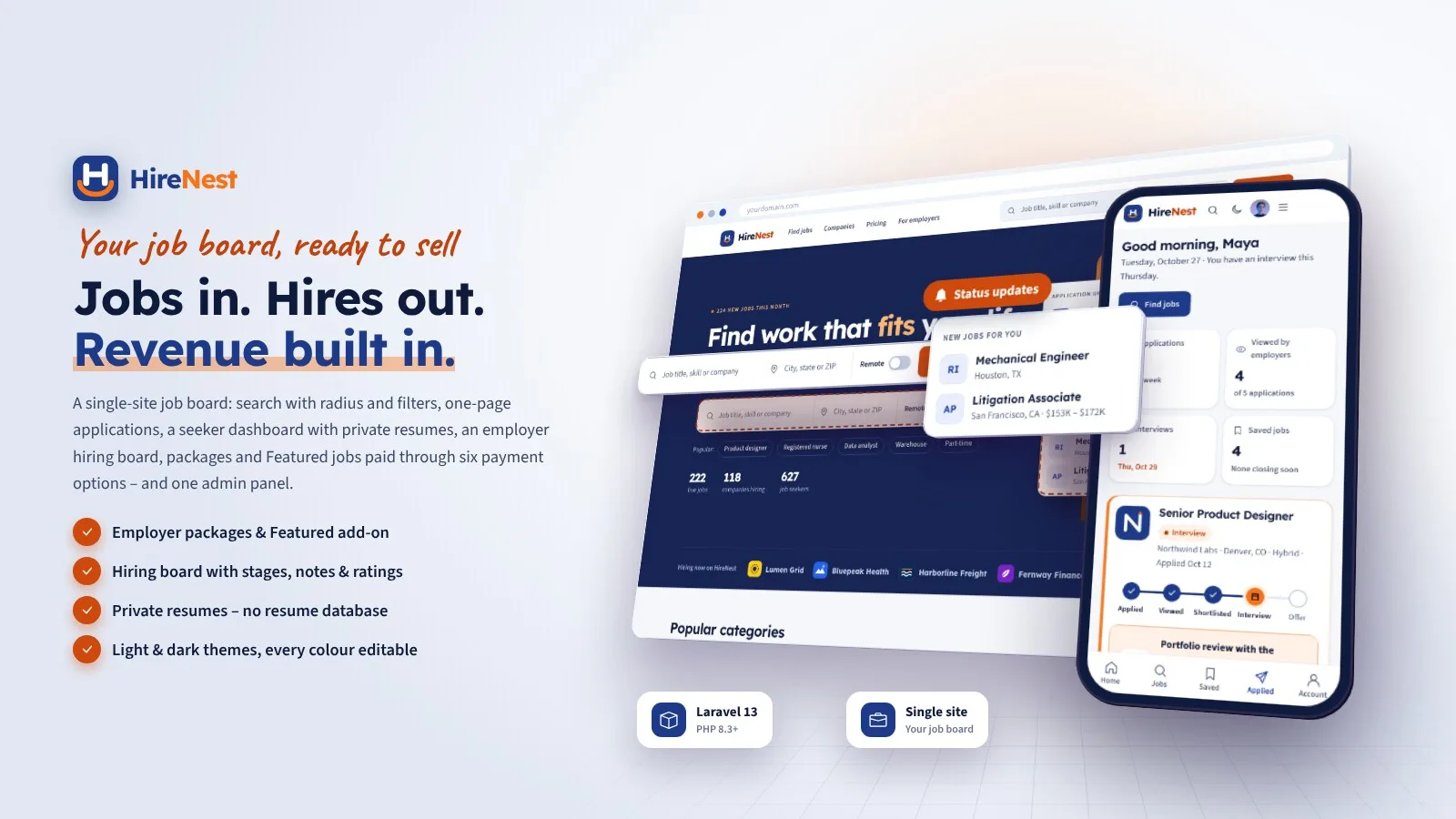
Job board for one website: radius search, one-page apply, private resumes, applicants board, employer packages and Featured jobs. Light and dark themes. Laravel 13.
Frequently bought together
Item details
Category
Platform
Files included
.php .html .css JavaScript .js .json .svg composer.json .blade.php .env example Documentation
Compatible with
PHP 8.3 PHP 8.4
Software framework
Laravel
Database
MySQL 5.7 MySQL 8.0 MySQL 8.4 LTS MariaDB 10.x MariaDB 11.x SQLite 3.x
HTML / CSS framework
Custom CSS
Programming language
PHP JavaScript HTML/CSS
Version
1.0.0
Support & inquiry
Product demo
Description
HireNest - your own job board, ready to earn
HireNest is a complete job board for one website. Job seekers search with keyword, location and radius, filter by work setting, job type, salary and experience, save jobs, create job alerts and apply on one page with a resume, a cover letter and the employer's screening questions - then follow every application on a status timeline. Employers buy packages, post jobs with a live preview, add the Featured add-on and work through candidates on an applicants board with stages, ratings, team notes and reject e-mail templates. Resumes are private: employers see only the people who applied to their own jobs. Your team runs it all from one admin panel with job moderation, company verification, payments and settings.
Built on Laravel 13 (PHP 8.3+) with a browser installer - the vendor folder is included, no Composer, Node.js or SSH needed. Light theme by default with a full dark theme; every colour can be changed in the admin. One installation is one website.
Every demo below opens with one click - no typing needed.
Live demo
- Open the demo website
- Open the job seeker demo (Maya Chen: applications, interview, saved jobs, alerts)
- Open the employer demo (Northwind Labs: applicants board)
- Job seeker and employer logins (manual, at /login): seeker@hirenest.test or employer@hirenest.test / password
- Open the admin panel (owner)
- Owner login (manual, at /staff/login): owner@hirenest.test / password
- Open the admin demo
- Open the moderator demo
- Other team logins (manual, at /staff/login): admin@hirenest.test, moderator@hirenest.test / password
- Read the documentation
Home and search that convert
A navy hero with keyword, location and remote search, popular searches and live counts; category pages; a results page with radius search by city or ZIP, work setting, job type, salary, experience and date filters, sorting, Featured jobs pinned on top, "Create job alert" for any search and a filter sheet on phones.
Job pages and one-page applications
- Salary range, work setting, benefits, the company card and similar jobs; save, share and report
- schema.org JobPosting data on every live job for Google for Jobs, plus the sitemap
- Apply on one page: saved resume or a new PDF, cover letter, screening questions (yes / no, number, text, link; required and knockout)
A dashboard for every job seeker
Applications with a status timeline (applied, viewed, shortlisted, interview, offer), the interview date and format, withdraw, saved jobs, job alerts by e-mail (daily or weekly) and a profile with experience, education, skills and up to five private resume versions - with the list of employers who can see it.
The employer dashboard
- Active jobs, applicants, views and time to review; applications per day by job
- The package card with credits left and the date they end; Featured credits
- Jobs table, company profile with photos and benefits, verification request, billing and printable invoices
Post a job with a live preview
Title, category, location or remote, salary range, rich description, benefits and screening questions with templates, with a live listing preview. The publish panel shows the credit used, the credits left and the live dates; verified companies' jobs go live at once, others wait for review, and jobs without credits are published by themselves once the payment is confirmed.
An applicants board that works
- Columns for every stage; a drawer with the resume sent, the answers (knockouts marked), notes and activity
- Star ratings and team notes private to the employer; interview details shown to the candidate
- Reject with an e-mail template that can be edited before sending; daily summary of new applicants
Packages, Featured and checkout
- Starter, Growth and Pro packages and the Featured add-on - every price, post count, duration and validity editable
- Stripe, PayPal, Paystack, PayHere, Razorpay and bank transfer with receipt upload - every payment verified on the server, signed fail-closed webhooks
- Sales tax by country or state, invoices, refunds recorded; credits are added only after a verified payment
- Pro "per month" is period-based: pay again for the next month after a reminder with a pay link
One admin panel for the team
A dashboard with jobs, applications, new seekers and employers and revenue from real payments; jobs moderation with automatic checks (unrealistic pay, fees asked from applicants, external links, duplicates) and reports; categories and locations; the company verification queue; job seekers; packages, payments with bank transfers to approve, manual credits and sales tax; settings, website content (pages, FAQ, contact inbox), AdSense, SEO and the System pages. Owner, admin and moderator roles with per-person sections and an activity log.
What you get
- The complete script with the vendor folder and browser installer (MySQL / MariaDB or SQLite)
- Optional demo data: a sample job board in Denver with about 190 companies, 1,600 jobs over twelve months, 640 job seekers, 22,000 applications in every stage and nearly 1,000 payments with invoices
- Illustrated HTML documentation with screenshots of both themes, and a Spanish language pack as a translation example
Good to know
- HireNest is for one website. Employers pay you for packages and Featured; there are no tenants, marketplace commissions or payouts.
- There is no resume database or candidate search on purpose: employers see only the people who applied to their own jobs, and resumes are private files.
- There is no chat or messaging between employers and job seekers; contact happens through stage e-mails, interview details and e-mail.
- The Pro package is period-based: one payment buys one month and renewal is a reminder with a pay link. Nothing is charged automatically and no cards are stored. Online payments need your own merchant accounts; refunds are made in the gateway dashboard and recorded in HireNest.
- Location data ships for the United States (states and 136 starter cities with coordinates; you add more cities in the admin). ZIP look-up uses each city's main ZIP code - there is no full ZIP code database. Radius search uses straight-line distance.
- Sales tax rates are entered by you; there is no tax service connection.
- Google decides whether jobs appear in Google for Jobs; HireNest outputs valid JobPosting data and a sitemap.
- No native apps - visitors can add the site to their home screen. Browser notifications need HTTPS and one command for the keys.
- The demo companies, people, jobs and numbers are sample content.
Requirements at a glance
PHP 8.3+, MySQL 5.7+ / MariaDB 10.3+ (or SQLite), Apache, LiteSpeed or Nginx, a cron job. No Composer, Node.js or SSH needed.
Support and updates
Support covers installation, configuration and bugs in the item. Server administration and custom development are not included.
Demo note: the live demo runs with demo mode on - settings, uploads and deletes are disabled; searching, saving, job alerts, applying, withdrawing, posting with the demo credits, the applicants board and the checkout up to the gateway (test keys) can be tried, and the demo data reloads every 6 hours.
Core features
Job search
- Keyword, location and radius search (city, "City, ST" or ZIP), remote / hybrid / on-site, job type, salary, experience and date posted filters
- Sort by relevance, newest or salary; category pages; Featured jobs pinned on top
- Company directory and company profiles with photos, benefits and open jobs
- Job pages with JobPosting structured data, similar jobs, save, share and report
Job seekers
- One-page apply with resume, cover letter and screening questions
- Dashboard with a status timeline per application, interview details, withdraw
- Saved jobs and job alerts by e-mail (daily or weekly, one-click unsubscribe)
- Profile with experience, education, skills and links; up to five private resume PDFs
- Notifications in-app, by e-mail and browser push
Employers
- Dashboard with KPIs, applications per day and credits left
- Post a job with a live preview, screening question templates, knockout questions, drafts
- Applicants board: stages, drawer, ratings, private team notes, interview details, reject e-mail templates
- Company profile, verification request, billing details and printable invoices
Revenue
- Starter, Growth and Pro packages and the Featured add-on - all editable
- Stripe, PayPal, Paystack, PayHere, Razorpay, bank transfer - verified on the server, signed fail-closed webhooks
- Sales tax by country or state, invoices, refunds and manual credits recorded
- Five AdSense placements, ads.txt, hide ads for employers or seekers
Admin & setup
- Dashboard with KPIs and charts from the database; global search; activity log
- Jobs moderation with automatic checks, reports with auto-hide, job rules
- Company verification queue, suspend employers; job seekers list and export
- Categories, states and cities with ZIP and coordinates
- Website content: pages, FAQ, contact inbox; SEO, sitemap, Google Analytics 4
- Owner, admin, moderator roles with per-person sections; two-step sign-in for the team
- Light and dark themes, six colour presets plus custom colours with automatic button text contrast, logo and fonts
- SMTP with e-mail templates, WhatsApp / SMS sign-in codes, Google / Facebook login, languages with a translation editor (Spanish example), currencies
- Browser installer, demo mode with one-click logins, backups, maintenance mode, changeable admin path, update upload
Server requirements
- PHP 8.3 or newer (8.3, 8.4)
- MySQL 5.7+ / 8.x or MariaDB 10.3+ (SQLite 3 for local tests)
- PHP extensions: pdo (pdo_mysql or pdo_sqlite), mbstring, openssl, tokenizer, xml, ctype, json, fileinfo, curl, gd (zip for update uploads)
- Apache with mod_rewrite (cPanel, Plesk, DirectAdmin), LiteSpeed or Nginx; Windows with XAMPP / Laragon
- One cron job every minute (Task Scheduler on Windows)
- HTTPS recommended (browser notifications, webhooks, social sign-in)
- No Composer, Node.js or SSH needed - the vendor folder is included
- Optional accounts: payment gateway merchant accounts, SMTP, Google / Facebook OAuth, AdSense, Google Analytics, Meta WhatsApp Cloud API or MSG91 / Twilio for sign-in codes
Installation instructions
Install
- Create an empty MySQL / MariaDB database and user in your hosting panel and select PHP 8.3 or newer.
- Upload the hirenest folder and point your domain to its public folder - or upload its contents straight into public_html (with the hidden .htaccess files).
- Open your-domain.com: the browser installer checks the server, asks for the database and creates your site and owner account (demo data optional, imported in short steps so shared hosts do not time out).
- Sign in at /staff/login and go through Settings (general, appearance, payments, e-mail, job rules, SEO, AdSense), Categories & locations and Packages & payments.
- Add the cron job
* * * * * cd /path/to/hirenest && php artisan schedule:runfor job expiry, job alerts, reminders and backups.
Updates
- Back up, upload the update zip in Admin › Settings › Update (or copy the new files over the old ones; .env, storage and public/uploads are kept), then click Run update - your data is kept.
The illustrated step-by-step guide (cPanel, VPS / Nginx, Windows and Task Scheduler, the installer, job rules, packages and credits, resume privacy, payments and webhooks, Google for Jobs, web push, languages, backups, demo mode, troubleshooting) is in documentation/index.html and online at /codester/docs/index.html.
Changelog
Version 1.0.0
- Initial release.
- Job search with keyword, location and radius filters, category pages, company profiles and job pages with JobPosting data.
- One-page applications with resumes, cover letters and screening questions (required and knockout).
- Job seeker area: application timeline, interview details, withdraw, saved jobs, job alerts, profile and private resumes.
- Employer area: posting with credits, Featured add-on, applicants board with stages, ratings, team notes and reject templates, company profile and verification, billing and invoices.
- Packages and the Featured add-on with Stripe, PayPal, Paystack, PayHere, Razorpay and bank transfer, server-side verification, sales tax and invoices.
- Jobs moderation with automatic checks and reports, AdSense placements, SEO and sitemap.
- Light and dark themes, colour presets and custom colours, one admin panel with three team roles, browser installer, demo mode with one-click logins, languages, backups and update upload.
Reviews
Based on 0 reviews