
 Web
- Home
- Products
- PHP Scripts
- Booking
- HomeCall – Home Services & Field Service Booking Script (Laravel, Single Company or Marketplace)
HomeCall – Home Services & Field Service Booking Script (Laravel, Single Company or Marketplace)
Web
0 sales
Updated Nov 14, 2026
Product overview
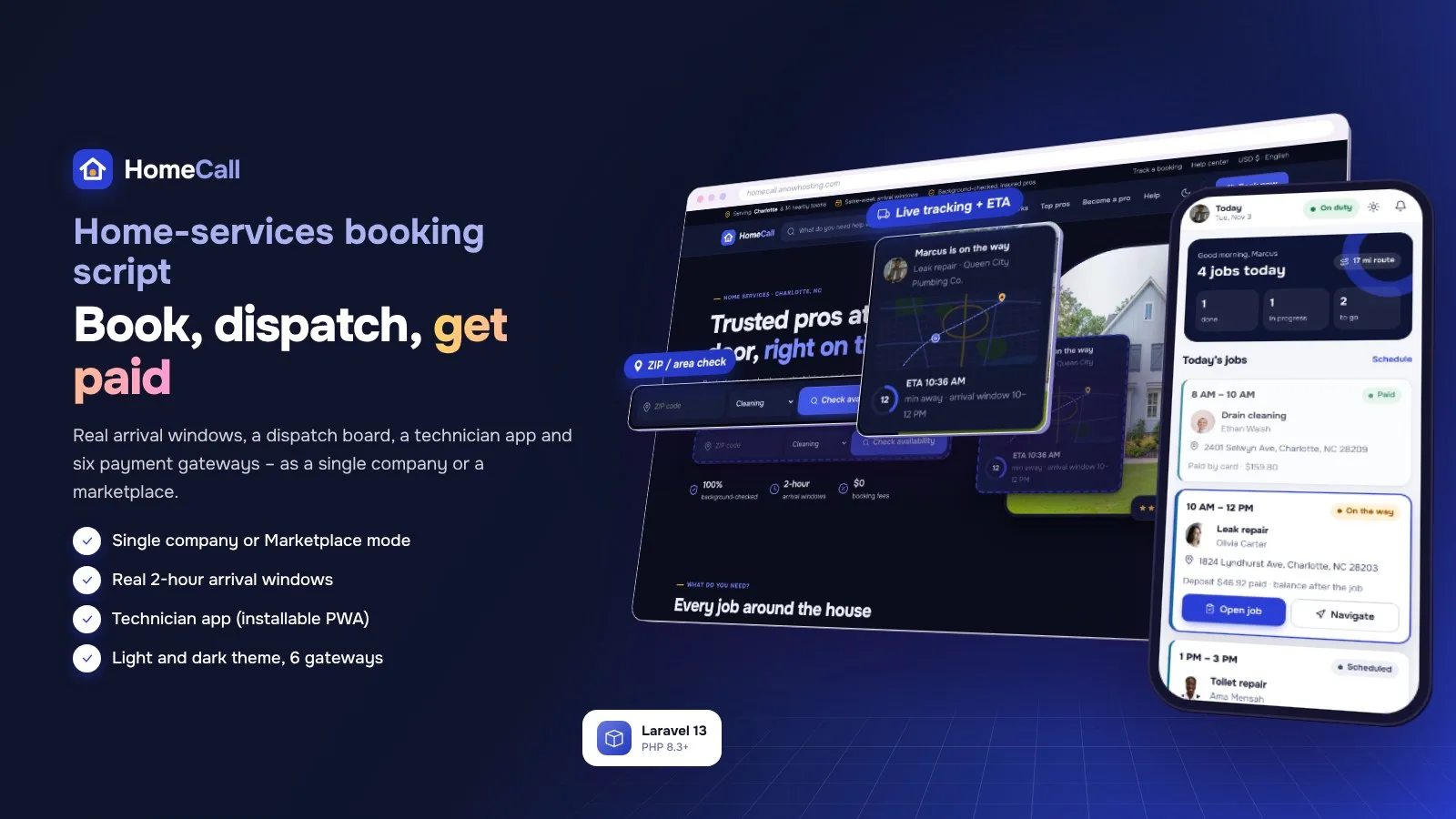
Laravel home-services script: single company or marketplace, real arrival windows, dispatch board, technician PWA, live tracking, invoices with US sales tax and 6 payment gateways.
Frequently bought together
Item details
Category
Platform
Files included
.php .html .css JavaScript .js .json .svg composer.json .blade.php Documentation
Compatible with
PHP 8.3 PHP 8.4
Software framework
Laravel
Database
MySQL 5.7 MySQL 8.0 MySQL 8.4 LTS MariaDB 10.x MariaDB 11.x SQLite 3.x
HTML / CSS framework
Custom CSS
Programming language
PHP JavaScript HTML/CSS
Version
1.0.1
Support & inquiry
Product demo
Description
HomeCall - book, dispatch, finish, get paid
HomeCall is a complete home-services booking and field-service script. Customers check their ZIP code, pick a service, choose a real 2-hour arrival window, pay a deposit online and follow their technician on a live map. Your office plans the day on a drag-and-drop dispatch board, technicians work from an installable technician app, and invoices with on-site parts and labor, US sales tax and pay links close every job.
Run it as a Single company with your own technicians, or as a Marketplace where providers join with their own teams and you take a commission - chosen in the installer and switchable any time in Admin › Settings › Business mode. Customers pay with Stripe, PayPal, Paystack, Razorpay, PayHere or bank transfer, or with cash and check on site.
Live demo
- Website demo (Marketplace mode): https://homecall.anowhosting.com/
- One-click admin demo (Victor Alvarez): https://homecall.anowhosting.com/demo-login/admin
- One-click provider demo (Derrick Moore, Queen City Plumbing Co.): https://homecall.anowhosting.com/demo-login/provider
- One-click technician app demo (Marcus Bell): https://homecall.anowhosting.com/demo-login/technician
- One-click customer demo (Olivia Carter): https://homecall.anowhosting.com/demo-login/customer
- Demo overview page: https://homecall.anowhosting.com/codester/index.html
- Documentation: https://homecall.anowhosting.com/codester/docs/index.html
Demo logins at /login (password: password):
- Admin (owner): victor.alvarez@example.com
- Staff (dashboard, dispatch, customers, technicians): jordan.lee@example.com
- Provider (Queen City Plumbing Co.): derrick.moore@example.com
- Technician (technician app): marcus.bell@example.com
- Customer: olivia.carter@example.com
Booking with real arrival windows
- ZIP check on the home page and in the booking flow - ZIP lists or a radius, with travel fees
- 2-hour arrival windows built from technician working hours, skills, time off, booked jobs and the travel buffer
- Packages, fixed, hourly and quote prices; add-ons with a live total including state sales tax
- Pay a deposit (25 % by default), in full, or after the job; repeat visits weekly, every 2 weeks or monthly - no auto-renew
Customers see who is coming and when
- "Technician on the way" with the ETA and the technician on a live map
- Technician photo, a Call button and chat with notes on every booking
- Reschedule or cancel inside your policy, skip or stop repeat visits
- Invoices with on-site parts and labor, PDF and pay link; quotes to compare and accept
A technician app that installs like a native app
- Today with job cards, On the way with ETA, navigate, call and chat
- Check-in timer, checklist, before / after photos, parts and labor added to the invoice
- Customer signature, collect payment by card link, cash or check, complete the job
- Schedule, time off and (Marketplace) earnings after commission
Plan the day on the dispatch board
- Technician lanes on a 7 AM - 7 PM timeline with a now line
- Drag a job from the unassigned queue onto a free technician; auto-assign the rest
- Live map with technicians and routes; late-risk and reschedule alerts
- Jobs list with the money split, verified payment, timeline and notes
Payments you can trust
- Stripe, PayPal, Paystack, Razorpay, PayHere and bank transfer with receipt + approval
- Amounts worked out on the server and verified with the gateway; signed webhooks
- Each transaction completes one payment once; nothing renews automatically
- Cash and check recorded on site by the technician
Marketplace: providers work, you earn
- Provider applications, approval, verified provider pages with their own social links
- Commission global, per category or per provider; balances and recorded payouts
- Provider panel with dashboard, dispatch, technicians, services & area, quotes and payouts
- Quote requests answered by up to 3 providers that serve the ZIP
Run the business at a glance
- Revenue against last year, jobs by trade, live jobs, on-time arrivals, top ZIPs
- Needs your attention: bank transfers, applications, unassigned jobs, out-of-area requests
- Customers, technicians with utilization, services, areas, billing and reviews
- Staff accounts with the sections they may open
Your brand, your mode
- Single company or Marketplace - one switch in Admin › Settings › Business mode
- Light and dark theme, 6 colour presets and custom colours with readable button text
- Installable app (PWA) for the website and the technician app
- Social networks with icons and your own networks, languages with auto-translate
What you get
- The complete script with the vendor folder and a browser installer (MySQL / MariaDB or SQLite) that picks the business mode and the demo data
- Optional demo data for each mode: services with packages and add-ons, service areas, providers or your own company, technicians, customers, two years of jobs, invoices, payments and reviews, plus one-click demo logins
- Illustrated HTML documentation: installation (cPanel, VPS, Windows), cron, every admin, provider and technician area, booking rules, sales tax, payments with webhook URLs, maps, PWA, languages, demo mode and updates
Good to know
- One installation runs one website (Single company or Marketplace); defaults are USA, USD, English, America/New_York and US sales tax - country, currency, time zone and tax are settings
- Maps use MapLibre with free OpenFreeMap styles - no map key needed
- Payouts to providers are recorded by the owner (bank, PayPal or other); nothing renews automatically
Support and updates
Support covers installation questions and bugs. Updates come as a full package and a small update zip with a one-click update in the admin.
Core features
Business modes
- Single company (own technicians) or Marketplace (providers with their own teams)
- Chosen in the installer, switchable in Admin › Settings › Business mode
- Light theme by default, full dark theme, 6 colour presets and custom colours
Booking
- ZIP check, ZIP-list or radius service areas with travel fees, out-of-area requests
- Real 2-hour arrival windows from technician hours, skills, time off and booked jobs
- Package, fixed, hourly and quote prices; add-ons; job questions and photos
- Deposit, full payment or pay after the job; repeat visits without auto-renew
- Quote requests answered by up to 3 providers; compare and accept
Field service
- Dispatch board with drag-to-assign, auto-assign, live map and alerts
- Technician app (PWA): on the way with ETA, check-in timer, checklist, photos, parts and labor, signature, payment on site
- Live tracking and chat for customers; reminders and review requests
Money
- Estimates, invoices with on-site lines, US sales tax by state, PDF and pay links
- Stripe, PayPal, Paystack, Razorpay, PayHere, bank transfer with receipt + approval; cash and check
- Server-side verification, signed webhooks, encrypted keys
- Marketplace commission global / category / provider, balances, recorded payouts
Everything else
- Installable app (PWA) with offline page for the website and the technician app
- Social networks with icons and your own networks; providers have their own links
- Maps with MapLibre + OpenFreeMap (no key), languages with auto-translate (DeepL, Google, LibreTranslate)
- Reviews with moderation and replies, staff permissions, add-ons, SEO, backups, one-click update, demo mode
Server requirements
- PHP 8.3 or newer (8.3, 8.4)
- MySQL 5.7+ / 8.x or MariaDB 10.3+ (SQLite 3 for small sites and local tests)
- PHP extensions: pdo (pdo_mysql or pdo_sqlite), mbstring, openssl, tokenizer, xml, ctype, json, fileinfo, curl, gd (zip for add-ons and the one-click update)
- Apache with mod_rewrite (cPanel, Plesk, DirectAdmin), LiteSpeed or Nginx
- A cron job every minute and an SSL certificate (payments, installable app, technician location)
- No Composer, Node or SSH needed - the vendor folder is included
- Your own merchant accounts for online payments (Stripe, PayPal, Paystack, Razorpay or PayHere)
Installation instructions
Install
- Create an empty MySQL / MariaDB database and user in your hosting panel and select PHP 8.3 or newer.
- Upload the contents of the homecall folder into the document root of your domain (the included .htaccess files route everything to the public folder) - or point the domain to its public folder.
- Open your domain: the installer checks the server, connects the database, lets you pick Single company or Marketplace and creates your admin account (optionally with the demo data).
- Sign in at /login - you land in the admin. Set the business details, booking rules, payments, sales tax, e-mail and appearance.
- Add the cron job:
* * * * * cd /path/to/homecall && php artisan schedule:run >> /dev/null 2>&1
Updates
Upload the update zip in Admin › Settings › Maintenance and press Run update (or php artisan hc:update).
Documentation
documentation/index.html in the download, also online on the demo.
Changelog
1.0.1 – November 2026
- Fixed: the one-click update (Settings › Maintenance › Run update) and "php artisan hc:update" now run correctly and keep the business mode (Single company or Marketplace).
- The full download includes the update package for 1.0.0 owners (Update-from-1.0.0).
1.0.0 – November 2026
- Initial release.
Reviews
Based on 0 reviews