
 Web
- Home
- Products
- Flutter Apps
- MusicVibe – Offline MP3 Music Player App (Flutter, Android + iOS) with Equalizer, Synced Lyrics, Playlists and AdMob
MusicVibe – Offline MP3 Music Player App (Flutter, Android + iOS) with Equalizer, Synced Lyrics, Playlists and AdMob
Web
0 sales
Updated Nov 09, 2026
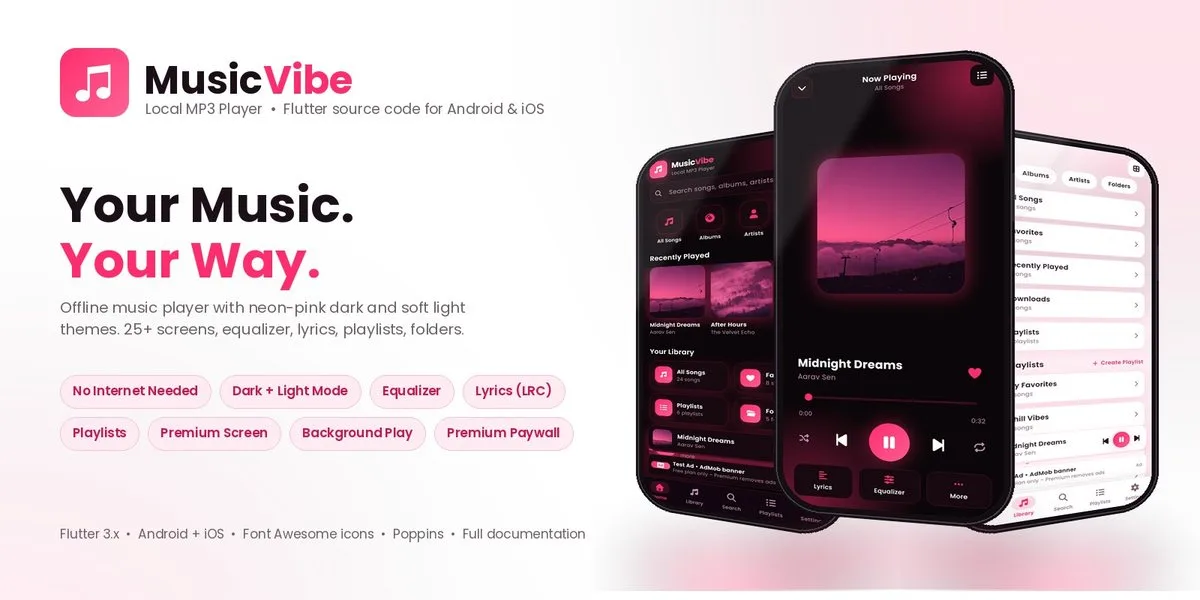
Product overview
Beautiful offline MP3 player for Android and iOS built with Flutter: 5-band equalizer, synced lyrics, playlists, folders, dark/light mode, AdMob and a premium plan screen. 25+ screens.
Frequently bought together
Item details
Category
Platform
Files included
.swift .xml .json .dart .kt .kts .gradle .md pubspec.yaml Documentation
Compatible with
Android 8+ iOS 15+ Flutter 3.x Xcode 15+ Android Studio
Software framework
Flutter
Programming language
Kotlin Dart
Version
1.0.0
Support & inquiry
Description
MusicVibe — offline MP3 player for Android & iOS
Your Music • Your Way. MusicVibe is a beautiful, fully offline music player built with Flutter — one codebase for Android and iOS. It finds the songs on the phone, reads their tags and artwork, and plays them with a 5-band equalizer, synced lyrics, playlists and background playback. Hot-pink neon dark mode and a soft pink light mode, 25+ screens, ready to publish under your own brand.
Read the illustrated documentation
Your whole library, beautifully organised
The app scans the device for MP3, M4A, AAC, WAV, FLAC, OGG and OPUS files in a background isolate, reads ID3 tags and embedded artwork, and sorts everything into Songs, Albums, Artists, Genres, Folders, Favorites, Recently Played and Listening History. Search with recent and trending searches, and a docked mini player on every tab.
Sound that feels right
A real 5-band equalizer with presets (Rock, Pop, Jazz, Bass, Classical, Vocal, Flat), Bass Boost, Virtualizer and Loudness using native Android audio effects.
Lyrics, playlists and background playback
- Synced lyrics (LRC) from a .lrc file next to the song, from embedded tags, or typed in the app
- Playlists: create, rename, delete, reorder and add songs from any screen
- Now Playing with shuffle, repeat, seek, favourite and a queue sheet
- Background playback with notification and lock-screen controls
Earn from your app
AdMob banner, interstitial and App Open ads for free users (Google test IDs built in) with Meta Audience Network through AdMob mediation. A Premium plan screen with monthly and yearly prices removes ads and is ready to connect to in-app purchases.
Make it yours
App name, prices, links and colours live in a single configuration file and theme file. Dark / light / follow-device theme, Poppins font, Font Awesome icons, profile screen, help & support, terms, privacy and an About screen with social links.
What you get
- Complete Flutter source code for Android and iOS
- Illustrated HTML documentation (setup, branding, ads, building the APK / AAB and the iOS app)
- Web preview build with screen deep links for demos and screenshots
Core features
- Offline player for MP3 / M4A / AAC / WAV / FLAC / OGG / OPUS with ID3 tags and embedded artwork
- Home, Library, Search, Playlists and Settings tabs with a docked mini player
- Albums, Artists, Genres, Folders, Favorites, Recently Played, Downloads and Listening History
- Now Playing with shuffle, repeat, seek, favourite and queue
- Synced lyrics (LRC) from file, embedded tags or typed in the app
- 5-band equalizer with presets, Bass Boost, Virtualizer and Loudness (native Android audio effects)
- Playlists: create, rename, delete, reorder, add from any screen
- Background playback with notification and lock-screen controls
- Profile, Premium plan screen (monthly / yearly), Help & Support, About with social links
- Dark / Light / Follow-device theme, Poppins font, Font Awesome icons
- AdMob banner, interstitial and App Open ads; Meta Audience Network via AdMob mediation; Premium removes ads
- One configuration file for name, prices and links; one theme file for colours
- Web preview build for demos and screenshots
- 25+ screens, one Flutter codebase
Server requirements
- Flutter 3.47+ (Dart 3.13+)
- Android Studio with Android SDK 37 (compileSdk 37, minSdk 23)
- Xcode 15+ on a Mac for the iOS build
- Your own AdMob account for live ads
Installation instructions
- Unzip the package and open the musicvibe folder in Android Studio or VS Code.
- Run flutter pub get.
- Set the app name, prices and links in lib/core/app_config.dart and the colours in lib/core/app_theme.dart; change the application ID and icons.
- Replace the Google test ad IDs with your own AdMob IDs.
- Build: flutter build apk --release --no-tree-shake-icons or flutter build appbundle --release --no-tree-shake-icons for Google Play (the flag keeps the Font Awesome icons).
The illustrated step-by-step guide is in the documentation folder.
Changelog
1.0.0
First release: offline MP3 player for Android and iOS with equalizer, synced lyrics, playlists, folders, background playback, dark and light mode, AdMob ads and a premium plan screen.
Reviews
Based on 0 reviews