Web
- Home
- Products
- PHP Scripts
- Multimedia
- PodNest – Podcast & Audio Platform Scrip...
PodNest – Podcast & Audio Platform Script with Persistent Player, Listener Library, Premium Early Access, RSS Feeds and Light/Dark Themes (Laravel 13)
Web
0 sales
Updated Oct 28, 2026
Product overview
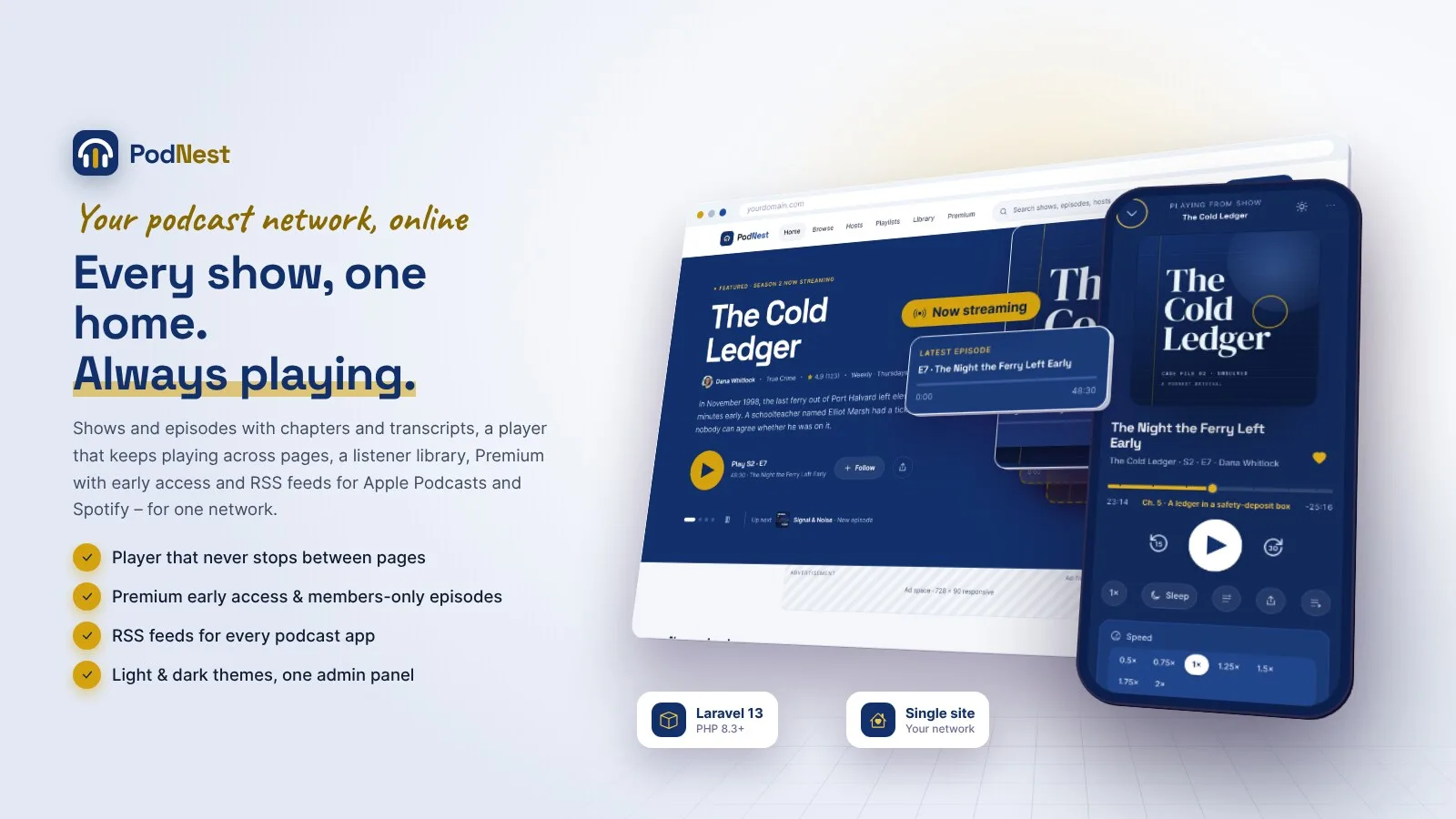
Podcast website for one network: shows, episodes, a player that keeps playing, listener library, Premium early access and RSS. Light and dark themes. Laravel 13.
Frequently bought together
Item details
Category
Platform
Files included
.php .html .css JavaScript .js .json .svg composer.json .blade.php .env example Documentation
Compatible with
PHP 8.3 PHP 8.4
Software framework
Laravel
Database
MySQL 5.7 MySQL 8.0 MySQL 8.4 LTS MariaDB 10.x MariaDB 11.x SQLite 3.x
HTML / CSS framework
Custom CSS
Programming language
PHP JavaScript HTML/CSS
Version
1.0.0
Support & inquiry
Product demo
Description
PodNest - your podcast network's own home on the web
PodNest is a complete podcast and audio website for one podcast network or brand. Listeners browse your shows and episodes with show notes, chapters and transcripts, play them in a player that keeps playing while they move between pages, and build their own library: follows, saved episodes, playlists, a queue and history that continue on any browser. Premium membership unlocks every new episode early, a members-only archive and listening without ads; free listeners see AdSense slots. Every show has an RSS feed for Apple Podcasts and Spotify with the free episodes. Your team runs it all from one admin panel with owner, admin, editor and moderator roles.
Built on Laravel 13 (PHP 8.3+) with a browser installer - the vendor folder is included, no Composer, Node.js or SSH needed. Light theme by default with a full dark theme. One installation is one website.
Every demo below opens with one click - no typing needed.
Live demo
- Open the demo website
- Try the player (free listener, newest Cold Ledger episode)
- Open a free listener's library, playlists and queue
- Open a Premium member's account
- Listener logins (manual, at /login): avery@podnest.test (free) or listener@podnest.test (Premium) / password
- Open the admin panel (owner)
- Owner login (manual, at /staff/login): owner@podnest.test / password
- Open the admin demo
- Open the editor demo
- Open the moderator demo
- Other team logins (manual, at /staff/login): admin@, editor@, moderator@podnest.test / password
- Read the documentation
Home, browse and search
A home page with the featured show, continue listening, new episodes, trending shows and categories; browse and search across shows, episodes, hosts and categories with filters; host pages and a feeds page with every show's RSS address. Fully responsive with a 60 px phone bar, and a dark theme listeners switch with one tap.
Show pages that sell the show
- Cover, hosts, star rating, follow and the new-episode bell, latest episode, seasons, serial or episodic order
- Reviews from listeners, release schedule, links to Apple Podcasts and Spotify
- Structured data for search engines and a share image
An episode page with a real player
Show notes, chapters, a transcript that follows the audio (.vtt) or plain text, comments with timestamps that seek the player ("23:14"), replies, likes and reports. The player has speed 0.5-2x, back 15 / forward 30 seconds, a sleep timer, chapters and resume on any browser.
Now playing, mini player and queue
- One player for the whole visit: links load inside the page, so the audio never stops while listeners browse
- Full-screen now playing with up next, chapters and the synced transcript
- A queue with drag-to-reorder and autoplay
A library for every listener
Continue listening, shows and hosts they follow, saved episodes, private or public playlists, listening history and notifications for new episodes and replies by in-app message, e-mail or browser push. Sign-in with a password or a one-time e-mailed code (Google / Facebook when set up).
Premium membership with early access
- Monthly and yearly plans you edit; early access (7 days by default), members-only episodes and no ads
- Stripe, PayPal, Paystack, PayHere, Razorpay and bank transfer with receipt upload - every payment verified on the server, signed fail-closed webhooks
- Sales tax by country or state, receipts, renewal reminders with a pay link (period-based: nothing is charged automatically)
- Uploaded Premium audio is stored privately and streamed only to members - everybody else gets 403
Account, subscription and receipts
Profile and photo, password and one-time codes, notification preferences per topic and channel, the Premium period with cancel and resume, receipts to print or save as PDF, data export and account deletion.
One admin panel for the team
A dashboard with plays, listeners, followers, Premium members and monthly revenue from real payments; shows, hosts and categories; the episode editor (MP3 / M4A upload up to 500 MB or an external URL, show notes, chapters with import, transcripts, scheduling, free / Premium / early access, artwork and SEO); members, payments with bank transfers to approve, plans and tax rates; comment moderation with rules; settings, AdSense, RSS, SEO and the System pages. Owner, admin, editor and moderator roles with per-person sections and an activity log.
What you get
- The complete script with the vendor folder and browser installer (MySQL / MariaDB or SQLite)
- Optional demo data: a sample network in Austin with twelve shows, fifteen hosts, over 1,200 episodes, listeners with a year of plays, comments and Premium members with payments
- Illustrated HTML documentation with screenshots of both themes, and a Spanish language pack as a translation example
Good to know
- PodNest is for one website (one network or brand). Only you and your team publish; there is no creator sign-up, marketplace, tenants or payouts.
- Premium is period-based: one payment buys a month or a year and renewal is a reminder with a pay link. Nothing is charged automatically and no cards are stored. Online payments need your own merchant accounts; refunds are made in the gateway dashboard and recorded in PodNest.
- RSS feeds carry the free episodes (early-access ones once they are free). Premium episodes play on the website only - there are no private member feeds.
- Only uploaded audio can be protected. An episode that uses an external audio URL plays from that address and cannot be protected by any website.
- Large audio uploads need matching PHP limits (a public/.user.ini is included; php.ini or Nginx settings on some servers).
- Sales tax rates are entered by you; there is no tax service connection.
- Plays are counted on your website only; listening in other podcast apps is not visible to PodNest.
- No native apps - listeners can add the site to their home screen. Browser notifications need HTTPS and one command for the keys.
- The demo shows, people and numbers are sample content, and every demo episode plays the same short sample tone.
Requirements at a glance
PHP 8.3+, MySQL 5.7+ / MariaDB 10.3+ (or SQLite), Apache, LiteSpeed or Nginx, a cron job. No Composer, Node.js or SSH needed.
Support and updates
Support covers installation, configuration and bugs in the item. Server administration and custom development are not included.
Demo note: the live demo runs with demo mode on - settings, uploads and deletes are disabled; listening, following, saving, playlists, the queue, comments (held for moderation), ratings and the Premium checkout up to the gateway can be tried, and the demo data reloads every 6 hours.
Core features
Shows & episodes
- Shows with cover, hosts, category, Apple Podcasts category, seasons, serial or episodic order, explicit flag, listing links
- Episodes: MP3 / M4A upload up to 500 MB (length and size read from the file) or an external audio URL
- Show notes editor, chapters with import, transcripts (.vtt synced or .txt), artwork, SEO fields
- Draft, scheduled at a date and time, published; full, trailer and bonus episodes
- Host profiles and categories
Player
- Keeps playing across pages, mini player and full-screen now playing
- Speed 0.5-2x, -15 / +30 seconds, sleep timer, chapters, synced transcript, resume on any browser
- Queue with autoplay, timestamp links in comments
Listeners
- Password or one-time code sign-in, Google / Facebook login
- Follow shows and hosts, new-episode bell, saved episodes, playlists, queue, history
- Comments with replies, likes and reports; ratings and reviews of shows
- Notifications in-app, by e-mail and browser push; data export and account deletion
Premium & revenue
- Monthly and yearly plans, early access, members-only episodes, ad-free listening
- Private audio storage with authorised streaming for Premium episodes
- Stripe, PayPal, Paystack, PayHere, Razorpay, bank transfer - verified on the server, signed fail-closed webhooks
- Sales tax rates by country or state, receipts, renewal reminders, refunds recorded
- Six AdSense slots for free listeners, ads.txt
Feeds & SEO
- RSS 2.0 per show with iTunes and Podcasting 2.0 tags (free episodes), feed health checks
- Sitemap, robots.txt, structured data, share images, Google Analytics 4
Admin & setup
- Dashboard with plays, listeners, followers, members and monthly revenue; global search; activity log
- Owner, admin, editor, moderator roles with per-person sections; two-step sign-in for the team
- Comment moderation rules, blocked words, reports
- Light and dark themes with a default setting, six colour presets, logo and fonts
- SMTP with e-mail templates, WhatsApp / SMS sign-in codes, languages with a translation editor (Spanish example), currencies
- Browser installer, demo mode with one-click logins, backups, maintenance mode, changeable admin path, update upload
Server requirements
- PHP 8.3 or newer (8.3, 8.4)
- MySQL 5.7+ / 8.x or MariaDB 10.3+ (SQLite 3 for local tests)
- PHP extensions: pdo (pdo_mysql or pdo_sqlite), mbstring, openssl, tokenizer, xml, ctype, json, fileinfo, curl, gd (zip for update uploads)
- Apache with mod_rewrite (cPanel, Plesk, DirectAdmin), LiteSpeed or Nginx; Windows with XAMPP / Laragon
- PHP upload limits that fit your audio files (512 MB for the maximum 500 MB episode)
- One cron job every minute (Task Scheduler on Windows)
- HTTPS recommended (browser notifications, webhooks, social sign-in, podcast directories)
- No Composer, Node.js or SSH needed - the vendor folder is included
- Optional accounts: payment gateway merchant accounts, SMTP, Google / Facebook OAuth, AdSense, Google Analytics, Meta WhatsApp Cloud API or MSG91 / Twilio for sign-in codes
Installation instructions
Install
- Create an empty MySQL / MariaDB database and user in your hosting panel and select PHP 8.3 or newer (raise the upload limits for audio).
- Upload the podnest folder and point your domain to its public folder - or upload its contents straight into public_html (with the hidden .htaccess and .user.ini files).
- Open your-domain.com: the browser installer checks the server, asks for the database and creates your site and owner account (demo data optional, imported in short steps so shared hosts do not time out).
- Sign in at /staff/login and go through Settings (general, RSS & directories, Premium, AdSense), System (appearance, payment gateways, e-mail), then add your hosts, shows and episodes.
- Add the cron job
* * * * * cd /path/to/podnest && php artisan schedule:runfor release notifications, renewal reminders and backups.
Updates
- Back up, upload the update zip in Admin › System › System update (or copy the new files over the old ones; .env, storage and public/uploads are kept), then click Run update - your data is kept.
The illustrated step-by-step guide (cPanel, VPS / Nginx, Windows and Task Scheduler, the installer, upload limits, the episode editor, Premium audio protection, RSS submission, payments and webhooks, web push, languages, backups, demo mode, troubleshooting) is in documentation/index.html and online at /codester/docs/index.html.
Changelog
Version 1.0.0
- Initial release.
- Shows, hosts, categories and episodes with MP3 / M4A upload or external URL, show notes, chapters, transcripts and scheduling.
- Player that keeps playing across pages: speed, skip, sleep timer, chapters, synced transcript, resume, queue and full-screen now playing.
- Listener library: follows, saved episodes, playlists, queue, history, notifications (in-app, e-mail, web push).
- Comments and ratings with moderation rules.
- Premium membership with early access, members-only episodes and no ads; private audio streaming for members.
- Stripe, PayPal, Paystack, PayHere, Razorpay and bank transfer with server-side verification; sales tax rates and receipts.
- RSS feeds for Apple Podcasts and Spotify, AdSense slots, SEO and sitemap.
- Light and dark themes, colour presets, one admin panel with four team roles, browser installer, demo mode with one-click logins, languages, backups and update upload.
Reviews
Based on 0 reviews