Web
- Home
- Products
- PHP Scripts
- eCommerce
- SecureVision – CCTV Store, Installation...
SecureVision – CCTV Store, Installation & Service Management Script with Technician App, AMC, Warranty by Serial, Site Surveys, Quotations & GST Invoices (Laravel 13)
Web
0 sales
Updated Oct 29, 2026
Product overview
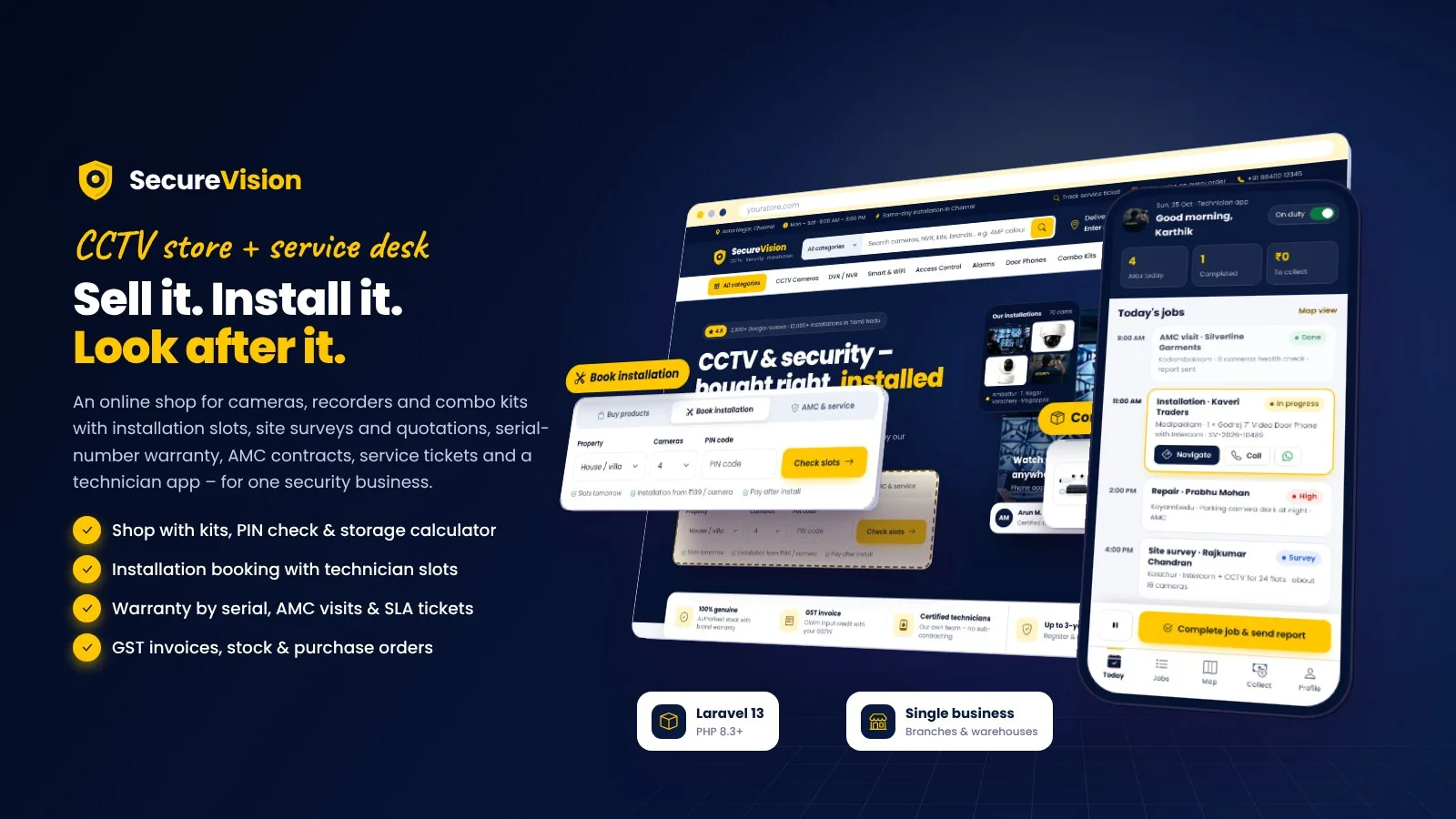
CCTV & security shop with installation slots, site surveys, quotations, serial warranty, AMC, SLA tickets and a technician app. One business with branches and warehouses. Laravel 13.
Frequently bought together
Item details
Category
Platform
Files included
.php .html .css JavaScript .js .json .svg composer.json .blade.php .env example Documentation
Compatible with
PHP 8.3 PHP 8.4
Software framework
Laravel
Database
MySQL 5.7 MySQL 8.0 MySQL 8.4 LTS MariaDB 10.x MariaDB 11.x SQLite 3.x
HTML / CSS framework
Custom CSS
Programming language
PHP JavaScript HTML/CSS
Version
1.0.0
Support & inquiry
Product demo
Description
SecureVision - sell it, install it, look after it
SecureVision is complete software for one CCTV and security business: an online shop for cameras, DVR / NVR recorders, smart cameras, access control, alarms, video door phones, accessories and combo kits, plus everything that happens after the sale. Customers check their PIN code for delivery and installation, size their hard disk with the storage calculator, build their own kit, pick a technician slot at checkout and pay online, by bank transfer, cash on delivery or after installation. Project buyers book a site survey and accept a quotation online with an advance payment. Every unit is tracked by serial number, so the warranty starts on the installation date; AMC contracts plan visits through the year and service tickets run on SLA timers. Technicians work from a phone-friendly technician app (checklist, serial scan, photos, signature, completion code, payment collection) and the team runs orders, GST invoices, stock, purchase orders and reports in the admin panel.
Built on Laravel 13 (PHP 8.3+) with a browser installer - the vendor folder is included, no Composer, Node.js or SSH needed. One installation is one business with its own branches, warehouses, team and payment accounts.
Every demo below opens with one click - no typing needed.
Live demo
- Open the demo website
- Try the shop and checkout
- Open the order tracker (story order SV-2026-10482)
- Open the customer account demo
- Customer login (manual, at /login?with=password): customer@securevision.test / password
- Open the technician app demo
- Technician login (manual, at /staff/login): tech@securevision.test / password
- Open the admin (owner) demo
- Owner login (manual, at /staff/login): admin@securevision.test / password
- Open the store admin (manager) demo
- Open the sales demo
- Open the service desk demo
- Other team logins (manual, at /staff/login): manager@, sales@, support@, warehouse@, accounts@securevision.test / password
- Open the warehouse demo
- Open the accountant demo
- Read the documentation
A shop built for CCTV
Header search with categories and suggestions, a "Deliver & install to" PIN code popover, a mega menu, a home page with an installation booking box and the combo kit of the week; categories with spec filters from category templates (resolution, lens, night vision, channels …), the product card with spec chips, installation badge and delivery date, compare up to 4, wishlist, recently viewed. Services, AMC plans, projects gallery, area landing pages, blog, FAQ and CMS pages; SEO fields, sitemap, robots.txt and schema markup.
Product pages, kits and the storage calculator
- Variants (lens, resolution, HDD size) with their own SKU, price, stock and image; datasheets, video, reviews with photos and product Q&A
- Product only, with installation or with an AMC plan; PIN code check with the delivery date, installation and cash on delivery; EMI estimate
- Ready-made combo kits and a step-by-step kit builder with a package discount
- Storage calculator with the formula shown and an admin-editable bitrate table - it suggests the HDD, recorder and PoE switch from your stock
Checkout with an installation slot
Guest checkout with a one-time code or signed in, saved sites with a map pin, technician slots per zone with live capacity, coupons, reward points and wallet, a GST invoice for business buyers with CGST + SGST or IGST worked out from the place of supply. Payment by Razorpay (UPI, cards, net banking, EMI options), Stripe, PayPal, Paystack, PayHere, bank transfer with receipt upload, cash on delivery or pay after installation - every online payment is verified on the server.
A customer account that tracks it all
Order tracker from placed to installed with the technician and slot, devices and warranty by serial number, warranty claims, service tickets with photos and chat, the AMC plan with visit reports and renewal, quotations to accept and pay, payments and GST invoices, sites and addresses, wishlist, rewards and referral, wallet and notification choices.
A technician app for the day
- Today's installations, repairs, AMC visits and site surveys in time order, route map, navigate, call and WhatsApp
- Check-in at the site, installation checklist, serial scan with the phone camera, photos and materials used
- Customer signature and completion code, payment collected on site, job report and rating; collections and earnings
An admin panel for the whole team
Live dashboard, orders from placed to packed, shipped (courier and tracking number), delivered, installed and completed, bank receipts to verify, new orders for phone and walk-in customers, leads with follow-ups, site surveys, a quotation builder with PDF and versions, customers, products with variants and CSV import, combo kits, serial numbers, stock per warehouse, purchase orders received with serials, PIN codes and slots. Seven team roles (owner, store admin, sales, service desk, warehouse, accountant, technician) each with their own menu, plus a global search and an activity log.
Service tickets with SLA and AMC contracts
- Tickets as a board, list or map with priority-based SLA timers, conversation with the customer, technician visits, spare parts and charges
- AMC plans, contracts with the devices covered, a visit calendar, health-check reports and renewal reminders
- Warranty claims, returns (RMA), refunds to wallet or the original method and GST credit notes
GST invoices, reports and stock
Invoices numbered per financial year with HSN / SAC, CGST + SGST or IGST, credit notes, the GST report with B2B list and CSV; reports for sales, service and AMC, technicians, payments, GST summary and stock valuation; coupons, rewards and referral, campaigns by WhatsApp / SMS / e-mail and automations (abandoned cart, installation and AMC visit reminders, AMC renewal, warranty expiry, review requests).
What you get
- The complete script with the vendor folder and browser installer (MySQL / MariaDB or SQLite)
- Demo data (a fictional CCTV store with two branches, about 80 products with variants, 6 combo kits, 600+ customers, 12 months of orders, installations, tickets, AMC contracts, quotations and leads, six technicians and a login for every role) and illustrated HTML documentation
Good to know
- SecureVision is for one business (with branches and warehouses). There are no other sellers, commissions or payouts.
- Online payments need your own Razorpay, Stripe, PayPal, Paystack or PayHere merchant account; EMI plans are those your gateway offers, the "EMI from" line is an estimate. Refunds to the original payment method are made in the gateway dashboard and recorded with the refund ID.
- Shipping is manual (courier name, tracking number and link) - there is no courier API. PIN code serviceability is your own list.
- The script does not connect to cameras or recorders; "recorder health" comes from the technician's visit report.
- GST invoices, credit notes and the GST report are included; e-invoicing (IRN), e-way bills and return filing are not.
- The customer account and technician app are responsive web apps (add to home screen); there are no native Android / iOS apps and no public API.
- WhatsApp needs a Meta WhatsApp Cloud API number with approved templates; SMS needs MSG91 or Twilio; e-mail needs SMTP; Google sign-in needs your own OAuth client. Maps use OpenStreetMap (Google Maps with your own key).
Requirements at a glance
PHP 8.3+, MySQL 5.7+ / MariaDB 10.3+ (or SQLite), Apache or Nginx, a cron job. No Composer, Node.js or SSH needed.
Support and updates
Support covers installation, configuration and bugs in the item. Server administration and custom development are not included.
Demo note: the live demo runs with demo mode on - settings, uploads and deletes are disabled, the daily flows (shopping and checkout up to the gateway, the technician's job, the service desk, order steps) can be tried, and the demo data resets every 6 hours.
Core features
Shop
- Category tree with spec templates and filters, brands, product variants with own SKU / price / stock, images, video and datasheets
- Product card with spec chips, installation badge and delivery date; compare, wishlist, recently viewed, reviews with photos, product Q&A
- Combo kits, kit builder with package discount, camera storage calculator with an editable bitrate table
- PIN code serviceability: delivery days, installation and cash on delivery per PIN code
Checkout & payments
- Guest checkout with OTP, saved sites with map pin, installation slots per zone, coupons, reward points, wallet, GST invoice with GSTIN
- Razorpay, Stripe, PayPal, Paystack, PayHere, bank transfer with receipt approval, cash on delivery, pay after installation - verified on the server, signed webhooks
Installation & projects
- Installation jobs with technician suggestion, slots and capacity, checklist, photos, serials, signature and completion code
- Leads with follow-ups, site surveys, quotation builder with PDF, link and versions, online acceptance with advance payment, conversion to an order
After-sales service
- Serial numbers per unit, warranty from the installation or delivery date, warranty claims, returns (RMA), refunds and GST credit notes
- AMC plans, contracts, visit calendar, health-check reports, renewal reminders
- Service tickets with priorities, SLA timers, chat, technician visits, spare parts and charges
Apps
- Customer account: orders and tracker, devices and warranty, tickets, AMC, quotes, payments, addresses, rewards, wallet
- Technician app: today's jobs, route map, check-in, checklist, serial scan, photos, materials, signature, collections
Admin & back office
- Dashboard, orders workflow with courier tracking, payments, invoices, GST report, customers, products, CSV import / export
- Stock per warehouse with row locks, transfers, suppliers, purchase orders received with serials, low-stock alerts
- Reports: sales, service & AMC, technicians, payments, GST summary, stock valuation; CSV and print
- Coupons, rewards & referral, campaigns, automations, reviews moderation, CMS, area pages, SEO
- Seven team roles with per-person sections, activity log, global search
Messages, design & setup
- WhatsApp Cloud API, MSG91 / Twilio SMS, SMTP e-mail with templates; OTP and Google sign-in
- Four colour palettes, logos, Google Fonts; languages with translation editor, currencies
- Browser installer with demo data, demo mode with one-click logins, maintenance mode, one-click update
Server requirements
- PHP 8.3 or newer (8.3, 8.4)
- MySQL 5.7+ / 8.x or MariaDB 10.3+ (SQLite 3 for local tests and small shops)
- PHP extensions: pdo (pdo_mysql or pdo_sqlite), mbstring, openssl, tokenizer, xml, ctype, json, fileinfo, curl, gd (zip for update uploads)
- Apache with mod_rewrite (cPanel, Plesk, DirectAdmin) or Nginx; Windows with XAMPP / Laragon
- One cron job every minute (Task Scheduler on Windows)
- HTTPS recommended (webhooks, Google sign-in, camera serial scan, location check-in)
- No Composer, Node.js or SSH needed - the vendor folder is included
- Optional accounts: payment gateway merchant accounts, SMTP, MSG91 / Twilio, Meta WhatsApp Cloud API, Google OAuth, Google Maps key
Installation instructions
Install
- Create an empty MySQL / MariaDB database and user in your hosting panel and select PHP 8.3 or newer.
- Upload the contents of the securevision folder (with the hidden .htaccess files) and point your domain to its public folder - or upload it straight into public_html.
- Open your-domain.com: the browser installer checks the server, asks for the database and creates your business and owner account (demo data optional, imported in short steps so shared hosts do not time out).
- Sign in at /staff/login and set up the business profile and GST state, branding, PIN codes and slots, products and stock, payment gateways, SMTP and WhatsApp / SMS, team and technicians.
- Add the cron job
* * * * * cd /path/to/securevision && php artisan schedule:runfor reminders, automations, AMC renewals and stock alerts.
Updates
- Back up, upload the update zip in Admin › System › System update (or copy the new files over the old ones; .env, storage and public/uploads are kept), then click Run update - your data is kept.
The illustrated step-by-step guide (cPanel, VPS / Nginx, Windows and Task Scheduler, installer, every role and app, payments and webhooks, GST, WhatsApp / SMS / SMTP, languages, demo mode, troubleshooting) is in documentation/index.html and online at /codester/docs/index.html.
Changelog
Version 1.0.0
- Initial release.
- CCTV and security online shop with spec filters, variants, combo kits, kit builder, storage calculator, compare and PIN code serviceability.
- Checkout with installation slots, coupons, reward points, wallet and GST invoice; Razorpay, Stripe, PayPal, Paystack, PayHere, bank transfer, cash on delivery and pay after installation with server-side verification.
- Leads, site surveys, quotations with online acceptance and advance payment, conversion to orders.
- Serial numbers and warranty, warranty claims, returns (RMA), refunds and GST credit notes; AMC contracts and visits; service tickets with SLA.
- Customer account and technician app (checklist, serial scan, photos, signature, completion code, collections).
- Admin panel with seven team roles, orders workflow, stock per warehouse, purchase orders with serials, reports, GST report, campaigns, automations, CMS and SEO.
- Browser installer, demo mode with one-click logins, languages, currencies, four colour palettes, Google Fonts and one-click update.
Reviews
Based on 0 reviews