Web
- Home
- Products
- PHP Scripts
- Video & Streaming
- VidNest - Video Sharing, Embed & Downloa...
VidNest - Video Sharing, Embed & Download Script (Resumable Uploads, 10 Storages, FFmpeg HLS, Plans) - Laravel 13
Web
0 sales
Updated Oct 29, 2026
Product overview
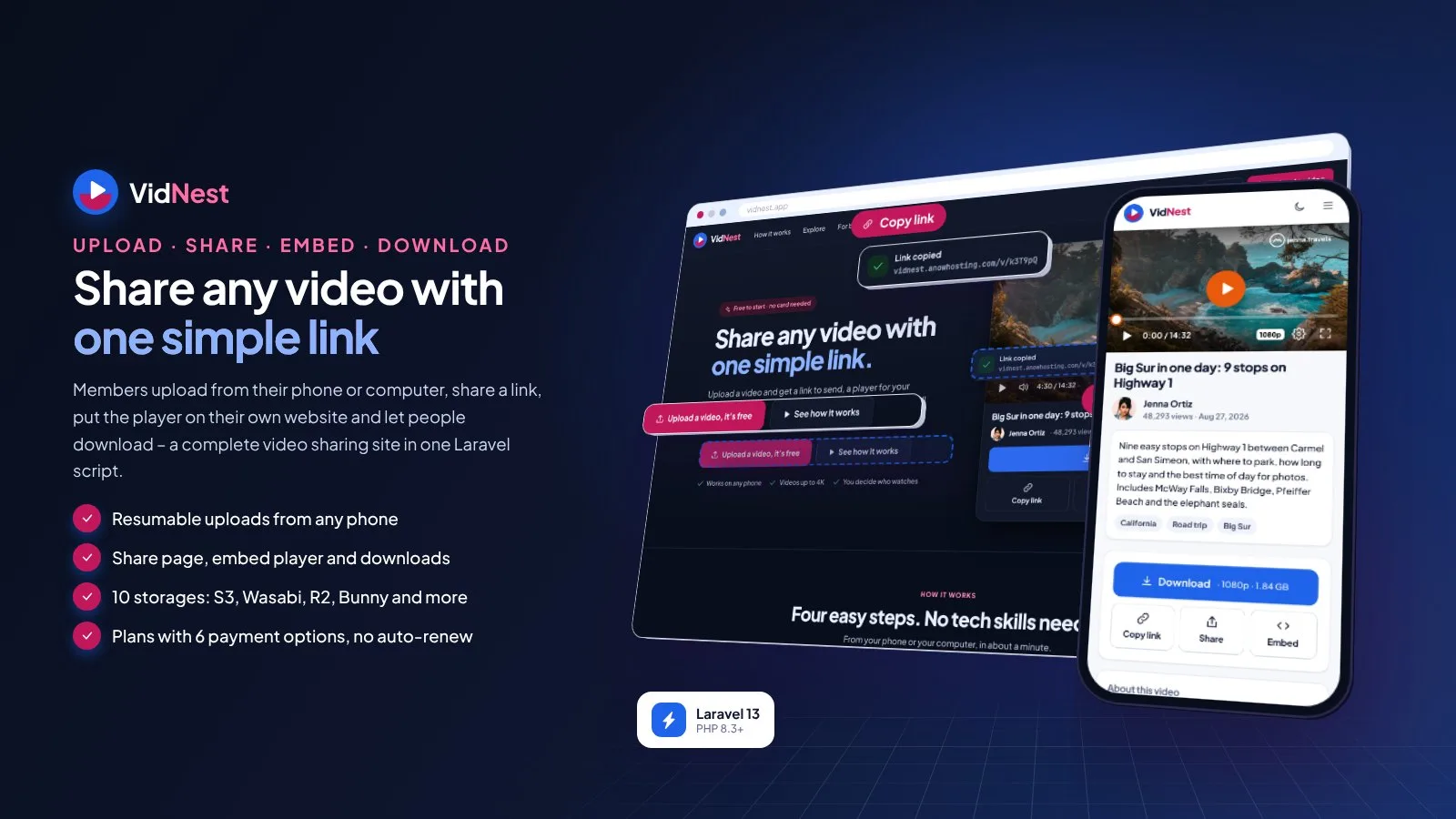
Video sharing site: resumable uploads, share links, embed player, downloads, stats, 10 storages, FFmpeg/HLS and plans.
Frequently bought together
Item details
Category
Platform
Files included
.php .html .css JavaScript .js .json .svg composer.json .blade.php .env example Documentation
Compatible with
PHP 8.3 PHP 8.4
Software framework
Laravel
Database
MySQL 5.7 MySQL 8.0 MySQL 8.4 LTS MariaDB 10.x MariaDB 11.x SQLite 3.x
HTML / CSS framework
Custom CSS
Programming language
PHP JavaScript HTML/CSS
Version
1.0.0
Support & inquiry
Product demo
Description
VidNest - your own video sharing website
VidNest is a complete video sharing website for one domain. Your members upload a video from their phone or computer (big files go up in pieces and resume after a lost connection), get a share link right away, put the player on their own website with one embed code - limited to their own websites if they like - and let people download it. Videos can be public, unlisted, password-protected or private, and every member sees clear stats: views, watch time, how much people watch, countries, devices, embedding websites and downloads.
You choose where the videos live: this server, Amazon S3, Wasabi, Backblaze B2, Cloudflare R2, DigitalOcean Spaces, MinIO, Bunny Storage, Bunny Stream or Cloudflare Stream. Videos are prepared with FFmpeg (sizes up to 4K with smooth HLS streaming), by a stream service, or played as uploaded on shared hosting. You earn from Free / Pro / Business plans paid per month or per year with six payment options.
Built on Laravel 13 (PHP 8.3+) with a browser installer - the vendor folder is included, no Composer, Node.js or SSH needed. Phone-first on every screen, light theme by default with a full dark theme; every colour, text, price and limit is editable in the admin.
Every demo below opens with one click - no typing needed.
- Demo website URL: https://vidnest.anowhosting.com/
- One-click member demo URL (Jenna Ortiz, Pro: uploads, share and embed, stats): https://vidnest.anowhosting.com/demo-login/member
- One-click admin (owner) demo URL: https://vidnest.anowhosting.com/demo-login/owner
- One-click admin demo URL (storage): https://vidnest.anowhosting.com/demo-login/admin?to=/admin/storage
- One-click support demo URL: https://vidnest.anowhosting.com/demo-login/support
- Public documentation: https://vidnest.anowhosting.com/codester/docs/index.html
- Demo logins (password "password"): Owner owner@vidnest.example, Admin rachel@vidnest.example, Support support@vidnest.example, Member jenna@jennatravels.example
A share page made for one thing: the video
- The player, title, owner and description, a big Download button in the quality the owner chooses
- Copy link, a Share sheet (text message, WhatsApp, e-mail, Facebook, X, LinkedIn, start at a time) and an Embed dialog
- Public, unlisted, password or private - no channels, no feed, no comment wall
Phone-first, resumable uploads
- Gallery, camera or drag and drop, several files at once, a live progress bar
- Big files go up in small pieces - no fight with PHP upload limits - and resume after a lost connection
- Title, description, thumbnail pick, folder, privacy, downloads and allowed websites while the file uploads
- File type, size, length and storage checked against the member's plan
An embed player for any website
- Responsive or fixed sizes, start time, muted autoplay, show title - one iframe code for WordPress, Shopify or any page
- Pro and Business: their own logo and player colour, no badge, and only on allowed websites
- Plays on embedded players are counted per website
Stats members understand
- Views on the share page vs embedded, watch time, average % watched and a retention curve
- Countries, devices, websites where it played and downloads by quality
- History per plan (30 days to 2 years); bots and own plays never count, no IP address stored
Ten storage choices
This server, Amazon S3, Wasabi, Backblaze B2, Cloudflare R2, DigitalOcean Spaces, MinIO, Bunny Storage, Bunny Stream and Cloudflare Stream. One switch says where new uploads go; every video keeps playing from where it was saved. Test button, keys stored encrypted, signed links that expire. The documentation walks through each provider step by step.
Video processing your way
- FFmpeg on your server: sizes from 360p to 4K (up to each plan), smooth HLS streaming, thumbnails, a queue with priority for Business
- A stream service: Bunny Stream or Cloudflare Stream prepare and play the video, with signed webhooks
- Play the original file: works on any shared hosting
Plans and payments - no auto-renew
- Free, Pro and Business for a month or a year - every price, limit (storage, file size, length, quality, stats history) and feature switch is editable
- Reminders with a pay link before the period ends, then a grace period
- Stripe, PayPal, Paystack, PayHere, Razorpay and bank transfer with receipt upload and approval
- Verified on the server, signed webhooks that fail closed, US sales tax by state and invoices
One admin panel
Dashboard with members, paid plans, revenue, views, videos, storage, processing and reports; users, videos with the processing queue, abuse reports, storage, video processing, player defaults, plans, payments, gateways, settings, colours and theme, languages with auto-translate, e-mail templates, SEO & AdSense, pages, staff roles (owner, admin, support), activity log, backups, demo mode and update upload.
What you get
- The complete script with the vendor folder and browser installer (MySQL / MariaDB or SQLite)
- Optional demo data: Jenna Ortiz, a travel creator in San Diego, with 48 videos and a year of views, Cedar & Pine Furniture with its player on its own website, about 4,100 members and twelve months of payments - short sample clips play for every demo video
- Illustrated HTML documentation with screenshots of both themes and a step-by-step guide for every storage provider
Good to know
- One installation is one website: members share your domain. No channels, team workspaces or public API.
- Plans are period-based: one payment buys one month or one year, and nothing is charged automatically. Online payments need your own merchant accounts.
- Several sizes and smooth streaming need FFmpeg on your server or a stream service; on plain shared hosting the original upload plays as it is.
- Storage and stream services are billed by those providers to your own account.
- Country statistics use a free GeoLite2 / DB-IP file you upload, or Cloudflare's country header.
- English is bundled; other languages are added in the admin.
- The demo people, businesses, videos and numbers are sample content.
Requirements at a glance
PHP 8.3+, MySQL 5.7+ / MariaDB 10.3+ (or SQLite), Apache, LiteSpeed or Nginx, a cron job; FFmpeg optional. No Composer, Node.js or SSH needed.
Support and updates
Support covers installation, configuration and bugs in the item. Server administration, storage or merchant accounts and custom development are not included.
Core features
Share, embed & download
- Resumable chunked uploads from phone and computer, several at once, details while uploading
- Share page with Download, Copy link, Share sheet and Embed; public, unlisted, password or private
- Embed player: responsive or fixed sizes, start time, muted autoplay, own logo and colour, allowed websites only
- Downloads in the quality the owner chooses, counted in the stats
- Folders, grid / list, search, bulk move and delete, thumbnail pick or upload
Stats
- Views (share page vs embedded), watch time, average % watched, retention curve
- Countries, devices, embedding websites, downloads by quality; no IP stored
Storage & processing
- Local server, Amazon S3, Wasabi, Backblaze B2, Cloudflare R2, DigitalOcean Spaces, MinIO, Bunny Storage, Bunny Stream, Cloudflare Stream
- "New uploads go to" switch, test button, encrypted keys, signed links that expire
- FFmpeg sizes 360p-4K with HLS, stream services with signed webhooks, or original-file mode for shared hosting
- Queue worker with priority for Business, retries and a parallel limit
Revenue
- Free, Pro, Business per month or year - no auto-renew, reminders with a pay link, grace period
- Stripe, PayPal, Paystack, PayHere, Razorpay, bank transfer - verified on the server, signed fail-closed webhooks
- US sales tax by state, invoices, refunds recorded, AdSense slots for Free pages
Admin & setup
- Dashboard, users, videos and processing queue, abuse reports, player defaults
- Owner, admin and support roles with sections per person, activity log
- Website texts, pages, FAQ, Explore categories, SEO, sitemap, GA4
- Light and dark themes, six colour presets plus custom colours with automatic button text contrast
- SMTP with branded e-mail templates, browser notifications
- Languages with a translation editor and auto-translate (DeepL, Google, LibreTranslate), currencies
- Browser installer, demo mode with one-click logins, backups, maintenance mode, changeable admin path, update upload
Server requirements
- PHP 8.3 or newer (8.3, 8.4)
- MySQL 5.7+ / 8.x or MariaDB 10.3+ (SQLite 3 for local tests)
- PHP extensions: pdo (pdo_mysql or pdo_sqlite), mbstring, openssl, tokenizer, xml, ctype, json, fileinfo, curl, gd, zip
- Apache with mod_rewrite (cPanel, Plesk, DirectAdmin), LiteSpeed or Nginx; Windows with XAMPP / Laragon
- One cron job every minute (Task Scheduler on Windows)
- Optional: FFmpeg 4.4+ with proc_open for several sizes and smooth streaming (or a Bunny Stream / Cloudflare Stream account)
- HTTPS recommended (webhooks, browser notifications)
- No Composer, Node.js or SSH needed - the vendor folder is included
- Accounts you bring: payment gateway merchant accounts and SMTP; optional storage service, translation key, AdSense, Google Analytics and a free GeoLite2 / DB-IP country file
Installation instructions
Install
- Create an empty MySQL / MariaDB database and user in your hosting panel and select PHP 8.3 or newer (post_max_size 16M or more).
- Upload the vidnest folder and point your domain to its public folder - or upload its contents straight into public_html (with the hidden .htaccess files).
- Open your-domain.com: the browser installer checks the server, asks for the database and creates your site and owner account (demo data optional, imported in short steps so shared hosts do not time out).
- Sign in at /login, choose your storage and video processing mode, check the plans and prices, switch on your payment gateways and set up SMTP.
- Add the cron job
* * * * * cd /path/to/vidnest && php artisan schedule:runfor the video queue, view statistics, reminders, retention and backups.
Updates
- Back up, upload the update zip in Admin › Update (or copy the new files over the old ones; .env, storage and public/uploads are kept), then click Run update - your data is kept.
The illustrated guide (cPanel, VPS / Nginx, Windows and Task Scheduler, the installer, cron and the video queue, every storage provider with CORS, FFmpeg, upload limits, plans and payments with webhooks, demo mode, troubleshooting) is in documentation/index.html and online at https://vidnest.anowhosting.com/codester/docs/index.html.
Changelog
1.0.0 – October 2026
- Initial release: resumable uploads from phone and computer, share pages, an embed player with allowed websites, downloads, public / unlisted / password / private videos, folders, stats (views, watch time, retention, countries, devices, websites, downloads).
- Ten storage choices (this server, Amazon S3, Wasabi, Backblaze B2, Cloudflare R2, DigitalOcean Spaces, MinIO, Bunny Storage, Bunny Stream, Cloudflare Stream) and three processing modes (FFmpeg with sizes up to 4K and HLS, a stream service, or the original file).
- Free / Pro / Business plans per month or year with no auto-renew, Stripe, PayPal, Paystack, PayHere, Razorpay and bank transfer, US sales tax, invoices.
- Admin panel with owner, admin and support roles, abuse reports, player defaults, languages with auto-translate, AdSense slots, light and dark themes with colour presets, browser installer, demo mode, backups and update upload.
Reviews
Based on 0 reviews