Web
- Home
- Products
- PHP Scripts
- AI
- VoiceGen AI – Text to Speech, Voice Clon...
VoiceGen AI – Text to Speech, Voice Cloning & AI Dubbing SaaS (Laravel) with REST API
Web
0 sales
Updated Oct 20, 2026
Product overview
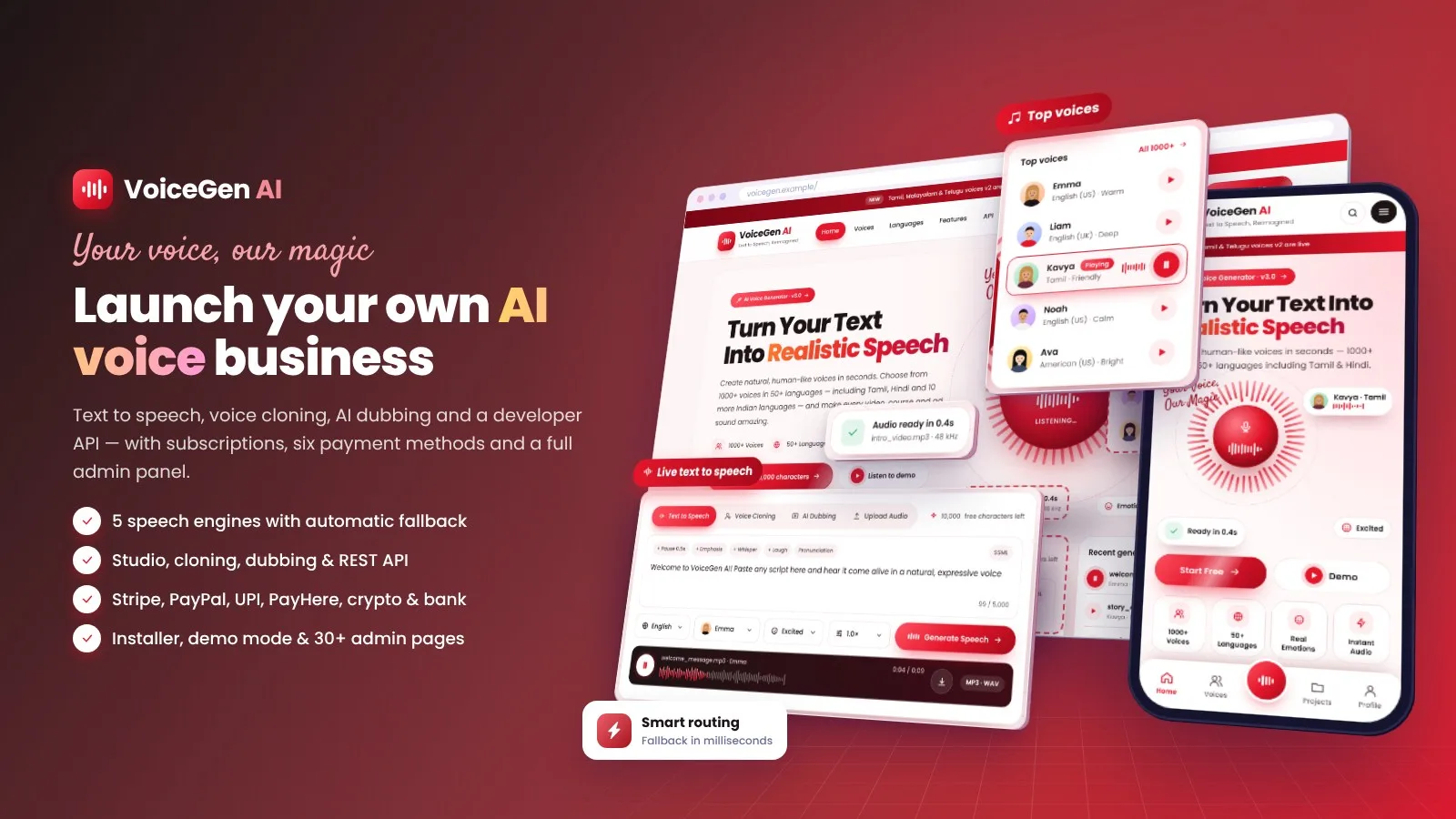
AI voice SaaS: text to speech with 5 engines and smart fallback, multi-speaker studio, voice cloning with consent review, AI dubbing, REST API and 6 payment methods. Laravel 13, installer included.
Frequently bought together
Item details
Category
Platform
Files included
.php .html .css JavaScript .js .json .svg .md composer.json .blade.php .env example Documentation
Compatible with
PHP 8.3 PHP 8.4
Software framework
Laravel
Database
MySQL 5.7 MySQL 8.0 MariaDB 10.x MariaDB 11.x SQLite 3.x
HTML / CSS framework
Custom CSS
Programming language
PHP JavaScript HTML/CSS
Version
1.0.4
Support & inquiry
Product demo
Description
VoiceGen AI — launch your own AI voice business
VoiceGen AI is a complete text-to-speech SaaS: a premium marketing site, a multi-speaker studio, voice cloning with consent review, AI dubbing, a REST API with signed webhooks and paid plans with Stripe, PayPal, Razorpay (UPI), PayHere, NOWPayments crypto and bank transfer. Requests are routed across ElevenLabs, OpenAI, Google Cloud, Azure Speech and Amazon Polly with automatic fallback. Laravel 13, browser installer, vendor folder included.
A marketing site that sells
Try-it-now speech box, top and featured voices with instant previews, categories, 50+ languages, cloning and API sections, pricing, reviews and FAQ — every text editable from the admin.
Find the perfect voice
- Filters by language, gender, age and use case with live counts
- Search, sorting, favourites and one-tap previews
- Public library and in-app library for signed-in users
A studio built for real scripts
- Multi-speaker blocks with voice, emotion, speed, pitch, stability and clarity
- Pause, emphasis, whisper and laugh tags, find & replace, grammar clean-up
- MP3, WAV, OGG export, subtitles (.srt), share links and embed player
- Pronunciation dictionary and automatic splitting of long scripts
Consent-first cloning and AI dubbing
Customers record in the browser with quality checks; every clone waits for an admin decision against its consent clip. Videos are dubbed into new languages with an editable transcript (ElevenLabs).
Payments you can trust
- Stripe, PayPal, Razorpay (UPI), PayHere (Sri Lanka), NOWPayments (200+ cryptocurrencies) and bank transfer
- Server-side confirmation with each provider, signed webhooks, fail-closed without keys
- Multi-currency prices, tax, coupons, credit packs and printable invoices
A developer API included
API keys with permissions, usage charts, HMAC-signed webhooks and documentation with JavaScript, Python and cURL examples.
An admin panel with everything
Revenue and provider cost, users, plans, payments, coupons, voice catalog, clone review, live generation logs, AI providers and smart routing, support tickets, content, e-mail templates and settings — responsive on phones.
Live in minutes
Upload, open your domain and follow the browser installer. Works on shared hosting with MySQL, MariaDB or SQLite.
What you get
- The full Laravel source with the vendor folder, browser installer and demo data
- Illustrated HTML documentation and a quick-start file
- Automated feature tests, including payment security tests
Support and updates
Support covers installation, configuration and bugs in the item. Speech-provider and payment-provider accounts, server administration and custom development are not included.
Core features
Speech & studio
- 5 speech engines: ElevenLabs, OpenAI, Google Cloud TTS, Azure Speech, Amazon Polly
- Smart routing by voice and language with automatic fallback and per-provider cost tracking
- Multi-speaker studio: voice, emotion, speed, pitch, stability and clarity per block
- Pause, emphasis, whisper, laugh and breath tags; pronunciation dictionary
- MP3, WAV, OGG export, subtitles (.srt), share links and embeddable player
- Voice library with filters, favourites and instant previews; 50 languages including RTL scripts
Cloning, dubbing & API
- Voice cloning with in-browser recording, quality checks, consent clip and admin review
- Celebrity name blocking and private clones per account
- AI dubbing of video and audio with editable transcript (ElevenLabs)
- REST API with per-key permissions, usage logs, rate limits and HMAC-signed webhooks
Payments & billing
- Stripe, PayPal, Razorpay (UPI), PayHere, NOWPayments crypto and bank transfer with receipt upload
- Monthly and yearly plans, credit top-up packs, coupons, referrals with bonus characters
- Multi-currency prices with your own exchange rates, tax and printable invoices
- Server-side payment verification, signed webhooks and one-time payment references
Admin panel
- Dashboard with revenue, provider cost, churn and traffic per provider
- Users, plans, payments, coupons, voice catalog, clone review, generation logs, support tickets
- Pages, blog, FAQ, testimonials, e-mail templates, team and activity log
- Settings for branding, 7 colour presets, home page texts, gateways, SMTP, social and phone login, SEO and AdSense
Security & setup
- Browser installer, demo mode with one-click logins, maintenance mode
- Admin 2-step login by e-mail code and changeable admin path
- Throttling, security headers, encrypted provider keys, private audio files
- Responsive on desktop and phones, dark mode, installable web app, translation-ready (Spanish included)
Server requirements
- PHP 8.3 or 8.4 (PHP 8.3 is the minimum — the installer checks it)
- MySQL 5.7 / 8.x, MariaDB 10.x / 11.x or SQLite 3
- PHP extensions: pdo, mbstring, openssl, tokenizer, xml, ctype, json, fileinfo, gd, curl
- Apache / LiteSpeed with mod_rewrite or Nginx; HTTPS recommended (needed for microphone recording)
- No Composer, Node.js or SSH needed — all libraries are included
- An API key from at least one speech provider (ElevenLabs, OpenAI, Google Cloud, Azure Speech or Amazon Polly); ElevenLabs for cloning and dubbing
- Optional: cron job, SMTP account, payment gateway accounts, Google / Facebook apps, Twilio Verify for phone login
Installation instructions
Install
- Create an empty MySQL database and a user in your hosting panel and select PHP 8.3 or newer.
- Upload the contents of the product folder to your domain folder (e.g. public_html).
- Open your domain: the installer checks the server, creates the tables and your admin account (optional demo content).
- Sign in at /admin, add a speech provider key in AI providers & keys, then set branding, SMTP and payment gateways in Settings.
- Add the cron job
* * * * * php /path/artisan schedule:run.
Update
Back up, upload the new files over the old ones (keep .env and storage/) and open the admin dashboard once — database changes are applied automatically.
The full illustrated guide is in documentation/index.html.
Changelog
1.0.4
- PHP 8.3 or newer stated consistently in requirements, installation steps, documentation and listing; the installer checks PHP 8.3 as the minimum
- robots.txt always lists the sitemap on Apache hosting
1.0.3
- Log out in the mobile menu and on the profile page; smoother mobile menu
1.0.2
- Dark mode contrast fixes; phones always get the latest CSS/JS; Google Cloud TTS accepts a service-account JSON
1.0.1
- Step-by-step guide with screenshots; works in public_html or a sub-folder; ElevenLabs free-plan and restricted keys supported
1.0.0
- Initial release
Reviews
Based on 0 reviews