Web
- Home
- Products
- Multimedia
- Music
- World Radios – 3D Globe Live Radio Direc...
World Radios – 3D Globe Live Radio Directory Script (Laravel 13, PHP 8.3) with Android App
Web
0 sales
Updated Oct 20, 2026
Product overview
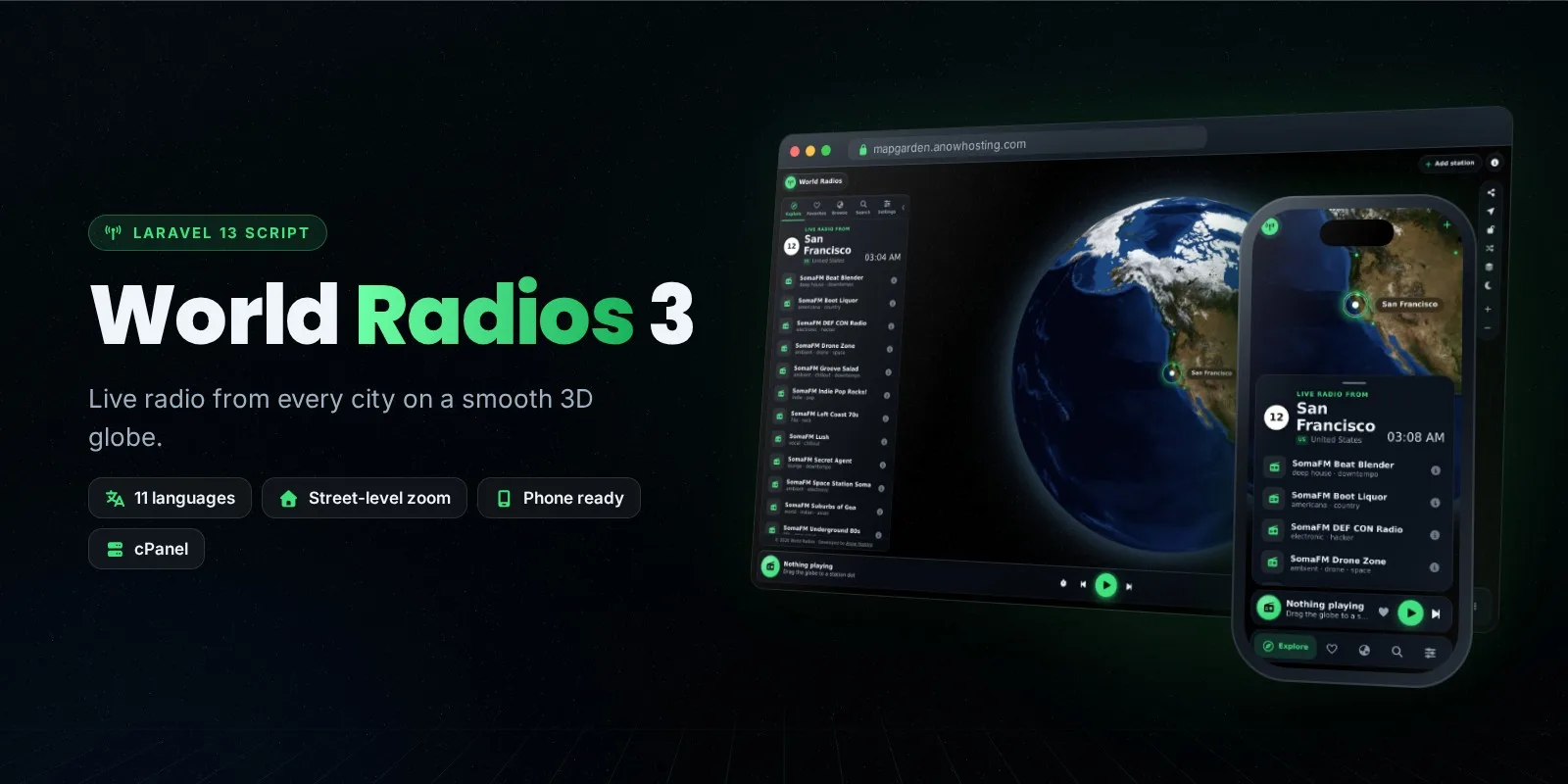
Spin a real 3D globe and listen to live radio from every country. Laravel 13 radio directory with Radio Browser importer, 11 languages, listener accounts, ratings, SEO station pages, PWA and Android app source.
Frequently bought together
Item details
Category
Platform
Files included
.php .html .css .svg .yml/.yaml .env example
Compatible with
PHP 8.3 PHP 8.4 PHP 8.5
Software framework
Laravel
Database
MySQL 5.7 MySQL 8.0 MySQL 8.4 LTS MariaDB 10.x MariaDB 11.x SQLite 3.x
HTML / CSS framework
Bootstrap
JavaScript framework
Alpine.js
Programming language
PHP JavaScript
Version
3.2.1
Support & inquiry
Description
A complete radio website built around a real 3D globe
World Radios turns your domain into a beautiful live-radio directory. Visitors spin a smooth 3D globe, move a glowing city dot into the circle and hear that city's stations instantly – from space down to street and house level on free satellite maps.
Why buyers choose it
- Real 3D globe (MapLibre GL) with satellite, streets, Night lights and Blue Marble maps – no API key needed
- Thousands of stations in minutes with the built-in Radio Browser importer (whole countries or single stations)
- The radio keeps playing while visitors read pages, open station pages or sign in
- Every station gets its own SEO page with schema.org data, Open Graph cards and sitemap.xml
- 11 built-in languages and 120+ more with one-click automatic translation, right-to-left support
- Installable app (PWA) for phones, laptops and computers, plus a ready Android app source (Android Studio) that also runs on Android TV
- One-click updates from the admin panel – your stations, settings and uploads are always kept
For listeners
Favourites synced across devices with free listener accounts, 1–5 star ratings, search, "radio near me", sleep timer, lock-screen controls, dark and light mode and a smooth phone layout with a mini player.
For you, the admin
A full admin panel with light/dark mode that works on phones: stations with bulk editing, places, visitor submissions with approval, reports, stream health checks that hide offline stations and fix links automatically, automatic logo finder, pages (privacy, terms, about), SMTP e-mail with a test button, AdSense and custom code, colours and map styles – everything without touching code.
Built to run on shared hosting
Upload, extract and run the web installer – all libraries are included, no Composer, Node.js or SSH. Background jobs never run side by side, the stream relay has a listener limit, and recent errors are shown right in the admin panel.
Core features
Globe & listening
- Real 3D globe with satellite (house-level zoom), streets, Night lights and Blue Marble maps – free, no API key
- Built-in offline NASA tiles, place names overlay, Normal / High / Very high quality
- Plays MP3, AAC, OGG, HLS and PLS/M3U playlists; http stations play on https sites (smart relay with listener limit)
- City station count and local time, radio near me, surprise me, share links, sleep timer, lock-screen controls
- The radio keeps playing while pages, station pages and forms open over the globe
Listeners
- Free listener accounts – favourites synced on phone, TV and computer, password reset by e-mail
- "My stations": listeners add and edit stations, every change waits for admin approval
- 1–5 star ratings (one per listener), reports for broken streams
- Installable web app (PWA) for phones, laptops and computers
SEO & money
- An SEO page for every station with schema.org (RadioStation, AggregateRating), Open Graph and sitemap.xml
- Google AdSense (auto ads + ad places), ads.txt, site verification, custom head/body code
- Pages: privacy policy, terms, about us and any custom page
Admin panel
- Light / dark mode, fully responsive on phones
- Radio Browser importer: whole countries or single stations
- Stations and places with filters and bulk actions (move, tags, language, logos, show/hide, merge, delete)
- Stream health: automatic checks, offline stations hidden, new links taken from Radio Browser, e-mail notices
- Automatic logo finder (website, Radio Browser, optional Google API) – download or link only
- SMTP e-mail settings with a test-mail button; notices for new submissions and reports
- 11 built-in languages + 120+ with one-click automatic translation (Google, DeepL, LibreTranslate, MyMemory); RTL
- One-click updates with automatic backup; recent error log
- Feature switches for every module
Android app (source included)
- Android Studio project: your site full screen, background playback with notification, AdMob, Back-button handling
- Runs on phones, tablets and Android TV; update notices and messages from the admin panel
Server requirements
- PHP 8.3 or newer (8.4 / 8.5 supported) with the usual extensions (PDO, mbstring, openssl, curl, zip, gd, fileinfo)
- MySQL 5.7+ / 8.x or MariaDB 10.3+ (SQLite also supported)
- Any cPanel, hPanel, Plesk, DirectAdmin or VPS hosting (Apache or Nginx); SSL (https) recommended
- A cron job (cPanel → Cron Jobs) for automatic stream checks and logos – optional
- Visitors: any current desktop or mobile browser with WebGL
- Android app: Android Studio (free) to build your own APK / AAB
Installation instructions
Install
- Create an empty MySQL database and a user with all privileges in your hosting panel.
- Upload worldradios-v3.2.1-cpanel.zip to your domain folder (e.g. public_html), extract it and select PHP 8.3 or newer.
- Open your domain: the web installer checks the server, creates the tables and your admin account.
- Log in at /radio_admin and set your site name, logo, colours and map styles in Settings.
- Open Import and import the countries or stations you want; add languages in Languages.
- Optional: add the cron job shown in Admin → Stream health, set up e-mail in Settings → E-mail, and submit /sitemap.xml to Google Search Console.
Updates
Admin → Update shows when a new version is out: upload the zip and click Install – a backup is made first and your database, stations, settings and uploads are kept.
Android app
Unzip the Android source, set your website address and app name in gradle.properties, open it in Android Studio and build a signed APK / AAB (step-by-step guide in the documentation, chapter 13).
Changelog
3.2.1
- Much lighter on shared hosting: background jobs never run side by side, time limits, stream relay listener limit
- Bulk editing of stations (filters, select all matching, move, tags, language, logos, delete) and places (merge, change country, delete)
3.2.0
- SMTP e-mail with test button, admin notices for new stations and reports
- Installable web app (PWA); Android app also runs on Android TV; Android Studio project included
- Automatic logos by cron, admin light mode, phone-friendly admin, one rating per listener, error log
3.1.1
- One-click updates from the admin panel with automatic backup
3.1.0
- Radio keeps playing while browsing, listener accounts with synced favourites, star ratings, pages, stream health, logo finder, feature switches
3.0
- Rebuilt on Laravel 13 with a new MapLibre 3D globe, house-level satellite zoom, 11 languages and automatic translation
Reviews
Based on 0 reviews