Web
- Home
- Products
- App Templates
- Flutter
- BeamDrop - File Sharing App for Android...
BeamDrop - File Sharing App for Android & iPhone
Web
0 sales
Updated Nov 01, 2026
Product overview
Flutter file sharing app: send any file by a 4-digit PIN worldwide, Nearby without internet or by QR. Pro plans and ads.
Frequently bought together
Item details
Category
Platform
Files included
.html .css .swift .xml .json .dart .kt .md .yml/.yaml pubspec.yaml Documentation
Compatible with
Android 8+ iOS 15+ Flutter 3.x Xcode 15+ Android Studio
Software framework
Flutter
Database
Firebase / Firestore
Programming language
Kotlin Swift Dart
Version
1.0.0
Support & inquiry
Description
BeamDrop - send files anywhere with a 4-digit PIN
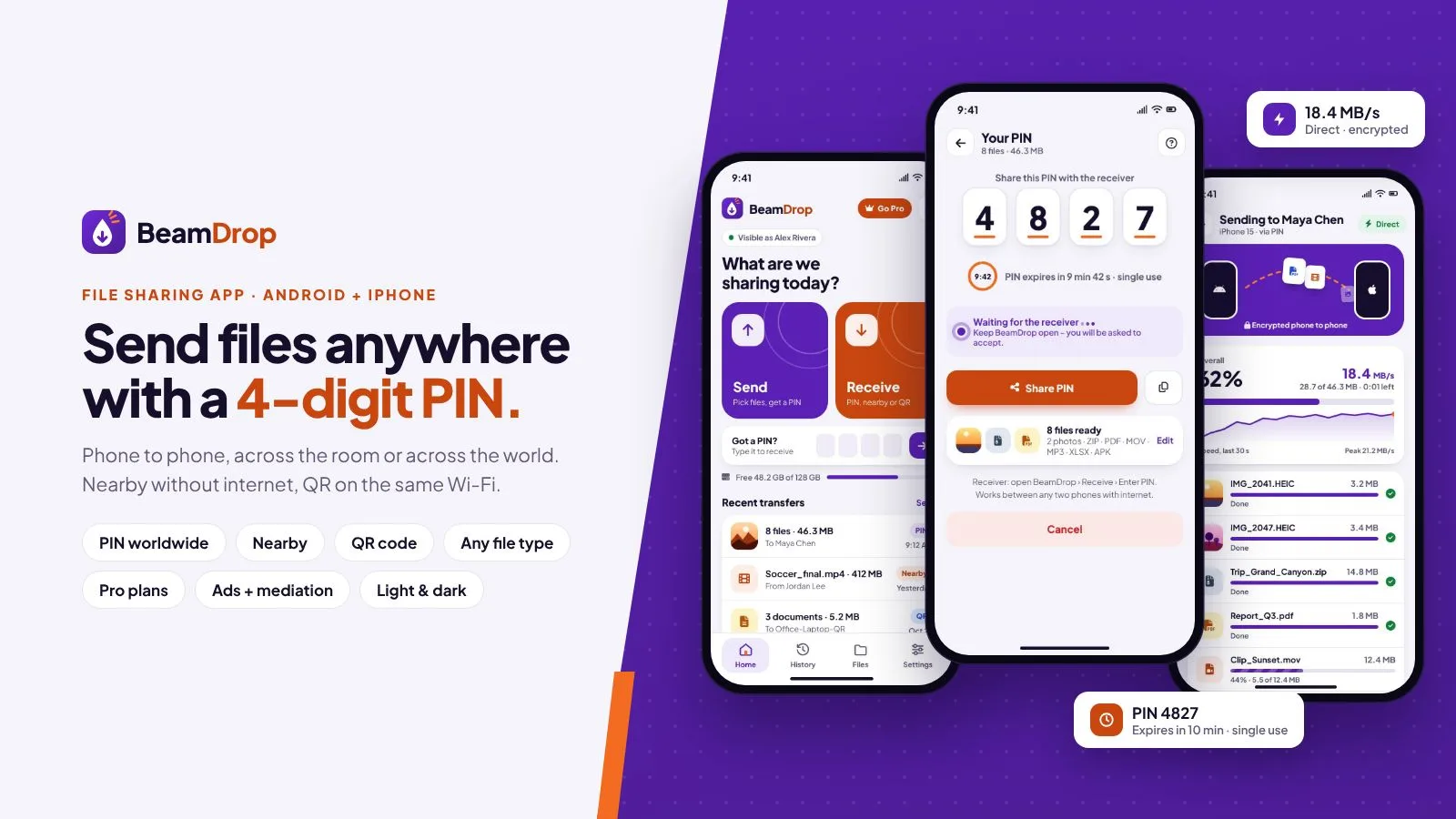
BeamDrop is a complete file sharing app for Android and iPhone (Flutter source code). Files go straight from phone to phone in three ways: by a short PIN anywhere in the world, Nearby without internet (Bluetooth finds the phone, files move over fast direct Wi-Fi) and by QR code on the same Wi-Fi - also between Android and iPhone.
No accounts and no server to rent: PIN transfers meet through your own Firebase project (the free plan is enough) and the files travel over an encrypted, direct WebRTC channel. You earn with Pro plans (monthly, yearly and lifetime through Google Play and the App Store) and ads with mediation (AdMob, Meta Audience Network, AppLovin, Unity Ads). Name, colours, texts, limits, prices and ads live in one settings file and can be changed later without a new build.
Live demo
- Showcase with every screen
- Demo APK for Android
- Documentation
Send or receive in one tap
- No sign-up: a friendly device name like "Blue Falcon 42", editable any time
- Big Send and Receive cards, a "Got a PIN?" shortcut, storage and recent transfers
- Onboarding, a clear permission explainer and a custom animated tab bar
Pick files, share a PIN
- Select photos, videos, music, documents, apps and whole folders
- Choose how to send: PIN (worldwide), Nearby or QR
- A unique 4-digit PIN by default (4 to 8 digits in the settings) with a live countdown
- Short lifetime, single use, attempt limits - and the sender accepts every receiver
Type the PIN - anywhere on Earth
- Receive: Enter PIN, Nearby or Scan QR
- Keypad with haptics; a wrong PIN shakes, the right one locks in
- The sender sees who is asking ("Maya Chen wants your files") and taps Accept
- Friendly screens for an expired PIN, no internet and a failed connection
Straight across the globe
- Your own Firebase project is the meeting point for the PIN (Firestore + anonymous sign-in, free plan)
- Files go directly phone to phone over an encrypted WebRTC channel
- Public STUN servers by default; add your TURN servers for strict networks
- Optional relay through Firebase Storage - off by default, with size limits
Real speed, real progress
- Large chunks over several parallel channels with back-pressure - no stalls
- Live MB/s, time left, speed graph and a per-file list
- Badge shows the path: Direct, Nearby Wi-Fi or Relay
- Keeps running in the background; PIN and QR transfers resume after a drop
No internet? Nearby and QR code
- Nearby: Bluetooth finds the phone, files move over direct Wi-Fi - Android to Android and iPhone to iPhone
- QR code on the same Wi-Fi or hotspot connects Android and iPhone, with several parallel streams
- Radar with the phones around you; every incoming request needs your OK
Any file, any size
- Photos, videos, music, PDF, Office, ZIP / RAR / 7z, APK, contacts and whole folders
- No type filter and no re-compression - files arrive exactly as sent
- Received files sorted by type; unknown formats open with the system "Open with" sheet
Built to earn: Pro plans and ads
- Monthly ($1.99) and yearly ($9.99) store subscriptions plus lifetime ($19.99) one-time - your prices
- Pro: no ads, bigger transfers, longer PINs, unlimited transfers per day - all limits are settings
- AdMob with Meta Audience Network, AppLovin and Unity Ads mediation
- Banner, interstitial after a transfer, rewarded "free Pro transfer" and app-open ads with frequency caps
- Consent (UMP) for GDPR and US states, iOS tracking prompt, rate prompt that follows store rules
Light, dark, phones and tablets
- Full light and dark themes, or follow the phone
- Tablets get a navigation rail and two panes
- Smooth motion everywhere; "Reduce motion" respected
- Rebrand in minutes: name, colours, logo and texts in one file, changeable later through Firebase Remote Config
What you get
- The complete Flutter source code of the app for Android and iPhone
- One settings file (
assets/config.json) plus a Firebase Remote Config template to change it without a new build - Firestore and Storage security rules, ready to publish
- Illustrated HTML documentation: Firebase setup, settings reference, branding, languages, ads and consent, Pro plans in Google Play and App Store Connect, build, store notes, FAQ
- PROTOCOL.md - how PIN rooms, signaling and transfers work
Good to know
- Monthly and yearly Pro are store subscriptions that renew automatically; users cancel anytime in their Google Play or App Store settings. Lifetime is a one-time purchase. The paywall says this clearly, with Restore purchases, Terms and Privacy.
- Nearby connects Android with Android and iPhone with iPhone; between Android and iPhone the QR code on the same Wi-Fi does the job, and PIN works between any two phones with internet.
- No server or hosting needed - Firebase's free plan covers PIN transfers.
Core features
Sharing
- PIN transfers worldwide: 4-digit PIN by default (4-8), countdown, single use, attempt limits, sender accepts every receiver
- Nearby without internet: Bluetooth to find, direct Wi-Fi to send (Android to Android, iPhone to iPhone)
- QR code on the same Wi-Fi or hotspot, also Android to iPhone, parallel streams
- Every file format and whole folders, no re-compression; received files browser and history
- Direct, encrypted WebRTC channel; STUN by default, optional TURN and optional Firebase Storage relay
- Live MB/s, time left, speed graph, background transfers, resume after a drop (PIN and QR)
Earning
- Pro: monthly and yearly subscriptions + lifetime purchase through Google Play and the App Store, Restore purchases
- Ads: AdMob with Meta Audience Network, AppLovin and Unity Ads mediation; banner, interstitial, rewarded, app open; caps; test mode
- Consent (UMP) and iOS tracking prompt; rate prompt following store rules
App
- No accounts - friendly generated device names
- Light and dark themes, phones and tablets, animated tab bar, rich motion with "Reduce motion" support
- One settings file + Firebase Remote Config: brand, colours, texts, languages, PIN, limits, plans, ads, TURN, links, force update, maintenance
Server requirements
- Flutter 3.44 or newer (stable) with Dart 3.12+
- Android Studio (Android SDK 36, JDK 17) or VS Code with the Flutter extension
- For iPhone builds: a Mac with Xcode 16+ and CocoaPods
- A Firebase project - the free Spark plan is enough (Firestore + anonymous sign-in) for PIN transfers
- Phones: Android 7.0+ and iOS 15+
- To publish: a Google Play developer account and an Apple Developer account
- For ads: an AdMob account (mediation partners optional)
- Optional: your own TURN server or TURN provider
Installation instructions
- Unzip the package and open BeamDrop/app in Android Studio or VS Code.
- Firebase: create a project, add your Android and iOS apps, put
google-services.json/GoogleService-Info.plistin place, enable Anonymous sign-in and publishfirebase/firestore.rules. - Settings: edit
assets/config.json- name, colours, PIN, limits, store links (thendart run tool/configure.dartfor iPhone). - Ads and products: add your AdMob ids and create the Pro products in Google Play Console and App Store Connect.
- Build:
flutter pub get, thenflutter build appbundle --release(Google Play) orflutter build ipa(App Store).
Full steps with screenshots: documentation/index.html in the package and online.
Changelog
1.0.0 – October 2026
- Initial release.
Reviews
Based on 0 reviews