 Android
- Home
- Products
- App Templates
- Android
- Bubble Pop Sky - Bubble Shooter Android...
Bubble Pop Sky - Bubble Shooter Android Game (Kotlin + Jetpack Compose, 1000 Levels, AdMob, In-App Purchases)
Android
0 sales
Updated Oct 26, 2026
Product overview
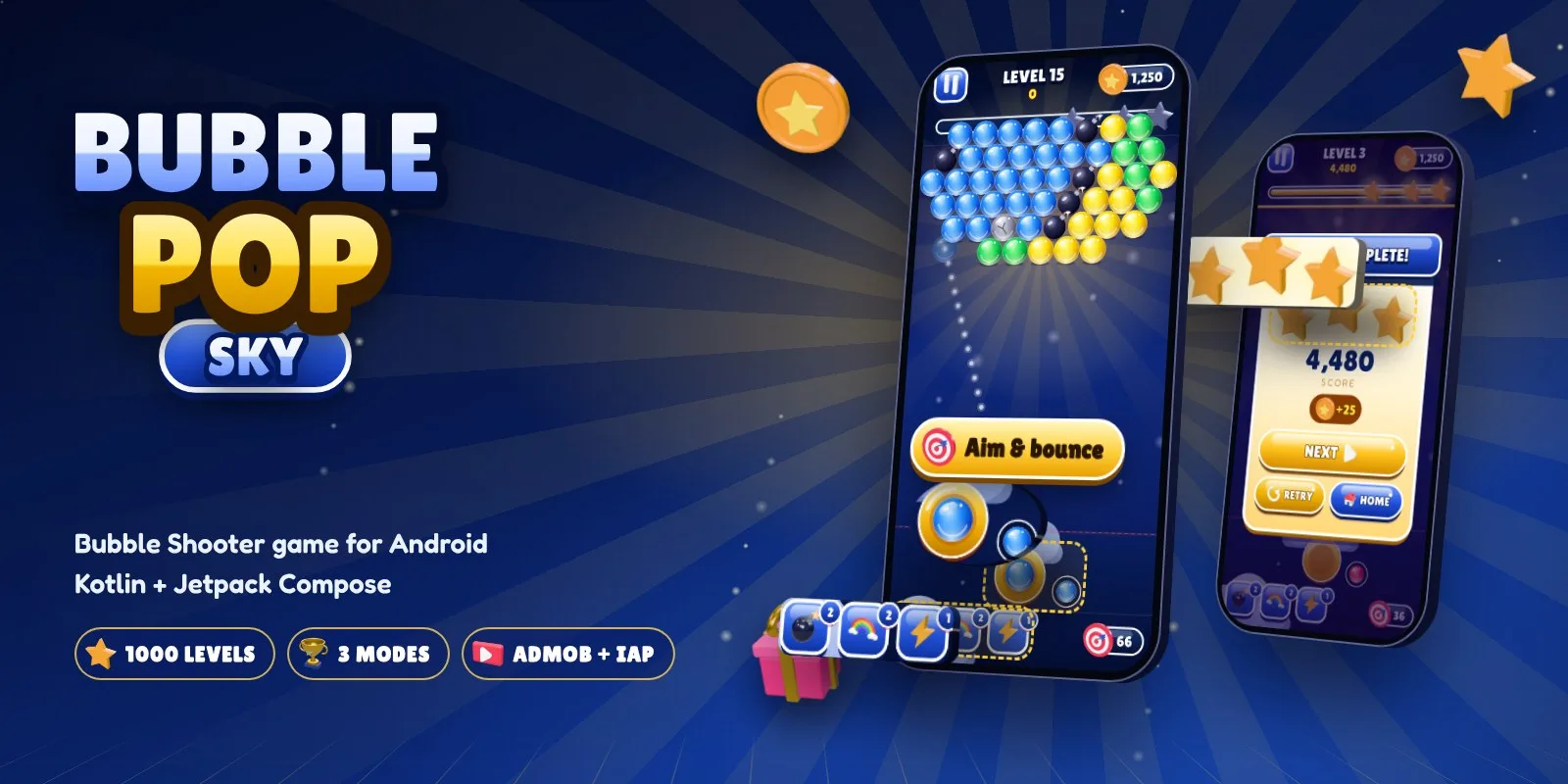
Bubble shooter for Android in Kotlin + Compose: 1000 levels, 3 modes, 3D icons, AdMob with consent and in-app purchases.
Frequently bought together
Item details
Category
Platform
Files included
.html .apk .xml .kt .kts .gradle.kts .aab .webp Documentation
Compatible with
Android 8+ Android 14 Android 15 Android Studio
Software framework
Jetpack Compose
Programming language
Kotlin
Version
1.0.3
Support & inquiry
Description
Bubble Pop Sky - a complete bubble shooter game for Android
Bubble Pop Sky is a polished, ready-to-publish bubble shooter written in Kotlin with Jetpack Compose. It targets API 36 as Google Play requires and ships with 1000 levels, 3 game modes, a real 3D icon set, AdMob with Google consent and Google Play Billing. Open it in Android Studio, change the name, IDs and colours, and publish.
Live demo
- Download the demo APK
- Demo page with screens and features
- Documentation
Aim, shoot and pop
Drag to aim with a live guide that shows every wall bounce, release to shoot, match 3 or more and watch whole clusters fall. Bombs, stones and three boosters keep every level fresh.
1000 levels that get harder every time
More colours, more rows and hidden rows arrive as players progress, and the sky moves down after missed shots. The difficulty curve was checked by simulating thousands of games.
Rewards that bring players back
A 7-day daily reward streak, up to 3 stars per level, coins for wins, lives that refill every 20 minutes and rewarded x2 bonuses.
Three game modes
Adventure with a winding level map, endless Arcade and Time Rush, a 2-minute score attack.
Monetization built in
AdMob banner, interstitial (every 2 levels) and rewarded ads with the Google User Messaging Platform consent flow. Play Billing 9.1 for coin packs and Remove Ads.
Easy to reskin
Two complete colour themes (Navy & Gold and Candy Sky), switched with one line. Icons, sounds, fonts and every gameplay number are in clearly named files.
What you get
- Full Android Studio project (Kotlin, Jetpack Compose, Gradle version catalog)
- 25 3D icons, mascot, original sound effects and music, launcher icon
- Unit tests and a screenshot generator for store images
- Detailed HTML documentation
Support and updates
Support through the store item page covers setup, configuration and bugs in the item. Custom development is not included.
Core features
Gameplay
- 1000 adventure levels with a winding level map and 3 stars per level
- Falling-sky mechanic: the board moves down after missed shots
- 3 game modes: Adventure, Arcade (endless) and Time Rush
- Aim guide that predicts wall bounces
- Bomb, Rainbow and Lightning boosters
- Stone and bomb bubbles in later levels
- Combo system, swap next bubble, continue after losing
Engagement
- 7-day daily reward streak
- Lives system (5 lives, refill every 20 minutes)
- Coins, shop and booster purchases
- Google Play in-app review prompt
Monetization
- AdMob adaptive banner, interstitial and rewarded ads
- Google UMP consent (GDPR and US states) with privacy options button
- Google Play Billing 9.1: coin packs and Remove Ads
Design and audio
- Real 3D icon set (25 icons) and 3D launcher icon
- Glossy 3D bubbles, particles, combo texts and screen shake
- Two colour themes: Navy & Gold and Candy Sky
- 14 original sound effects, background music and haptic feedback
- 3D cartoon mascot splash screen, light rays and floating clouds
Technical
- Kotlin 2.4, Jetpack Compose (BOM 2026.09), AGP 9.4
- Target SDK 36 (Android 16), min SDK 24
- Progress saved with DataStore and Android backup
- English and Spanish, easy to add more languages
- Unit tests and a screenshot generator
Server requirements
- Android Studio (current stable) with Android SDK Platform 37 (compile) and Build Tools 36
- JDK 17 or newer (the one bundled with Android Studio works)
- Gradle wrapper included (Gradle 9.6, AGP 9.4.1)
- Runs on Android 7.0 (API 24) and newer
- Optional: Google AdMob account for ads, Google Play Console for publishing and in-app purchases
Installation instructions
- Unzip the package and open the
sourcefolder in Android Studio. - Let Gradle sync, then press Run. The game starts with Google's test ads.
- Change the app name in
res/values/strings.xmlandapplicationIdinapp/build.gradle.kts. - Put your AdMob IDs and product IDs in
res/values/ads_config.xml. - Pick a colour theme in
ui/theme/Theme.ktand tune gameplay inGameConfig. - Create your keystore, fill
keystore.propertiesand run./gradlew bundleRelease.
Everything is explained step by step in documentation/index.html.
Changelog
Version 1.0.3
- New 3D cartoon mascot splash screen
- Full-screen ad after every 2 levels, banners on menu screens
- Start-up crash fix for shrunk release builds
- Smoother animations on low-end phones
- Target SDK 36
Reviews
Based on 0 reviews